As professionals across industries continue to participate in the real-world experiment of integrating artificial intelligence into their daily workflows, many are finding that the technology is a mixed bag of helpful acceleration and frustrating hurdles. Almost every day, knowledge workers must figure out where AI genuinely assists and where it actively gets in the way. For data storytellers and presentation designers, a central question continually surfaces: when is it actually desirable to lean on artificial intelligence, and when should the human hand take complete control?
There are tedious parts of the data storytelling process that many professionals genuinely enjoy, such as tinkering with visual alignment, adjusting color schemes, and sketching out rough conceptual ideas before committing to a final path. While these early-stage steps might superficially appear unnecessary or inefficient, they almost always result in fresh ideas and a significantly better final output.
By contrast, building every single chart from scratch or manually manipulating complex spreadsheet data to produce a non-standard chart rarely improves a designer’s critical thinking. This is the mechanical phase that practitioners would gladly hand off, provided they do not lose granular control over the final design. Every minute saved from manually creating baseline charts is another minute that can be dedicated to analyzing the underlying narrative and refining the core visual story.

Rather than looking for artificial intelligence to completely redesign a complex slide independently, many designers are discovering the value of using it to produce a solid, functional starting point that can be subsequently refined and polished. Testing this collaborative approach in real-world scenarios is beginning to fundamentally shift how data professionals approach their daily work.
One Chart That Is Doing Too Much
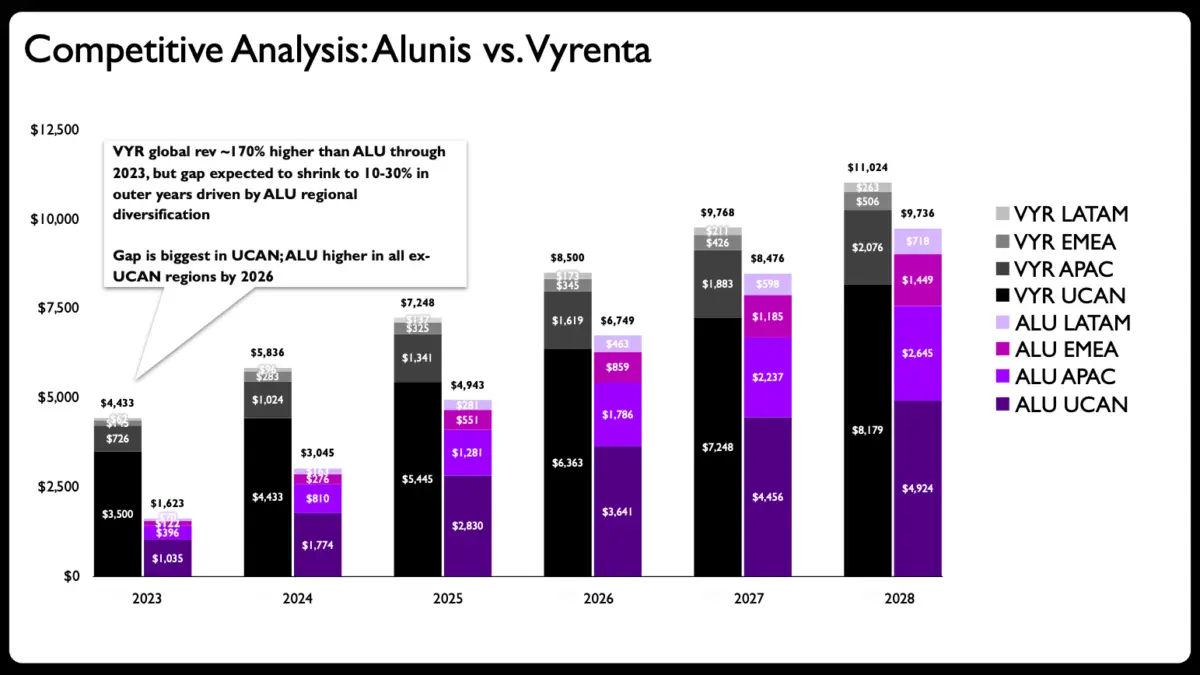
A recent client project provided the perfect testing ground for this collaborative workflow. In the original slide, a stacked bar chart was deployed to illustrate a competitive revenue comparison. The primary objective was to demonstrate how a company named Alunis planned to close a substantial revenue gap with its top competitor, Vyrenta, by strategically focusing on regional expansion over time.
However, a closer look at the graphic reveals a classic design dilemma. The chart needed to simultaneously communicate change over time, compare the overall trajectories of two distinct companies, and break down each company’s regional composition across multiple global markets. That is an immense amount of heavy lifting for a single visual element to perform.
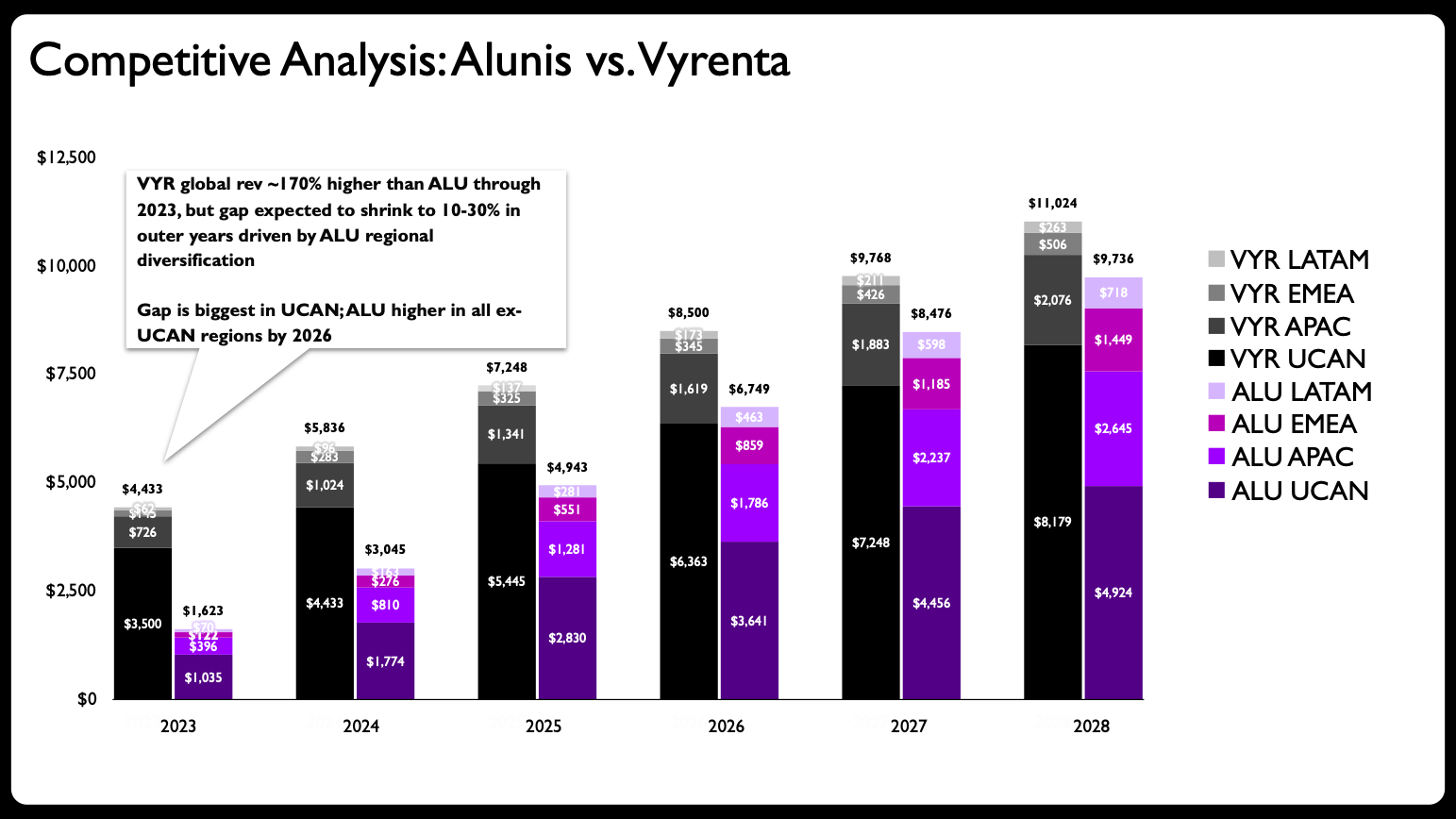
In professional data visualization circles, this issue is well-documented. Practitioners often emphasize that adding too much information to one single graph is among the most common mistakes in presentation design. The initial step for a successful makeover is to avoid this trap by breaking down an overcrowded graph into multiple, digestible charts.
Partnering with AI for Layout and Execution
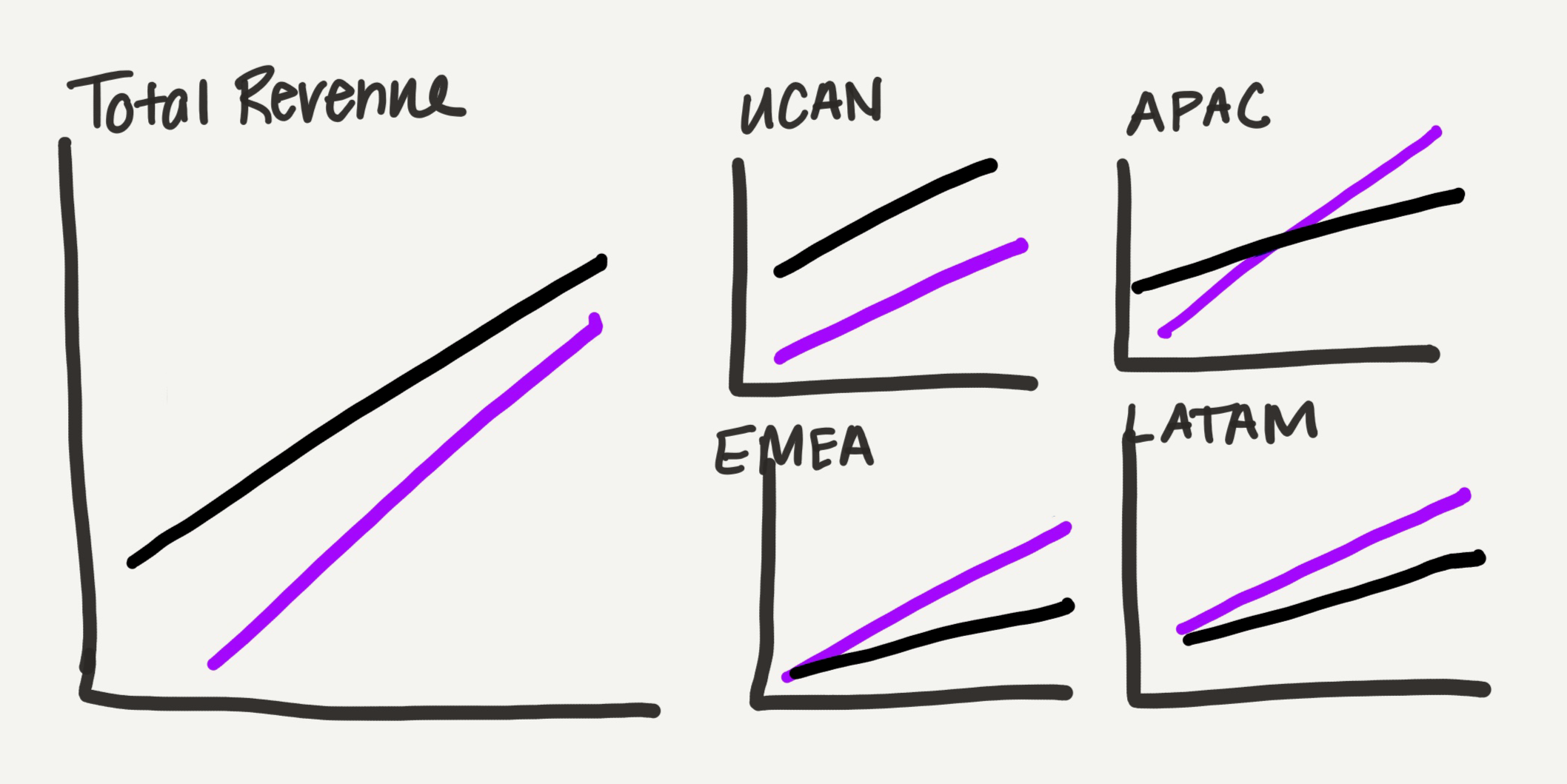
Because iterating through sketching remains a preferred method for many designers, the next step involved creating a rough hand-drawn draft of how a multi-chart redesign could look. In this conceptual sketch, the approach shifted from heavy stacked bars to line charts. Line charts carry a much lighter visual footprint—a distinct advantage when a slide needs to accommodate multiple data panels without overwhelming the viewer.
The redesigned layout divided the graphs by geographical location: one primary graph dedicated to total global revenue, paired with four smaller regional graphs. Instead of sizing all the charts consistently, the total global view was made larger, while the four regional charts were arranged into a compact grid occupying roughly the same amount of space as the total chart. This subtle arrangement serves as a visual metaphor for the data’s part-to-whole nature.
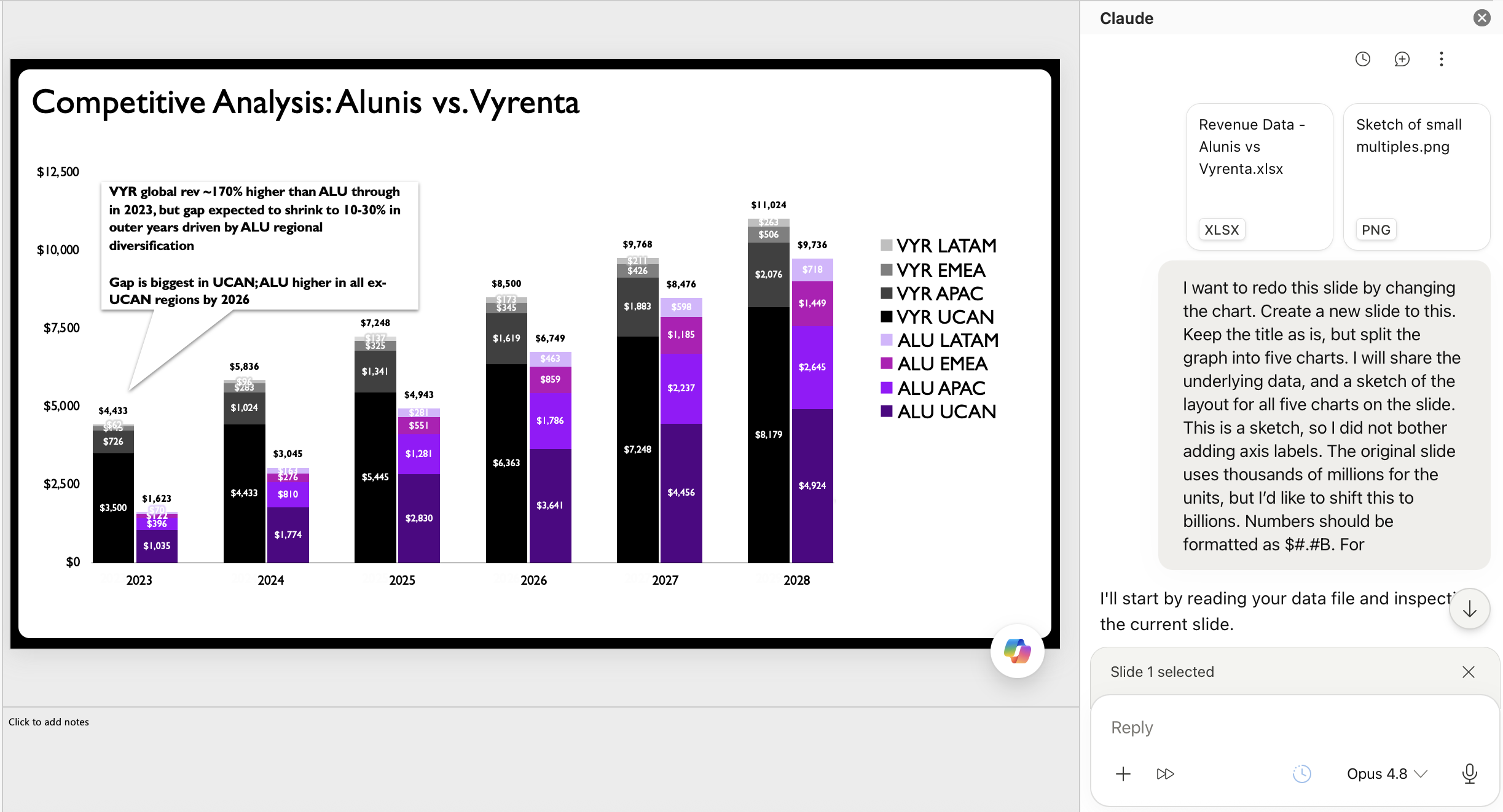
In the pre-AI era, creating each of these individual graphs manually in presentation software would have consumed a significant amount of time, patience, and mental energy. For this project, however, the designer shared the hand-drawn sketch and raw data directly with an AI assistant via a specialized presentation add-in.
While various artificial intelligence tools have emerged to assist with slide creation, add-ins that generate fully editable charts directly within standard presentation software have proven to be the most practical for professional workflows. That native editability is what makes a true collaborative experiment possible. When AI tools can output manipulable vector charts and text boxes rather than flat, uneditable raster images, they transform from novelty features into genuinely useful workflow enhancements.
The Value That Humans Bring
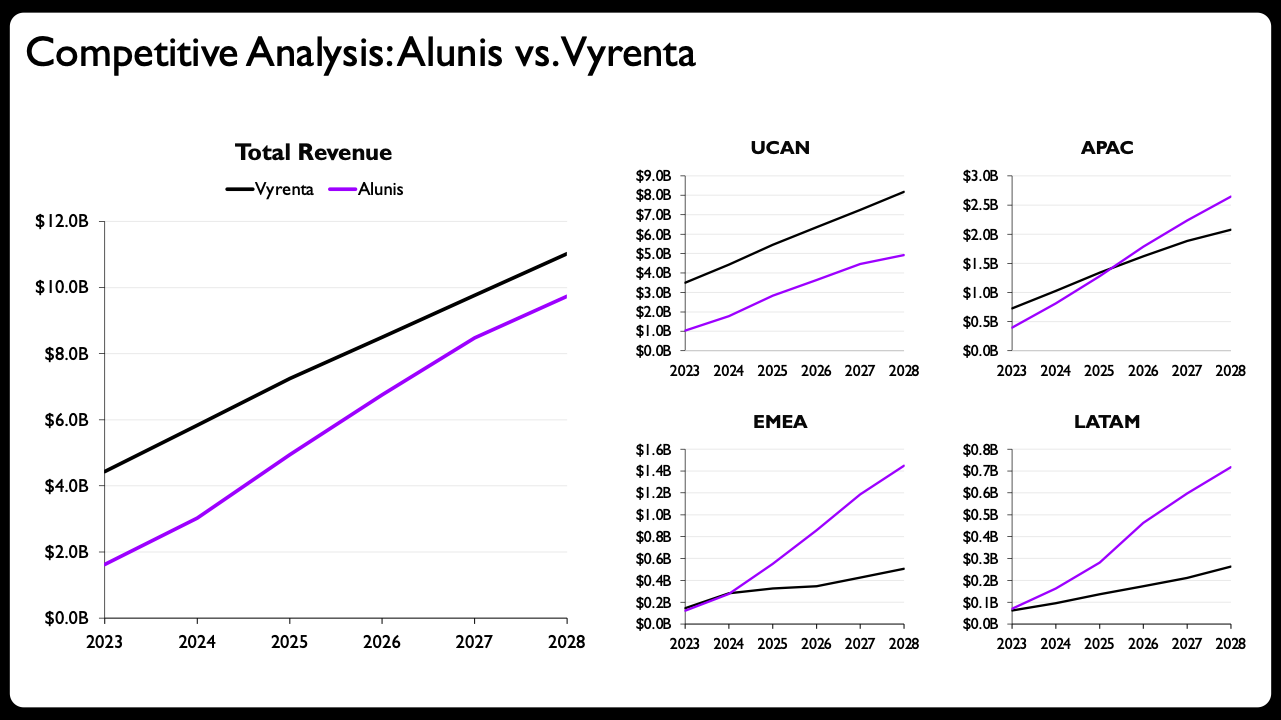
The initial output generated by the AI assistant based on the uploaded sketch and data was a marked improvement over the original stacked bar chart. For many general professionals, simply rewriting the slide title and adding brief descriptive text above those generated charts would be more than enough to call the project complete.
For dedicated data storytellers, however, additional human-led tweaks are often necessary to elevate a graphic from good to exceptional. The final design phase involves several crucial refinements. These include adding subtle shaded areas between competing lines to emphasize performance gaps, integrating direct end-of-line labels displaying exact values, scaling per-panel axis ranges appropriately to each individual region, utilizing solid versus dashed lines to clearly separate historical actuals from future projections, and formatting years compactly on the smaller regional panels.
The success of this redesign highlights a broader shift in how professionals view human-AI collaboration. A major historical hurdle for practitioners was that AI-generated charts were frequently delivered as static images, often plagued by processing inaccuracies that made them difficult to correct. Now that advanced AI tools can generate solid, editable native vector charts, they are finally earning a permanent place in the data storytelling toolkit.
These developments extend well beyond experienced practitioners. For individuals who are relatively new to the field of data storytelling or who feel uncertain about how to technically construct a specific type of chart in presentation software, artificial intelligence can effectively lower the initial learning curve.
Yet, this technology does not eliminate the need for foundational design principles. Throughout the AI-assisted makeover process, the human designer still had to recognize that a stacked bar chart was fundamentally flawed for the dataset, determine a clean layout strategy for multiple charts on a single slide, and intentionally decide whether breaking consistent axis scales was a valid design choice. The human remained fully in the driver’s seat.
Ultimately, this dynamic highlights the division of labor in modern professional workflows: artificial intelligence accelerates the mechanical execution, while human practitioners provide critical judgment, strategic direction, and narrative oversight.