Learning to program often comes with an unspoken expectation that developers must immediately tackle grand, sweeping applications to see the true value of their code. For many newcomers, however, the real power of programming is realized much closer to home, through short, elegant scripts designed to eliminate mundane, repetitive administrative work. Rather than spending weeks architecting complex workflows, developers can achieve immediate productivity gains by writing concise automation scripts that handle everyday digital chores.
The primary hurdle for beginners is often identifying which tasks are ripe for automation and avoiding the trap of overly complex tutorials. While comprehensive guides covering large-scale web scraping or multi-tool workflows have their place in a developer’s education, starting with smaller, well-defined problems provides a clearer window into how Python operates under the hood. By focusing on distinct, manageable challenges, programmers can build confidence, master core libraries, and immediately apply their skills to real-world scenarios.
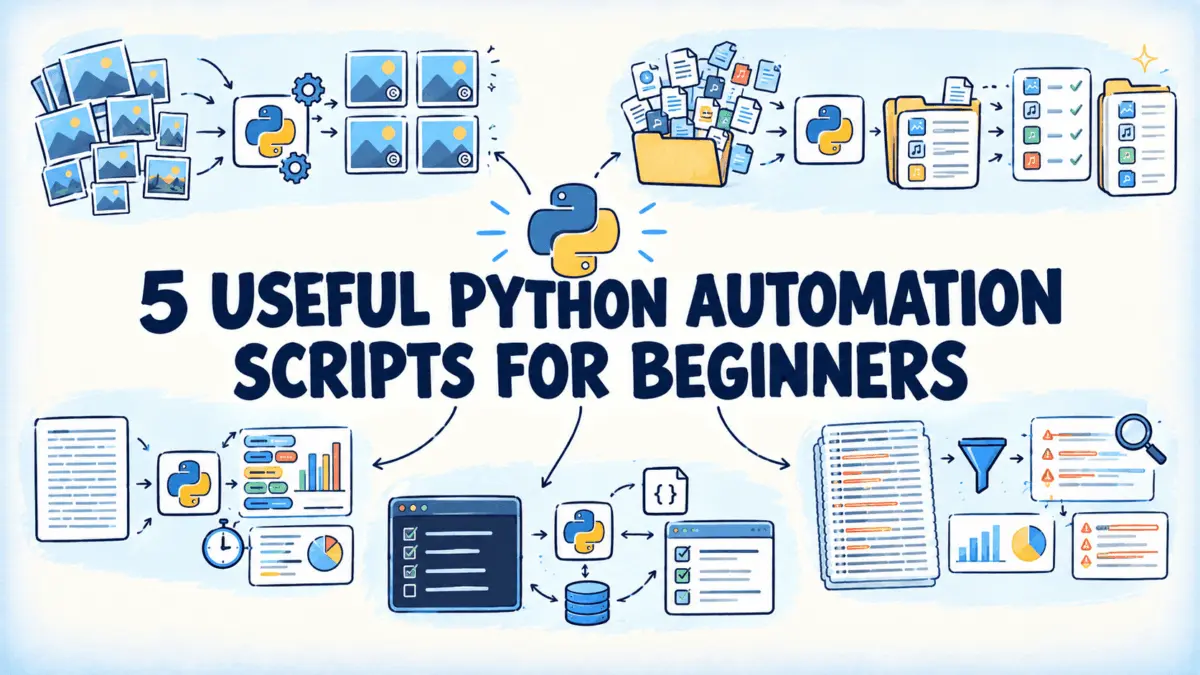
To bridge this gap, developer and technical writer Bala Priya has released a curated collection of beginner-friendly Python scripts designed to solve everyday problems across four core programming domains: image processing, file management, text manipulation, and command-line tooling. Each script is intentionally compact, allowing learners to study the codebase without feeling overwhelmed by architectural complexity.
Streamlining Visual Assets with Batch Processing
A common friction point for web developers, content creators, and administrators alike is the management of digital images. Consider the scenario of handling a directory containing fifty photographs destined for a corporate website or a submission portal. If those images require uniform dimensions alongside a discreet copyright watermark in the corner, processing them individually through a graphical image editor quickly devolves into an exhausting exercise.
To address this specific inefficiency, the image resizer and watermarking script leverages the Pillow Python library to automate the entire batch. The script programmatically opens each image in a designated directory, calculates optimal dimensions that preserve the original aspect ratio, and applies a high-quality resampling filter. Furthermore, it utilizes the ImageDraw module to render watermark text onto a semi-transparent layer, which is then composited onto the resized image at a user-selected corner. Designed with resilience in mind, the script safely skips unsupported files with a warning rather than crashing the entire batch operation, concluding with a concise performance report.
Taming Disorganized Directories Through Bulk Renaming
Digital clutter often accumulates silently, manifesting as folders filled with generic filenames like sequential camera shots or disparate downloads requiring uniform client prefixes. Attempting to manually rename dozens or hundreds of files through a standard file browser is an unsustainable approach that fails to scale.
The bulk file renamer script resolves this logistical hurdle by operating directly on directory paths using Python’s built-in pathlib module. Users can define arbitrary rules—such as appending prefixes and suffixes, applying sequential numbering, or executing find-and-replace operations across multiple filenames. Crucially, the script features a built-in dry-run mode that previews all proposed alterations before committing changes to the file system. Before executing any rename operations via Path.rename(), the utility performs safety checks to detect potential naming collisions, preventing the accidental overwriting of vital data.
Extracting Insights from Text and Log Files
Beyond media and file management, programming excels at parsing and analyzing unstructured text. Whether reviewing a draft essay, an interview transcript, or a massive server log file, extracting actionable metrics manually is exceptionally tedious.
The text file word frequency and readability analyzer offers an automated solution by processing plain text files to calculate total word counts, sentence lengths, and estimated reading times based on standard adult reading paces. By normalizing text to lowercase, stripping punctuation via regular expressions, and tallying terms with the collections.Counter module while filtering out common stop words, the script delivers a clear statistical overview directly to the terminal.
A similar philosophy drives the log file analyzer, which targets system administrators and developers knee-deep in troubleshooting. When confronted with thousands of log lines, constructing complex grep queries under pressure can slow down incident response. The script reads log files line by line to maintain optimal memory efficiency, utilizing regular expressions to isolate timestamps and severity levels such as errors or warnings. Users can filter logs simultaneously by severity, keywords, and date ranges, allowing engineers to rapidly isolate specific anomalies without loading entire multi-megabyte files into memory.
Enhancing Productivity Through Command-Line Integration
For developers who spend their working hours inside a terminal, context switching to external graphical applications to manage simple daily tasks can disrupt deep focus. Sticky notes are prone to physical loss, while dedicated project management software can feel unnecessarily heavy for a running list of three or four daily objectives.
The command-line to-do list manager provides a lightweight, terminal-native solution for task tracking. Utilizing the argparse library with distinct subcommands, users can effortlessly add, list, complete, or remove tasks directly from the command line. To ensure continuity, tasks persist between sessions inside a straightforward JSON file, making the data easily inspectable or eligible for automated backups.
Reflecting on the broader utility of these utilities, Priya emphasizes that these foundational scripts form a modular starter set that developers can easily adapt to their unique workflows. The collection spans image processing, file management, text analytics, command-line productivity, and log parsing, offering practical applications for everyday technical challenges. The complete codebase is publicly available on GitHub for learners and practitioners seeking to integrate practical automation into their daily routines.