SkyeBrowse, a prominent name in rapid 3D and 2D mapping technology, has announced a significant expansion of its videogrammetry platform, introducing a comprehensive suite of tools designed to streamline site analysis, construction tracking, and security planning. Released on October 20, 2026, the update centers on SkyeBrowse Timelines alongside a robust collection of construction and measurement utilities, including Cut/Fill calculations, Cross-Sections, Stockpile Inventory, Bare Earth modeling, and Ground Control Point (GCP) accuracy checks. Furthermore, the platform has integrated a specialized Camera Coverage tool aimed at optimizing security camera placement directly within a 3D model. These new features are live immediately on the SkyeBrowse web application.
For industry professionals who routinely fly the same job site on a monthly or weekly basis, the historical data of a project accumulates naturally within their existing SkyeBrowse models. Until now, comparing these recurring scans often demanded tedious data exports and external software workflows. The newly introduced Timelines feature addresses this friction by gathering multiple surveys of a single location into one cohesive, interactive view. By eliminating the traditional bottlenecks associated with multi-temporal analysis, the platform allows project managers, surveyors, and construction teams to derive actionable insights directly from their aerial data without ever leaving the browser environment.
Bobby Ouyang, co-founder and chief executive officer of SkyeBrowse, emphasized the practical motivation behind the new development, noting that field teams should not have to spend hours wrestling with complex software to answer fundamental site questions. According to Ouyang, customers repeatedly reported the frustration of juggling separate exports, cumbersome spreadsheets, and round-trip transfers into computer-aided design systems just to obtain metrics that were already inherently captured within their scans. By embedding these analytical capabilities straight into the 3D model, SkyeBrowse aims to accelerate decision-making cycles on active job sites.
How SkyeBrowse Timelines works
The core mechanism of SkyeBrowse Timelines is designed for intuitive navigation, enabling users to place up to 10 distinct surveys of the same geographic site onto a single, unified timeline interface. Operators can interact with the data by scrubbing a date rail to seamlessly crossfade between different historical surveys, pressing a play button to step chronologically through every recorded date, or toggling a specific changes view that automatically highlights what has appeared, disappeared, or shifted between any two selected timeframes.
To ensure spatial consistency across different flights, each newly uploaded survey automatically aligns itself to an established base survey. In instances where environmental factors or GPS variations cause the automated fit to drift by approximately 4 inches, or 10 centimeters, or more, SkyeBrowse provides a 3-point picking mechanism. This manual intervention allows the user to designate three corresponding reference points to lock the models into precise alignment. Once aligned, measurement tools function uniformly across any historical date, and teams can easily share these interactive timelines with stakeholders or clients via a read-only public link that requires no user login or specialized software credentials.
Construction and accuracy tools

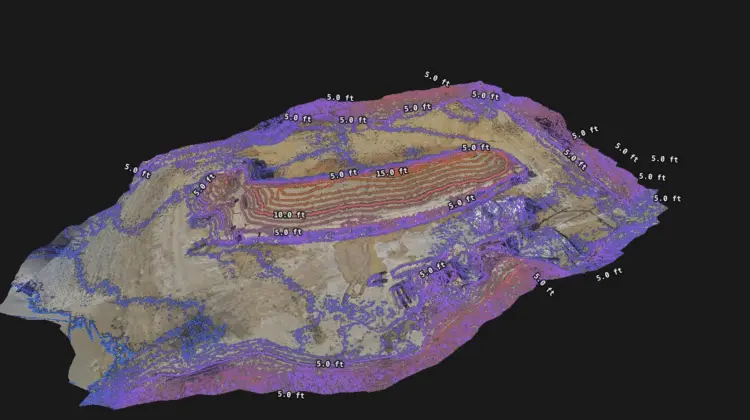
In addition to temporal comparison, the latest software release introduces heavy-duty construction and volumetric tools that bridge the gap between drone mapping and traditional civil engineering requirements. The Cut/Fill tool allows users to evaluate a site model against a planned design surface imported in formats such as LandXML, DXF, or GeoTIFF elevation files. Once loaded, the system drapes a visual heatmap over the scan, instantly illustrating remaining cut volumes, fill requirements, and net volumetric totals across the terrain.
Complementing the Cut/Fill functionality, the Cross-Sections tool generates station and offset sections along a defined centerline at specified intervals, delivering immediate reports on haul-road grades and terrain profiles. For material management, the Stockpile Inventory tool measures multiple aggregate piles simultaneously using flexible base options, subsequently converting raw cubic volume measurements into estimated weight based on the assigned material type and specific density of each individual pile.
Topographic analysis also receives a significant upgrade with the inclusion of Bare Earth classification. This feature intelligently isolates ground points from above-ground objects like vegetation and structures, enabling the topographic map to effortlessly toggle between a digital surface model and a bare-earth digital terrain model. To ensure that data integrity matches professional surveying standards, the new GCP accuracy checks allow users to evaluate their models against independently surveyed ground control points imported via CSV, TXT, or XYZ files. The platform calculates root mean square error across the X, Y, and Z axes, along with spatial bias, National Standard for Spatial Data Accuracy 95 percent thresholds, and an immediate pass or fail status against user-defined tolerances, all without altering the underlying processed model.
Camera Coverage for security planning
Beyond construction and earthworks, the 2026 update extends the utility of SkyeBrowse into physical security design and event planning. The Camera Coverage tool is engineered specifically for public safety agencies, event security coordinators, and facility managers who need to strategize surveillance layouts before physical hardware installation begins. Users can virtually position security cameras onto the 3D model, meticulously defining each camera’s specific mounting location, physical height, directional orientation, field of view, focal range, and tilt angle.
Once the parameters are set, SkyeBrowse visually shades the visible area on the model and generates statistical reports indicating the exact percentage of the site that falls under the surveillance of at least one camera. For rapid deployment planning, a built-in suggestion function can automatically recommend up to 10 optimal camera positions based on the geometry of the site. Furthermore, integrated environmental checks simulate weather conditions and sun glare patterns, showing operators how accumulations of snow might obscure fields of view and forecasting precisely when each camera will point directly toward the sun throughout the changing seasons.
These newly launched features—including Timelines, Camera Coverage, and the comprehensive suite of construction utilities—are available to subscribers using SkyeBrowse Pro models at a rate of $49.99 per model, as well as to users on Public Safety and Enterprise subscription tiers. This release follows the company’s structural transition to a per-model pricing model implemented earlier in the autumn, alongside the introduction of specialized crash analysis and crowd-counting tools. For newly registered organizations, an introductory commercial offer allows users to test a first model for five dollars, granting access to Camera Coverage and all construction tools with the exception of Timelines. Further details regarding the platform and its updated feature set can be found directly through the official SkyeBrowse web portal.