In the modern landscape of data storytelling, choosing the right visual is rarely a straight line from a first attempt to a finished graph. Professionals frequently try one form, realize it emphasizes the wrong metric, switch to another, and gradually get closer to their intended message. This iterative process—experimenting with different views of the exact same data to find the format that best serves the core narrative—is precisely where artificial intelligence is beginning to accelerate modern data workflows. Rather than spending valuable hours building a complex chart only to realize the visual architecture does not work, analysts can now rapidly prototype options, evaluate them against a core takeaway, and commit to a clear direction before investing time in a final build.
Fundamentally, different visual structures serve distinct communicative purposes. Bar charts compare values across discrete categories, while dot plots and slopegraphs emphasize change between two distinct points in time or state. Line graphs are traditionally reserved for showing continuous change over time. When analysts are in doubt, familiar visual formats almost always work best because an audience should never have to learn how to read a graph before they can understand the underlying message. Using less familiar visual forms is generally reserved for situations where an unconventional layout reveals an insight that would otherwise remain hidden.
Working with artificial intelligence to select an appropriate visual requires a structured foundation. If analysts are following a sequential storytelling workflow, they typically already know what they want to show, as takeaway titles from the preceding storyboarding phase outline these core concepts. However, for those approaching the task independently or still operating in an exploratory mode, AI can help surface patterns and trends worth highlighting. Once an interesting trend emerges, professionals must pause to clearly articulate the takeaway before moving into prototyping. That articulation step is critical, transforming a raw data prototype into a purposeful, high-impact visual.
From there, the workflow is relatively straightforward. Analysts tell the system what they want to communicate, share their raw datasets, and ask for a series of distinct visual options. Professionals do not necessarily need to clean or aggregate the data beforehand, as handling that preliminary lifting is part of what modern AI tools can manage. For each generated prototype, users should ask the system to explain the operational tradeoffs—specifically, what each option makes easy to see and what it inadvertently obscures. The goal is not to have AI make the final creative decision, but rather to use the technology to quickly surface viable alternatives that can be evaluated using human judgment, audience awareness, and strategic goals.
Once a strategic direction is chosen, the chart is built in the analyst’s preferred tool, either manually or with the assistance of built-in generative AI features. Regardless of the method used, professionals must always remain ultimately responsible for the absolute accuracy of the visual data displayed.
However, practical execution comes with certain technical hurdles. Chart rendering capability currently varies significantly across different software applications and account tiers. While any standard text-based tool can assist with the preliminary planning and conceptual thinking phases, visual prototyping demands tools capable of rendering actual, high-resolution chart images. Even with advanced platforms, users frequently find it takes multiple prompts to generate actual image outputs rather than text-based approximations using symbols and code blocks.
Recent testing across major generative platforms indicates that free versions of tools like Copilot and ChatGPT often struggle to render clean chart images for direct visual comparison, whereas free iterations of Gemini and Claude generally produce much stronger results. Paid tiers across the board consistently yield the highest quality outputs, making them worth utilizing for professionals who have access to enterprise accounts. To maximize options, analysts can even copy and paste identical prompts across multiple competing platforms to generate a diverse array of visual approaches for comparison and iterative refinement.
When initiating this process, context is paramount. If an analyst is continuing an ongoing conversation from previous steps like context-setting or story-crafting, the background is already established, allowing them to jump straight into visual prototyping. If starting a fresh conversation, a brief orientation is necessary, requiring just a few sentences to describe the target audience and the primary message meant to be communicated visually. The prompt typically instructs the AI to act as a thought partner, evaluating a specific audience, a single-sentence takeaway, the intended usage context—such as a live presentation slide or an email report—and the underlying dataset, ultimately requesting two to three rendered chart options along with their respective analytical tradeoffs.
To see this workflow in action, consider the scenario of a People Analytics Manager at a mid-sized consulting firm. The team has just completed an exhaustive analysis of the company’s hybrid work policy, examining performance metrics, in-office attendance logs, collaboration network density, and employee attrition trends. The synthesized recommendation is clear: transition away from the current blanket policy requiring three days in office and two days remotely for all employees, moving instead toward a differentiated approach tailored to specific roles and team structures.
Having already established the strategic context and narrative arc in previous phases, the manager now needs to create actual content, beginning with two distinct graphs supporting different parts of the narrative story. For the first graph—illustrating how early-tenure attrition rates have surged since the implementation of the hybrid policy—Gemini was selected due to its superior output among tested free-tier applications.
Using a detailed prompt tailored for a leadership team with divided opinions and high stakes, the manager provided summarized data tables showing pre- and post-hybrid attrition rates broken down by role type and tenure. Before generating visual suggestions, the AI asked several clarifying questions to better orient its output. It inquired about the specifics of the proposed differentiated policy, anticipated sources of pushback from leadership, and whether the executive board preferred traditional visual formats or would be open to less familiar layouts.
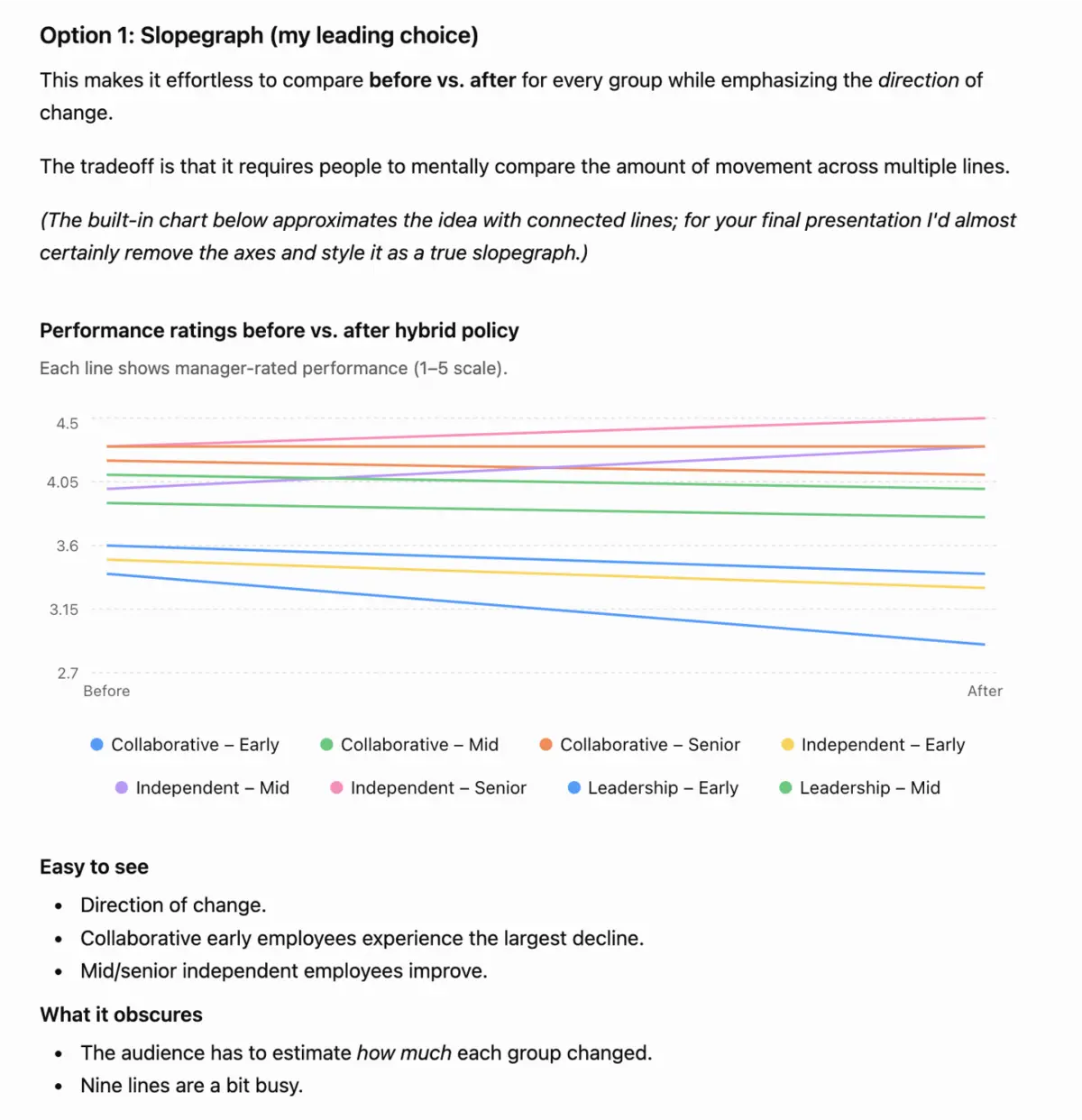
After incorporating those details, the system provided three distinct structural options: a slopegraph, a grouped bar chart, and a dumbbell graph. To enhance clarity, the AI intentionally utilized a neutral gray tone to signify the baseline pre-policy period as well as the mid- and senior-tenure segments where no dramatic statistical changes occurred, while reserving a sharp red accent color specifically to highlight early-tenure attrition post-policy, where the upward shift was most pronounced. This collaborative prototyping approach ultimately allowed the analytics team to evaluate multiple visual lenses rapidly, ensuring the final presentation effectively persuaded the leadership team without unnecessary trial and error.