As professionals across industries increasingly rely on data to drive decisions, the ability to communicate insights clearly has become paramount. This challenge forms the core of the ongoing SWD + AI series, which provides practical guidance for using artificial intelligence as a thoughtful partner throughout the various stages of data storytelling. Previous installments have explored how to start with context, craft a compelling narrative, and choose appropriate visuals. Once those foundational choices are made, however, professionals face the rigorous work of actually designing the visuals. This next phase ensures that slides communicate clearly, direct the audience’s attention to what truly matters, and hold together as part of a cohesive presentation.
This design phase is precisely where many people spend the bulk of their time, and it is where the gap between a "good enough" output and genuinely effective communication becomes most visible. Whether a graph originates from a traditional charting tool or an AI model, the first version is rarely ready to present to stakeholders. It typically requires decluttering, targeted focusing, and the addition of meaningful language to provide context. A graph lacking a takeaway title forces the audience to guess the underlying point, while a slide overcrowded with raw data makes viewers work far too hard to comprehend it. Getting this step right separates a presentation that merely informs from one that moves people to decisive action.
Fortunately, this is also a stage where artificial intelligence—provided it receives the right context and direction—can handle a significant portion of the heavy lifting. Rather than building every single slide from scratch, professionals can describe what they need, share their underlying data, and let AI produce a functional first version to react to. While the initial output will rarely be flawless, it serves as a productive starting point. Reaching that baseline in minutes rather than hours fundamentally changes what is possible in a professional workflow.
To achieve this efficiently, modern approaches utilize AI integrated directly into standard office software, ensuring the output consists of editable slides rather than static images. This marks an important distinction from earlier exploratory phases where users evaluated high-level prototypes. In the design stage, professionals are building the real deliverable, and AI assists in refining those elements directly in place.
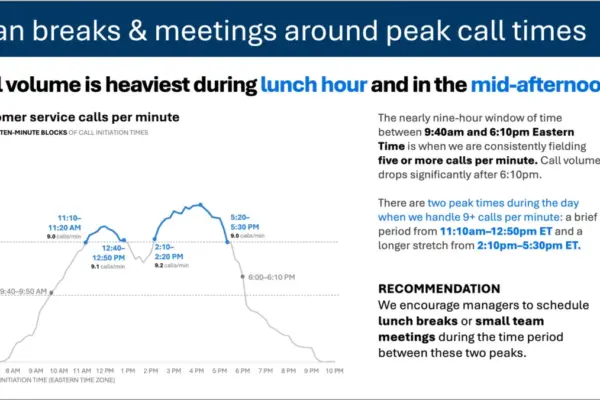
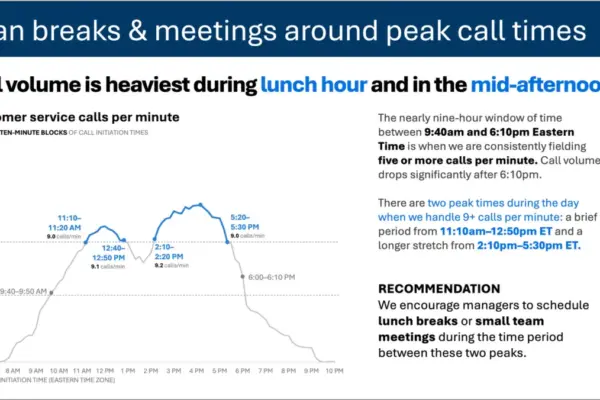
Effective graph and slide design ultimately comes down to a few essential principles: removing extraneous elements, creating visual order through alignment, actively directing attention to what matters most, and using words strategically to make the core message unmistakable.
Every single element added to a graph or slide contributes to cognitive load, which is the mental effort an audience must expend just to process what they see. Any component that fails to add informative value functions as clutter, making visuals feel far more complicated than they actually are. The primary goal is not minimalism for its own sake, but rather the reduction of extraneous details so that the essential message stands out. In practice, this often involves stripping away unnecessary chart borders, gridlines, tick marks, redundant labels, and default formatting applied automatically by software tools simply because they are built into the template. When unnecessary elements are removed, the remaining data points grow stronger and easier to interpret.
Beyond decluttering, visual alignment plays a crucial role in shaping audience perception. When elements on a slide are misaligned—such as text starting at inconsistent points, graphs floating at random positions, or titles failing to anchor the content below them—the slide feels inherently unintentional, even if viewers cannot immediately articulate why. Consistent alignment creates a structural flow that audiences can navigate intuitively without conscious thought. Thoughtful design seamlessly fades into the background, whereas poor design places a heavy cognitive burden on the viewer.
Even with a clean and well-aligned visual, audiences are often left to decide for themselves what matters most, and they may not naturally focus on the intended takeaway. The next vital step is to actively guide where the eye travels. The most powerful tool for this purpose is color applied sparingly and with purpose. When every data series shares the same color or every element features a different hue, nothing stands out. Conversely, when a single element is highlighted against a neutral background, viewers look there immediately. Size, position, and contrast operate similarly: making crucial items larger, placing them in primary viewing areas, and using visual weight to establish a clear hierarchy. The objective is to make the right information obvious without needing to verbally instruct the audience where to look.
Words must also be used wisely to support even the best-designed graphs. Every graph requires a descriptive title that tells the audience precisely what they are examining, while every slide needs a definitive takeaway title—a single sentence that answers the "so what?" question before the audience has to ask it. Axes should be clearly labeled, and key data points annotated only where they add genuine meaning. Brevity remains essential, as every word that fails to earn its place merely adds noise.
Professionals must also account for organizational standards, such as corporate templates and established brand guidelines. Colors, fonts, and layouts aligned with a company’s visual identity are far more than aesthetic choices; they signal credibility and consistency to stakeholders. Ensuring compliance with these standards before applying general design principles helps maintain organizational authority.
These foundational principles must work in tandem, always keeping the audience’s specific needs at the forefront. When design succeeds, it becomes completely invisible, allowing the audience to focus entirely on the core message rather than the mechanics of the slide.
Working with AI to Design Effective Graphs and Slides
Having a shared foundation in storytelling principles proves especially useful when collaborating with artificial intelligence. While earlier stages involved providing AI with brief snippets of context, experts recommend going further during the design phase by sharing foundational AI primers and structured frameworks with the tool before initiating any work. Grounding the AI in established data communication principles produces noticeably superior results compared to prompting without context.
The workflow relies heavily on AI tools integrated directly into presentation software, enabling the generation of fully editable slides rather than static images. Platforms equipped with native AI assistants allow users to either input a pre-built draft slide for refinement or describe a desired outcome alongside raw data to generate a fresh baseline.
This approach typically covers the vast majority of the foundational work quickly, producing clean, structured, and on-message layouts that would otherwise require hours of manual labor. The remaining refinement relies on human judgment, involving final adjustments to color schemes, visual emphasis, wording, and alignment. These final touches transform a standard slide into an exceptional communication tool, achieved either by directing the AI to make specific edits or by making adjustments directly.
Adopting this methodology streamlines the transition from raw data to polished presentations, empowering professionals to communicate complex insights with clarity, precision, and impact.