Data professionals live inside their web browsers. Whether they are reading dense technical documentation, analyzing complex research papers, reviewing intricate model cards, working through active GitHub repositories, or synthesizing industry reports, much of a data scientist’s or analyst’s day is spent navigating the web—increasingly with an artificial intelligence assistant sitting alongside their work.
While the tools most practitioners instinctively reach for, such as Chrome paired with Gemini, Perplexity, or ChatGPT kept open in a pinned browser tab, are undeniably capable, each carries a distinct privacy cost that is easy to overlook during a busy workday. Consumer-tier Gemini may utilize user conversations to improve Google’s underlying services, with selected interactions subject to human review. Perplexity actively routes queries and live page content to its cloud servers for processing. Meanwhile, unless users explicitly opt out, ChatGPT is permitted to use inputs for model training.
For casual browsing or general information retrieval, these trade-offs are often acceptable. However, for data professionals working with proprietary datasets, sensitive client research, unreleased model architectures, or confidential business intelligence, relying on standard cloud-based AI tools can introduce substantial compliance and security risks.
Amid these growing enterprise and professional concerns, Brave Leo has emerged as an alternative that many technical workers have yet to seriously consider. Built directly into the Brave browser rather than operating as a separate tab or a third-party extension, Leo functions as an integrated sidebar capable of reading the content currently displayed on the user’s screen. Crucially, it responds without storing, logging, or utilizing shared data for model training. Furthermore, the free tier requires neither an account nor a sign-up, offering a model lineup that often exceeds expectations for everyday technical workflows.
Understanding the Structural Privacy Landscape in AI Browsing
Before evaluating feature sets or performance metrics, examining the underlying architecture of mainstream browser AI tools reveals that data handling differences are structural rather than merely cosmetic.
When utilizing Chrome’s Gemini integration, official Google documentation explicitly advises users not to enter sensitive information that they would not want reviewed by human staff. Additionally, models like Gemini Nano are frequently downloaded silently to local devices in the background, sometimes without explicit user consent. On standard consumer plans, user inputs remain eligible for model improvement by default.
Similarly, Perplexity serves as a robust exploratory research tool backed by reliable citations, earning the trust of many data professionals for preliminary investigations. Yet, like Gemini, it fundamentally operates on a cloud-first infrastructure where user queries and visited page contents inevitably leave the local machine.
While Apple’s Safari and its Apple Intelligence framework offer a more privacy-respectable mainstream alternative by executing a greater share of processing directly on-device, the technology remains locked exclusively to Apple hardware. This restriction effectively shuts out data professionals who rely on Windows, Linux, or custom workstation environments.
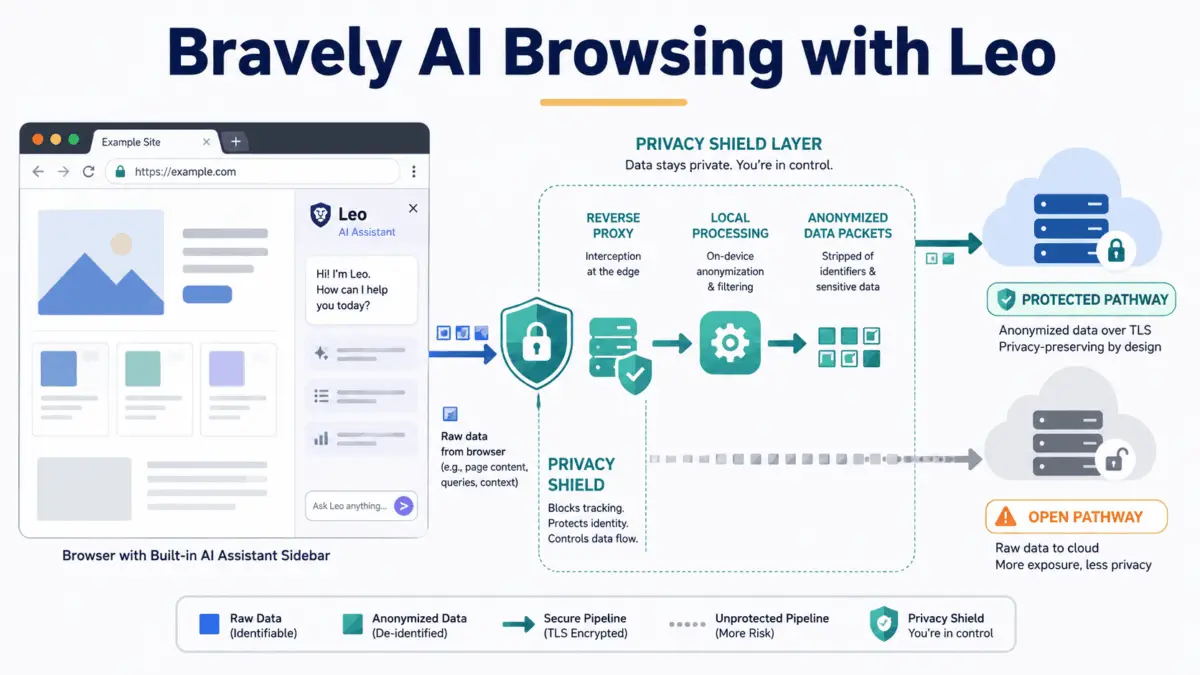
Brave Leo approaches the problem through a fundamentally different architecture. Incoming queries are routed through a specialized reverse proxy designed to strip away the user’s IP address before requests ever reach the underlying AI model. Conversations are immediately discarded the moment a response is generated, ensuring that no persistent data remains on Brave’s servers. No user account is tied to individual usage, and no user inputs are ever repurposed for model training. This privacy-preserving behavior is enabled by default for all users, regardless of whether they utilize the free or paid tier.
For data professionals, the practical implications are significant. Practitioners can safely paste proprietary documentation, interrogate internal dataset schemas, or review unpublished client research without worrying about the data persisting beyond the active session.
Integrating Leo into Professional Technical Workflows
Because Leo ships natively with every installation of Brave across Windows, macOS, Linux, Android, and iOS, transitioning to the browser is remarkably frictionless. Built upon the same underlying Chromium engine as Chrome, Brave allows users to import bookmarks, saved passwords, and browser extensions in just a few clicks.
Access to the AI assistant is immediate, residing directly within the browser sidebar or accessible via a dedicated toolbar icon. On desktop systems, users can even initiate conversations straight from the address bar without logging into an account.
The free tier includes access to capable open models suitable for day-to-day operations, such as summarizing academic papers, explaining technical documentation, or answering questions about open-source codebases. For advanced users requiring deeper reasoning capabilities, Leo Premium unlocks frontier models including Claude Sonnet, DeepSeek R1, and specialized architectures, alongside higher rate limits and priority access during peak utilization periods.
Crucially, upgrading to Premium does not compromise the underlying privacy model. Brave employs a credential-based token system that strictly separates payment information from chat activity, ensuring that even paying subscribers remain entirely anonymous and unlinkable to their usage patterns. Furthermore, local-first summarization capabilities, such as Brave Ocelot, allow inference to run directly on the user’s local hardware, ensuring that sensitive documents never leave the machine. Bring Your Own Model functionality also permits advanced users to connect local models or integrate third-party API keys for custom setups.
Core Capabilities and Context-Aware Operations
Leo’s most defining characteristic in a professional environment is its native page-awareness. Unlike standalone chatbots that demand tedious copy-and-pasting workflows, Leo reads active browser tabs in real time.
When reviewing academic papers on preprint servers, model cards, or dense technical documentation, practitioners can instruct Leo to extract key findings, explain specific mathematical methodologies, or outline evaluation metrics instantly. This capability proves particularly valuable for lengthy specification documents where users require precise details, such as training data provenance, known model limitations, or recommended enterprise use cases.
The assistant natively handles complex file formats opened directly within the browser, including PDFs, Google Docs, and Google Sheets. Data analysts can open dataset documentation files or methodology reviews and immediately query specific data collection methods or potential biases regarding sample sizes. When working with unfamiliar third-party data dictionaries, Leo can clarify dataset contents and explain obscure field names.
Furthermore, Leo can read the transcripts of online technical talks or video tutorials directly within the browser. Instead of spending hours watching lengthy conference presentations, professionals can prompt the assistant to extract core contributions and experimental setups, directing their attention only to the most relevant segments. Code generation and explanation are also supported, with page-awareness allowing Leo to generate code snippets that precisely match the architectural structures described in the currently open documentation.
Advanced Features and Professional Boundaries
Beyond single-tab interactions, advanced features allow Leo to draw contextual awareness across multiple open tabs simultaneously. This multi-tab capability eliminates the constant context-switching required when cross-referencing API documentation against a tutorial or comparing two competing research papers. Specialized additions like Tab Focus Mode direct the assistant’s attention to a single authoritative source while practitioners browse supplementary material elsewhere. Saved prompt chains, known as Skills, allow users to automate recurring analysis tasks, turning the assistant into a semi-custom workflow tool for repetitive technical reviews.
Despite its utility, honest evaluation requires acknowledging Leo’s limitations. Unlike cloud-native research tools that independently crawl the live web for rapidly evolving topics, Leo relies primarily on the active page and its pre-trained knowledge base. It does not generate images, lacks advanced voice modes on desktop platforms, and does not maintain persistent memory across sessions by default. Additionally, it is strictly bound to the Brave browser ecosystem, meaning practitioners committed entirely to Chrome, Safari, or Firefox cannot access it via standard extension frameworks.
Ultimately, as data professionals re-evaluate the tools in their technical stacks, the assumption that advanced AI assistance inherently requires surrendering operational data to external cloud services is facing renewed scrutiny. By combining frontier model performance with a strict privacy architecture, tools like Brave Leo demonstrate that technical capability and data security no longer need to be mutually exclusive compromises in modern data science workflows.