As professionals increasingly turn to artificial intelligence to streamline administrative and creative workflows, a new challenge has emerged: bridging the gap between raw algorithmic output and truly effective visual communication. The latest installment in the ongoing "SWD + AI" series tackles this exact hurdle, offering practical guidance on how to transition from choosing appropriate visuals to actually designing them. By focusing on clarity, audience attention, and cohesive presentation structures, data practitioners are learning how to leverage AI tools integrated directly into software like PowerPoint to transform rough drafts into polished, editable slides in a fraction of the traditional time.
This phase of the data storytelling process is where many professionals spend the bulk of their working hours, and it is where the distinction between "good enough" and genuinely impactful communication becomes most visible. Whether a graph is generated by standard charting software or produced via an AI assistant, the initial rendering is rarely ready for immediate presentation. These early iterations typically require careful decluttering, sharp focusing, and the addition of meaningful contextual text. A graph lacking a clear takeaway title forces an audience to guess at the underlying point, while a slide overcrowded with raw data demands excessive mental effort to interpret. Overcoming these hurdles is what ultimately separates a presentation that merely informs from one that moves people to act.
Fortunately, this is also a stage where artificial intelligence—provided it receives the correct context and direction—can shoulder a significant portion of the heavy lifting. Rather than constructing each slide from scratch, professionals can describe their requirements, share their underlying data, and prompt AI to generate an initial version to react to. While the first output is rarely flawless, it serves as an invaluable starting point. Reaching this foundational stage in minutes rather than hours fundamentally changes what is possible in fast-paced corporate environments, allowing creators to focus their energy on high-level refinement rather than mechanical layout tasks.
A crucial distinction in this modern workflow is the use of AI integrated directly into presentation software rather than relying on standalone external tools or static image generators. By utilizing integrated solutions, the resulting assets consist of fully editable slides rather than static graphics that would otherwise need to be rebuilt piece by piece. This integration shifts the AI’s role from producing isolated prototypes to actively assisting in the in-place refinement of real presentations.
Effective graph and slide design ultimately relies on a core set of timeless principles: removing unnecessary elements to reduce cognitive load, creating clear visual order through rigorous alignment, directing audience attention precisely where it matters most, and using words strategically to make the core message unmistakable.
Decluttering is the first major hurdle. Every visual element on a graph or slide contributes to cognitive load, which is the mental effort an audience expends just to process what is on the screen. Anything that fails to add informative value constitutes clutter, making visuals feel far more complex than they actually are. The objective is not minimalism for its own sake, but rather the reduction of extraneous details so that the essential information stands out clearly. In practice, this requires stripping away unnecessary chart borders, distracting gridlines, redundant tick marks, and default formatting applied automatically by software tools rather than by human design intent. When extraneous elements are removed, the remaining data points gain strength and visibility.
Alignment plays an equally critical role in establishing professional credibility. When elements on a slide are misaligned—such as text starting at irregular points, graphs floating at inconsistent positions, or titles failing to anchor the content positioned directly below them—the slide feels unintentional and chaotic, even if the viewer cannot immediately articulate why. Consistent alignment establishes a seamless visual structure that allows the audience to navigate the information intuitively. When design is executed thoughtfully, it fades quietly into the background, whereas poor alignment places an unnecessary burden on the viewer.
Even a clean and well-aligned visual, however, still leaves the audience to decide for themselves what matters most—and there is no guarantee they will focus on what the presenter intended. The next logical step is to actively guide where the eye travels. Color used sparingly is one of the most powerful tools for achieving this effect. When every element shares the same color or every item features a different bright hue, true emphasis becomes impossible. Conversely, highlighting a single element against a neutral background draws immediate visual focus. Size, position, and spatial contrast function similarly by making critical data points larger, placing them where the eye naturally lands first, and utilizing visual weight to establish a clear hierarchy. The ultimate goal is to make the right takeaway obvious without resorting to verbal cues like asking the audience to look in a specific direction.
Using words wisely is the final pillar of effective visual design. Even the most elegantly constructed graph requires precise text to communicate its full point. Every graph needs a descriptive title that tells the audience exactly what data they are examining, while every slide requires a strong takeaway title—a complete sentence that answers the unspoken question of why the information matters before the viewer has to ask. Axes must be clearly labeled, and key data points should be annotated only where those notes add genuine meaning. Adhering to strict discipline means ensuring that every single word earns its place on the slide, cutting out anything that adds noise rather than clarity.
Professionals are also reminded to account for organizational standards before finalizing their designs. Incorporating established corporate templates, brand colors, and approved typography is not merely an aesthetic choice; it signals institutional credibility and consistency to the audience. Working within an organization’s established visual identity ensures that the data presentation feels authoritative and aligned with broader company communications.
These principles do not operate in isolation; they function as an interconnected system designed with the audience’s needs at the forefront. When visual design is working as intended, it becomes entirely invisible, allowing the audience to focus entirely on the core message rather than the mechanics of the slide itself.
To achieve the best results when incorporating artificial intelligence into this design workflow, experts recommend establishing a strong foundational understanding of data storytelling principles beforehand. Rather than providing ad-hoc prompts, professionals can share specialized resources, such as comprehensive methodology primers, with their AI tools before beginning a project. Grounding the algorithm in established visual design frameworks consistently yields noticeably superior results compared to prompting without contextual guidance.
This workflow relies heavily on integrated software capabilities, such as assistant tools embedded directly within presentation platforms. Users can approach this phase either by uploading a draft slide they have already constructed and asking the AI to help refine it, or by describing their objectives and letting the algorithm generate an initial version from scratch. In either scenario, AI is capable of handling the heavy lifting to produce a clean, structured, and on-message foundation that would otherwise require significant manual labor. The final phase relies entirely on human judgment—making the nuanced tweaks to color, emphasis, wording, and alignment that elevate a standard slide into an exceptional one.
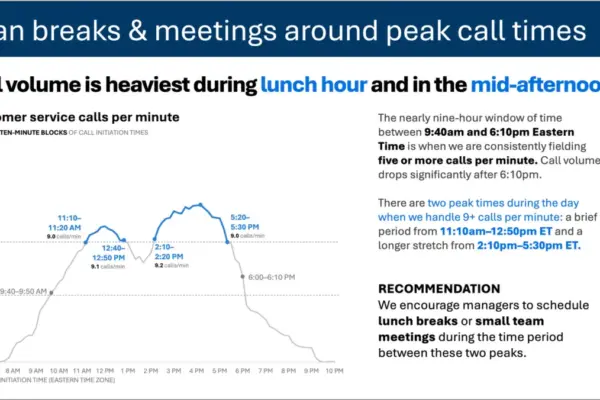
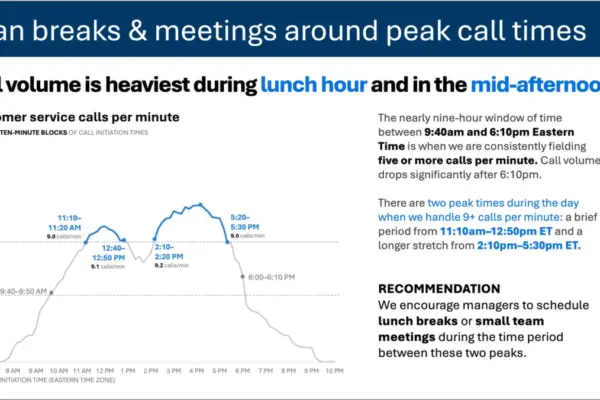
The practical application of these methods can be observed in everyday corporate scenarios, such as developing internal business recommendations. For instance, a workforce analytics manager preparing a proposal to adjust hybrid work policies follows a structured trajectory: identifying the target audience, forming a core narrative, planning the story arc, and selecting appropriate visual formats. Once those foundational steps are complete, the focus shifts to slide design using integrated AI tools. By grounding the assistant in established communication principles and providing summarized data alongside clear context regarding the audience and the desired takeaway, the creator can rapidly generate and refine professional, editable slides that effectively drive organizational decision-making.