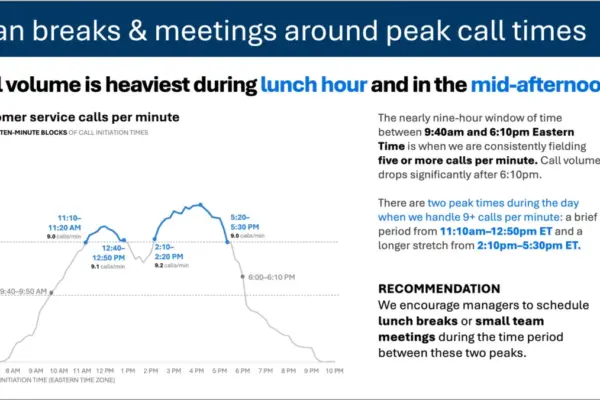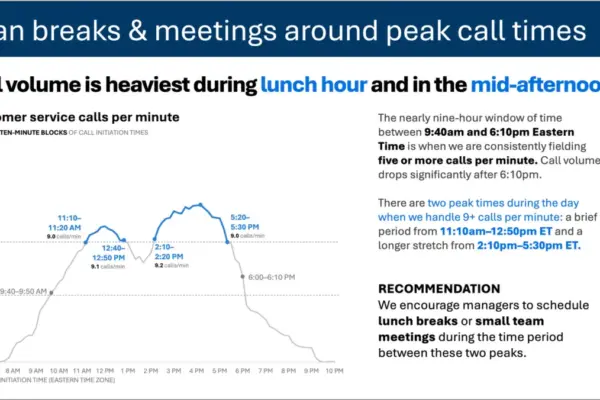
Choosing the right visual is only the first hurdle in data storytelling. Once a chart or graph has been selected, professionals face the meticulous work of actually designing it—ensuring that the visual communicates clearly, directs the audience’s attention to what matters most, and holds together as part of a cohesive, impactful presentation.
This critical phase is where many people spend the bulk of their preparation time, and it is where the gap between a "good enough" graphic and a genuinely effective communication tool becomes most visible. Whether a chart originates from a traditional spreadsheet tool or an advanced artificial intelligence generator, the first version is rarely ready for an audience. It almost always requires decluttering, targeted focus, and the deliberate addition of meaningful language. A graph lacking a clear, takeaway title forces an audience to guess at the underlying point, while a slide crowded with raw data makes viewers work far too hard to comprehend the message. Getting this design step right is ultimately what separates a presentation that merely informs from one that moves people to decisive action.
It is also a stage where artificial intelligence—when provided with the right context and direction—can shoulder a significant portion of the heavy lifting. Rather than building every individual slide entirely from scratch, professionals can describe their needs, share their data, and prompt AI to produce an initial version to react to and refine. While this first iteration is rarely perfect, it serves as an invaluable starting point. Reaching that foundational stage in minutes rather than hours fundamentally changes what is possible in corporate communications and data analysis workflows.
Recent developments in this space focus on integrating AI directly into presentation platforms like Microsoft PowerPoint, ensuring that the generated output consists of fully editable native slides rather than static images. This distinction marks a major shift in how professionals evaluate technology: creators are no longer just assessing prototypes, but are instead building the final product with AI assisting them in real time and right in place.
Effective graph and slide design ultimately comes down to a few essential principles: removing what does not belong, creating visual order through clean alignment, actively directing audience attention to what truly matters, and using precise words to make the underlying message unmistakable.
Decluttering for Clarity
Every single element added to a graph or slide contributes to cognitive load—the mental effort an audience must expend just to process what they are seeing. Anything that fails to add informative value is essentially clutter, and clutter makes visuals feel far more complicated than they actually are. The primary goal is not minimalism for its own sake, but rather the reduction of extraneous details so that the essential insights can stand out clearly.
In practical terms, this often means removing unnecessary chart borders, distracting gridlines, superfluous tick marks, redundant labels, and the default formatting that charting tools automatically apply simply because they are programmed to do so, rather than because they serve the audience. When creators strip away elements that do not belong, the information that remains becomes inherently stronger and easier to digest.
Aligning for Visual Structure
When elements on a slide are misaligned—such as text boxes starting at irregular points, graphs floating at inconsistent vertical positions, or titles failing to cleanly anchor the content sitting directly below them—the entire slide feels unintentional, even if the viewer cannot immediately articulate why. Consistent alignment establishes a reliable visual structure that an audience can navigate almost subconsciously. When design is executed thoughtfully, it fades quietly into the background, whereas poor design constantly reminds the viewer of the effort required to make sense of the material.
Focusing Audience Attention
Even a clean and well-aligned visual still leaves the audience to decide for themselves what matters most, and there is no guarantee they will focus on what the presenter intended. The next vital step is to actively guide where the eye travels. The most powerful tool for this purpose is color used sparingly and strategically. When everything on a slide is rendered in the same color, or conversely, when every element is a completely different color, nothing stands out.
However, when a single key element is highlighted against a neutral background, viewers naturally look there immediately. Size, position, and contrast operate on the exact same psychological principles: making important data points larger, placing them prominently where the eye naturally lands first, and utilizing visual weight to establish a clear hierarchy. The overarching objective is to make the right takeaway entirely obvious without ever needing to resort to phrases like "look here."
Using Words Wisely
Even the finest graphical design requires well-chosen words to fully convey its point. Every graph needs a descriptive title that informs the audience precisely what they are looking at, while every slide requires a strong takeaway title—a complete sentence that answers the unspoken question of "so what?" before the audience even has to ask it. Axes should be appropriately titled, and key data points annotated only where they genuinely add interpretive value.
At the same time, more text is rarely better. Every single word that fails to earn its place is simply adding cognitive noise. The discipline required here mirrors best practices across data storytelling: include what serves the audience, and ruthlessly cut what does not.
Another vital practical consideration involves adhering to organizational standards. If a company maintains a standard template or established brand guidelines, creators should always start there. Colors, fonts, and layouts that align with corporate branding are far more than mere aesthetic choices; they signal immediate credibility and consistency to the audience. Before applying advanced design principles, creators must ensure they are working safely within their company’s established visual identity.
Working with AI to Design Effective Slides
Navigating this design workflow becomes significantly more efficient when professionals establish a shared foundation in data storytelling principles before engaging with automated tools. Rather than offering basic context on the fly, industry experts recommend sharing comprehensive reference primers—such as specialized guides on AI data storytelling—with the chosen AI tool before beginning any design work. This approach grounds the artificial intelligence in proven communication methodologies, yielding noticeably superior results compared to unguided prompting.
This modernized workflow relies heavily on AI tools embedded directly within standard presentation software, ensuring that the generated outputs remain editable rather than locked into static image formats. Programs like Copilot in PowerPoint, alongside conversational models capable of structuring presentation files, fully support this integrated approach.
Professionals can approach this phase by bringing a draft slide they have already constructed and asking the AI to help refine it, or by describing a desired outcome alongside raw data and letting the AI generate a fresh first version to react to. In either scenario, AI can frequently bridge ninety percent of the gap quickly, producing a clean, structured, and on-message foundation that would have otherwise taken hours to build from scratch. The remaining ten percent relies entirely on human judgment: the final tweaks to color, emphasis, wording, and alignment that elevate a slide from good to exceptional.