Running a language model on your own hardware has become straightforward enough that the interesting problems have moved elsewhere. In the early days of local machine learning, simply getting a model to boot up on a consumer GPU or Apple Silicon chip was considered a major technical hurdle, requiring complex compilation flags, manual dependency management, and deep familiarity with lower-level hardware libraries. Today, tools have evolved to abstract away much of that initial friction, allowing developers and researchers to focus on what actually matters: application logic, performance tuning, and system integration.
At the center of this shift is Ollama, an open-source tool designed to streamline the deployment and execution of large language models locally. Ollama handles the heavy lifting behind the scenes, pulling model weights from remote repositories, managing memory allocation, and maintaining a local HTTP server running by default on port 11434. Crucially, it hands any client an OpenAI-shaped endpoint pointed directly at your own machine, meaning that developers can swap out cloud-based API URLs for a local localhost address with minimal code changes. The good news for practitioners is that getting to the point of running a sophisticated model locally only takes a single command in the terminal.
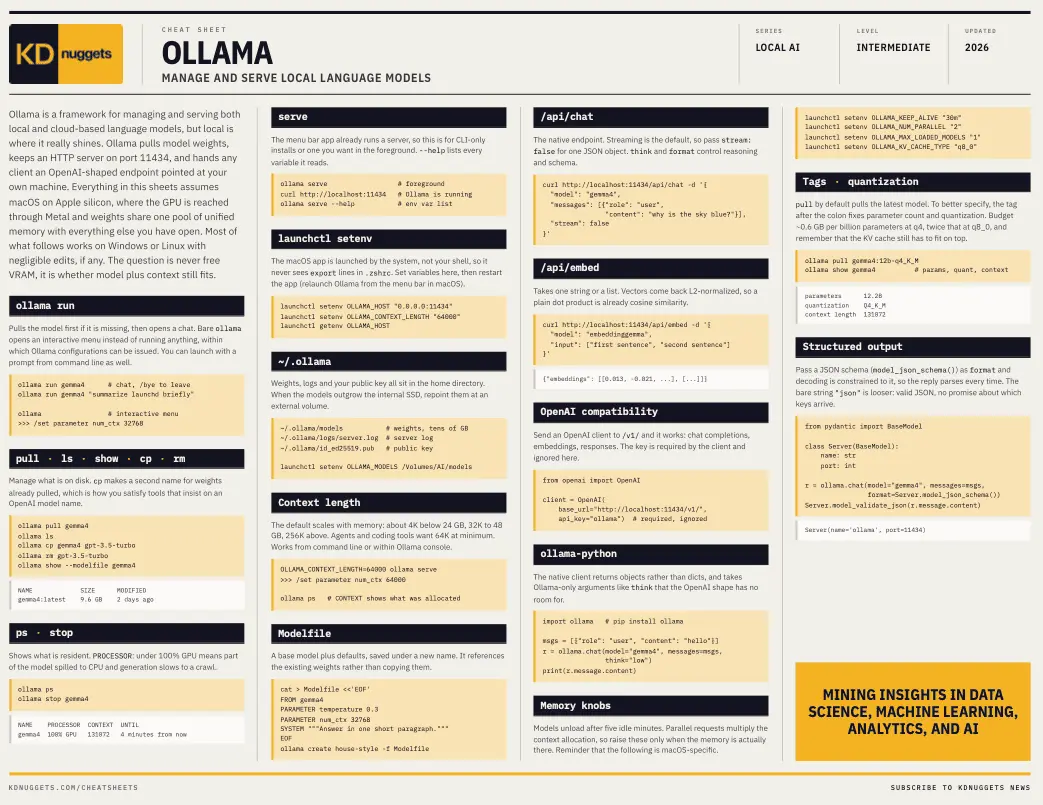
However, once that initial hurdle is cleared, a different kind of question emerges: whether or not the model, combined with its active context window, still fits within the physical memory available on the host machine. This is where hardware limitations often catch developers by surprise, as performance can degrade drastically if memory limits are exceeded. To help navigate these resource management challenges, KDnuggets has released a comprehensive new cheat sheet focusing on Ollama for managing local language models, providing developers with a handy reference guide for building and experimenting with local artificial intelligence infrastructure.
The command line utility ollama ps serves as the primary diagnostic tool for monitoring resource consumption in real-time. Alongside displaying which models are currently resident in memory, it features a crucial processor column. Any reading showing less than 100 percent GPU utilization indicates that part of the model has spilled over into the system CPU, a bottleneck that causes text generation speeds to slow down to a crawl. Furthermore, the utility shows the exact context window that has been allocated for the active session, which may occasionally differ from the number a developer expected or explicitly requested. Knowing how and where to adjust these local model sizing decisions helps resolve performance bottlenecks quickly when serving applications with Ollama.
Beyond basic memory monitoring, deploying local models often brings unexpected friction when interacting with the underlying host operating system for easy management. One of the most common pitfalls involves environment variables and system-level configurations, particularly on macOS. Because the Ollama desktop application is launched directly by the operating system rather than from a user shell, it never reads environment variables defined in user configuration files like a .zshrc or .bash_profile. Consequently, configuration settings that appear entirely correct when tested in a terminal window simply have no effect on the background service.
To overcome this, variables must be explicitly set through the macOS system manager launchd via commands like launchctl setenv. This particular quirk is responsible for the vast majority of cases where a context length or a designated model storage directory stubbornly refuses to change, leaving newcomers bewildered as to why their configuration changes are being ignored despite looking correct on paper. Understanding how local operating systems manage background application environments is becoming an essential skill for developers moving beyond simple experimentation into building robust local development environments.
Another critical consideration for developers working with local language models is the nuance of handling structured output. When building production applications, getting free-form natural language is often insufficient; systems frequently require predictable, machine-readable responses. Ollama addresses this by allowing developers to pass a strict JSON schema as a format parameter during API requests. This constrains the decoding process of the model to strictly adhere to that specific shape, ensuring that the reply parses successfully every time rather than just most of the time. In contrast, passing the bare string "json" acts as a looser version of the constraint, guaranteeing valid JSON syntax but offering no promises about which specific keys will ultimately arrive in the payload.
The newly released cheat sheet from KDnuggets also rounds out the broader fundamentals of the ecosystem, covering essential disk management commands, API endpoints such as /api/chat and /api/embed, and the /v1/ compatibility layer. This compatibility layer is particularly powerful for existing applications built around OpenAI clients, allowing them to switch their target base URL to localhost and interact with local models without requiring any structural changes to the codebase. Additionally, the reference guide highlights the use of Modelfiles, which allow developers to save a base model alongside custom system prompts, default parameters, and specific configurations, as well as the environment variables that govern how long models stay loaded in memory and how many can run concurrently.
As local artificial intelligence continues to mature, having quick access to essential commands, configuration pathways, and optimization techniques remains invaluable for developers looking to maximize their hardware efficiency. The new resource from KDnuggets aims to serve as a practical companion for those navigating the complexities of local deployment, ensuring that building and experimenting with Ollama remains both efficient and productive.