When an organization faces an expected staffing shortfall, bringing the issue to leadership’s attention is a critical first step. Yet, presenting a forecast alone rarely tells executive leaders where the gap is actually originating. When corporate analysts and human resources teams find themselves with a complex web of numbers to explain, they often face the overwhelming temptation to squeeze every available detail into a single chart. This precise dilemma recently emerged during a custom client workshop conducted by the data storytelling organization Storytelling with Data, illustrating the common pitfalls of trying to communicate too much information in a single visualization.
In the case study examined during the workshop, a corporate team needed to communicate several crucial messages to top-tier decision-makers. First, they needed to show that full-time equivalent (FTE) staffing levels were projected to fall significantly below the established operational plan. Second, they needed to highlight that a measurable decline in operations support roles constituted an important part of the overall picture. Finally, they needed to prompt leadership to engage in a substantive discussion regarding an approach to resolve the widening gap to plan.
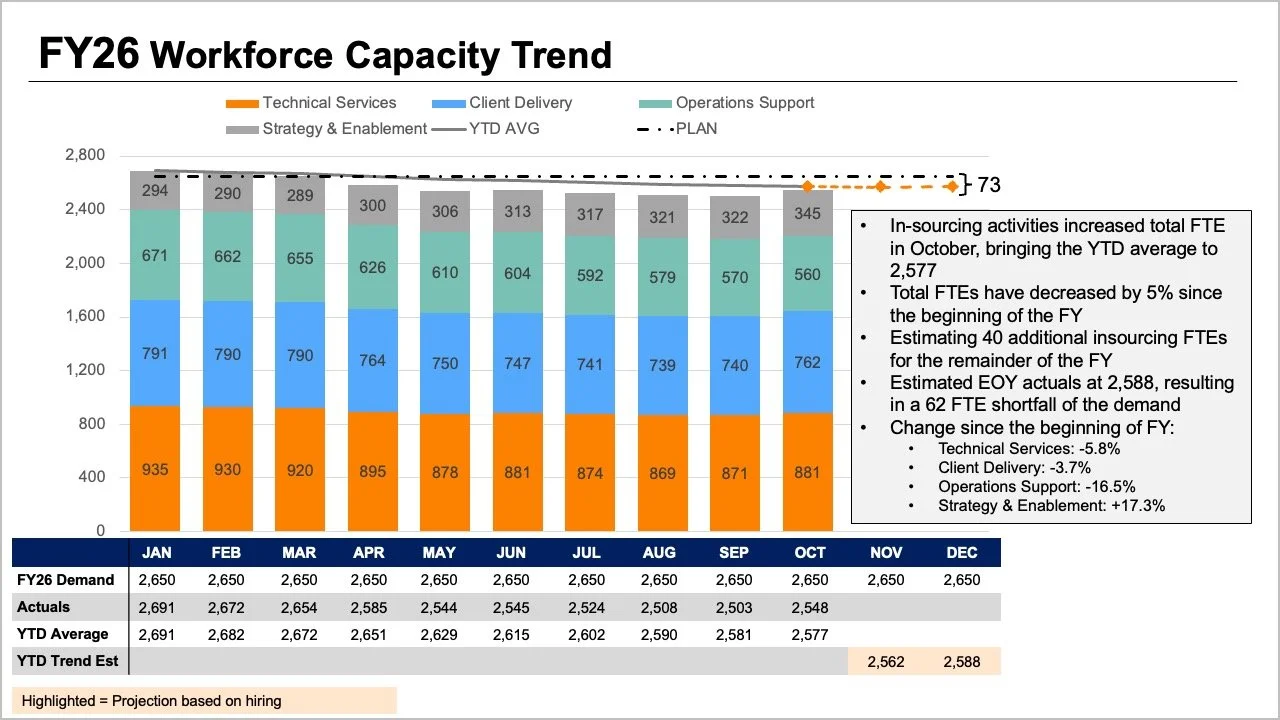
All of the necessary and important information was undeniably present in the team’s initial reporting materials. However, the core narrative and actionable insights were effectively buried in the dense complexity of the communication. The original presentation slide required readers to track multiple visual variables simultaneously. The tops of stacked bars, overlapping trend lines, and a detailed data table all attempted to show overall FTE numbers in different ways. Meanwhile, the internal segments within the bars displayed a complex breakdown by individual job roles, while plans, actual figures, year-to-date averages, and forward-looking projections added yet another layer of cognitive burden for interpreters to navigate.

Each individual element on that original slide answered a reasonable question when viewed in isolation. Yet when crammed together into a single graphic, they made it exceptionally difficult for leadership to answer any one question well. Taking a step back and carefully considering what executives would actually require for the strategic conversation ahead helped guide a much more effective way to present the information. Leadership ultimately needed clear, unambiguous answers to two fundamental questions: How big of a shortfall should the organization realistically expect, and what do the latest staffing data trends tell us about where the structural change has occurred?
Rather than packing every variable, projection, and category into one overloaded graph, the workshop participants restructured the communication by splitting the data into two distinct visuals, dedicating one clear chart to each core question.
Use a line chart for the overall trend
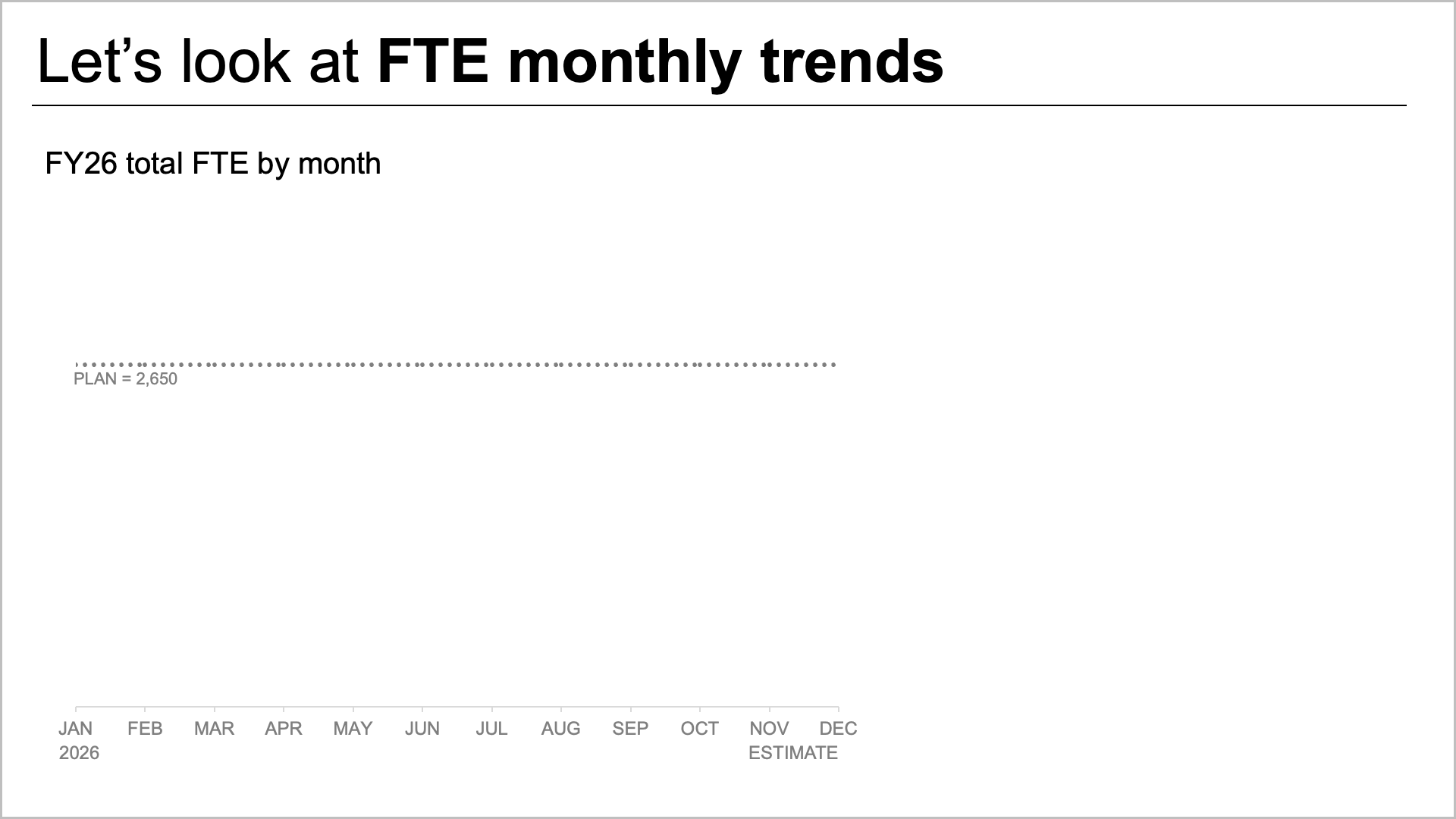
To tackle the anticipated staffing shortfall effectively, the team first isolated the macro-level trajectory. A standalone line chart makes it considerably easier for decision-makers to see precisely how staffing has tracked against the strategic plan set at the beginning of the fiscal year, and how the current forecast compares with that plan going forward.
This simplified view also leaves ample room to incorporate targeted annotations at key inflection points along the timeline. Instead of struggling to decode a complicated role mix or scanning a dense data table, readers can immediately focus their attention on the expected gap to plan. By stripping away the peripheral noise, the line chart provides an unclouded view of the overarching trajectory, allowing executive leadership to grasp the sheer scale of the staffing deficit at a glance.
Add a second view for the role-level breakdown
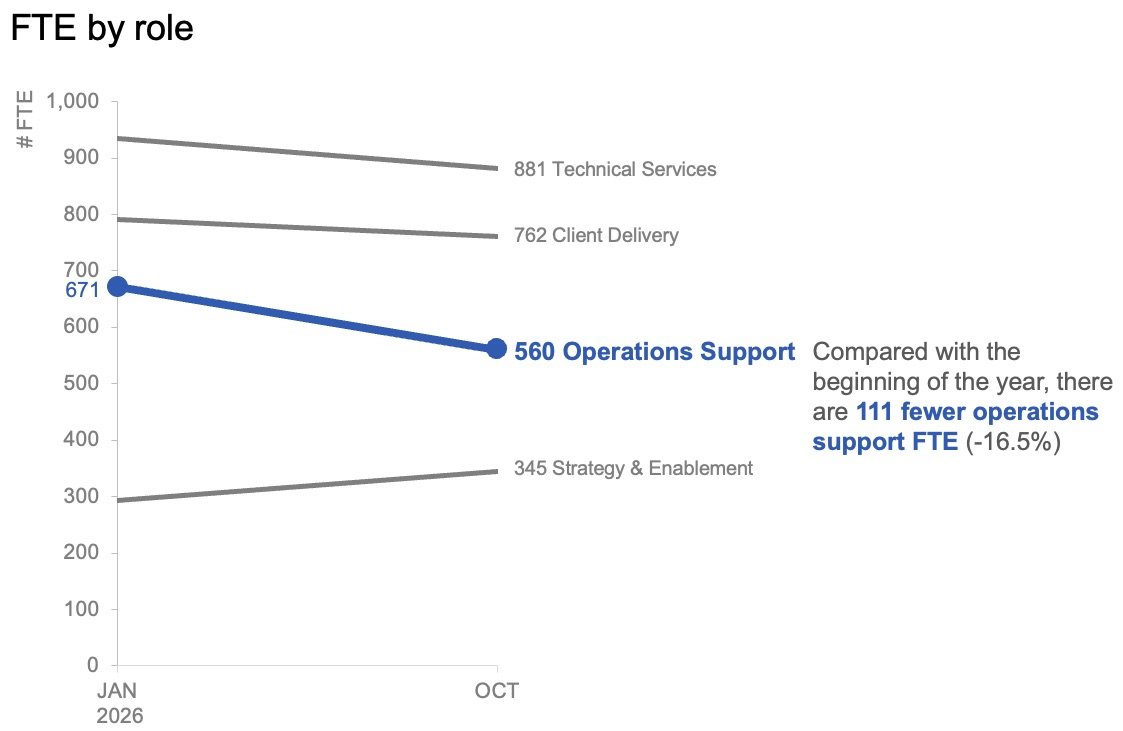
Once the overall view establishes the expected difference between actual headcount and the target set at the beginning of the year, the analysis can shift to examining role-level changes in the actual data. This secondary perspective helps leadership understand where the largest shifts have occurred beneath the surface of the macro numbers.
In this context, minor month-to-month variations matter far less than the overarching directional shift. Plotting only the headcount at the start of the year alongside the latest actual month using a specialized slopegraph provides a remarkably quick sense of which specific roles have changed the most over the interim period. By utilizing color and descriptive text very sparingly, the visualization successfully draws immediate attention to the noticeable decline in operations support roles, helping the audience swiftly identify the primary driver of the staffing gap.
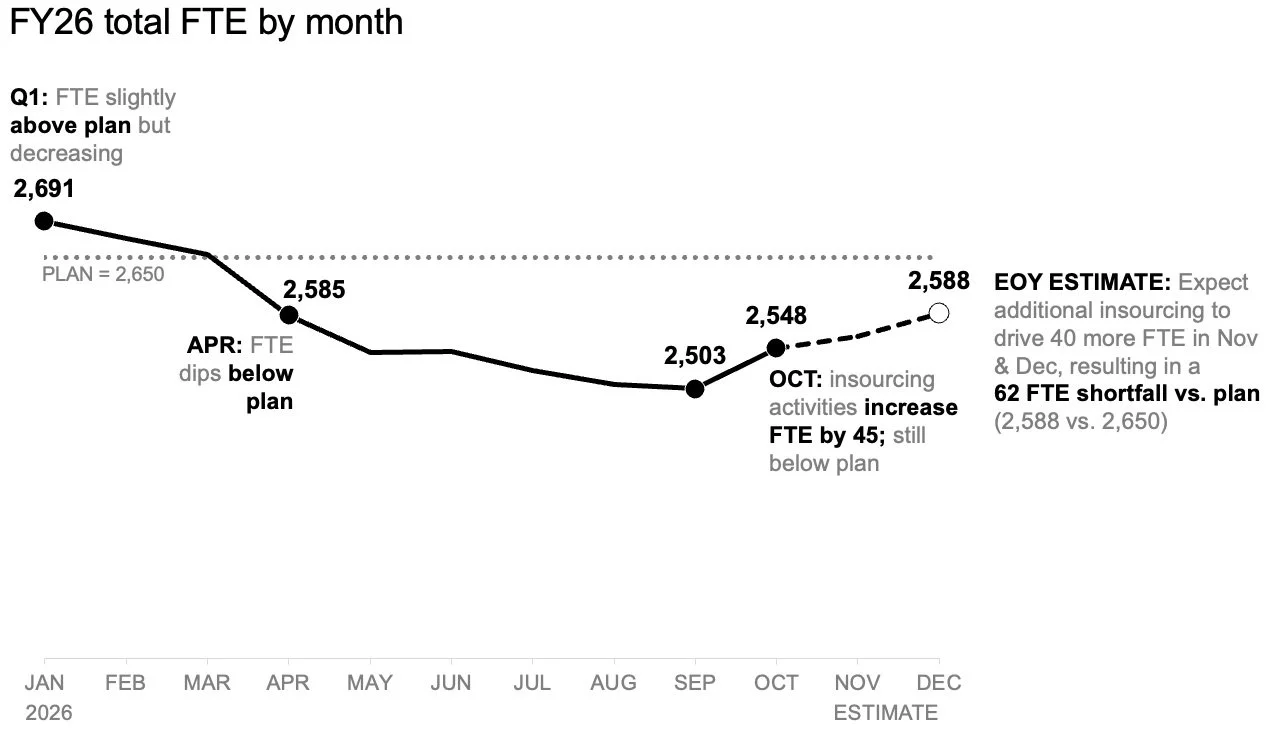
These two distinct visuals ultimately function as a powerful pair. The standalone line chart answers the macro question of what is happening overall, while the slopegraph answers the granular question of which roles have changed the most so far.
Plan for how the story will be shared
The method of delivery dictates how these visual components should be arranged. For a summary report that might be read asynchronously or forwarded across departments without a live presenter present to guide the interpretation, the two views can sit together comfortably on a single page or slide. A well-crafted takeaway slide title can explicitly state the expected shortfall, while concise supporting text points directly to the decline in operations support roles and signals that leadership needs to convene to discuss next steps. In this static format, the charts provide the necessary empirical evidence without competing for the same visual space.
For a live presentation, however, the same underlying data can be deployed quite differently. Rather than asking an audience to take in a comprehensive summary all at once while a speaker talks over it, a presenter can walk through the overall macro forecast first, then reveal the actual role-level changes piecewise, and finally transition the conversation organically to what actions need to be taken next. This measured sequence allows the audience to fully absorb one critical point before moving forward to the next. The underlying data and core message remain identical, but what changes is the cognitive pacing and how much information the audience is expected to process at any single moment.
When comprehensive business overviews demand higher levels of detail, professionals often feel a strong temptation to consolidate everything into a single, highly dense view under the assumption that it represents the most efficient use of space. Yet experience shows that more information does not automatically translate into deeper understanding. By separating the overall FTE trend from the role-level changes, both critical insights become immediately visible and interpretable. Together, these two focused charts tell a clear, compelling story that provides executive leadership with the precise foundation they need to take decisive action.