When facing an expected staffing shortfall, bringing the issue to leadership’s attention is a critical first step. However, a forecast alone rarely tells executives where the gap is actually originating. When corporate communicators and data analysts are tasked with explaining complex organizational trends, the temptation to squeeze every detail into a single chart can be overwhelming.
That exact challenge recently took center stage during a custom client workshop focused on data storytelling. The participating team needed to convey a multifaceted message to company leadership: full-time equivalent (FTE) staffing levels were projected to fall below plan; a notable decline in operations support roles was driving a significant portion of that shortfall; and executives needed to actively discuss a strategic approach to resolving the looming gap.
The essential information was undeniably present, but the core narrative was buried deep beneath layers of visual complexity.

Untangling the Overloaded Original Slide
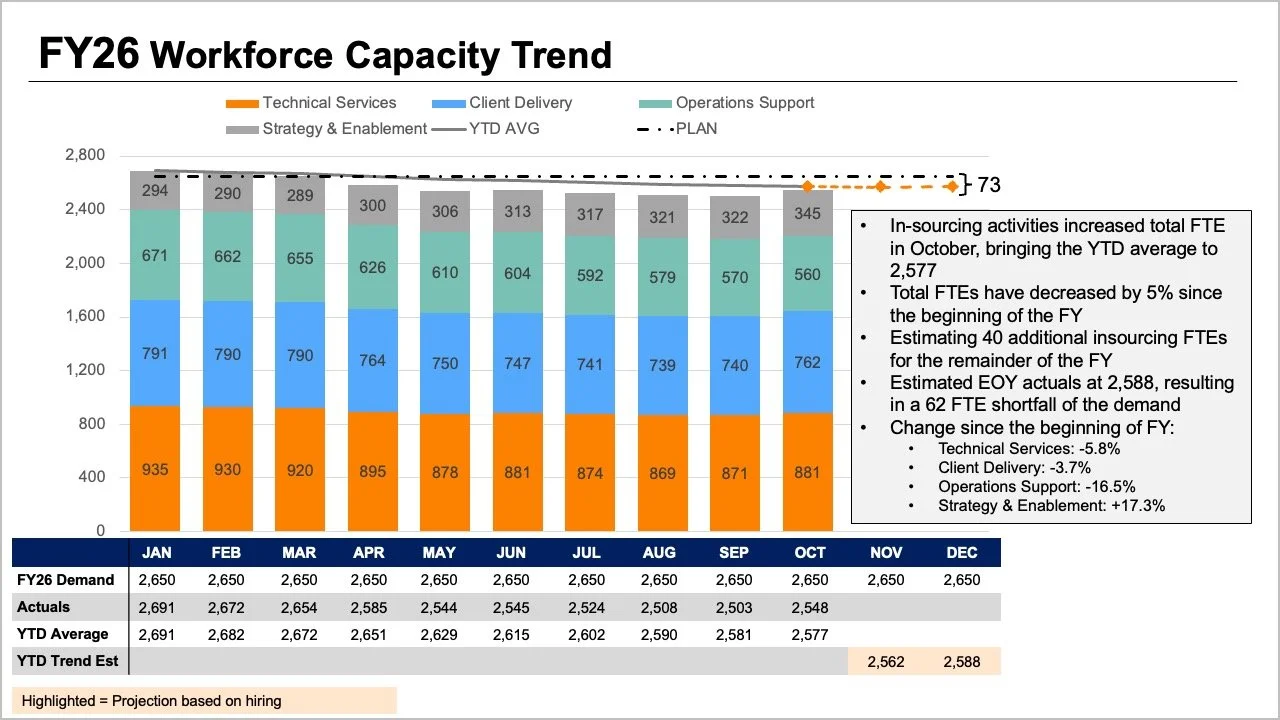
The original data visualization placed heavy cognitive demands on its readers, asking them to track multiple variables simultaneously. The tops of stacked bars, overlapping lines, and a comprehensive data table all attempted to display overall FTE metrics in slightly different ways. Meanwhile, the internal segments of the bars illustrated a detailed breakdown by role, while shifting layers of plans, actual figures, year-to-date averages, and forward-looking projections added yet another tier of interpretation.
Each individual element addressed a perfectly reasonable question, but when crammed together into a single graphic, they made it remarkably difficult for an audience to answer any one question well. Taking a step back and evaluating what leadership truly needed for the upcoming strategic conversation helped guide a better approach to displaying the information. Executives ultimately required answers to two fundamental questions: How big of a shortfall should the organization expect, and what do the latest staffing figures reveal about where those changes have occurred?
Rather than packing every available data point into one overcrowded graph, the workshop team decided to split the visualization in two, dedicating one distinct visual to each core question.
Utilizing a Line Chart for the Overall Trend
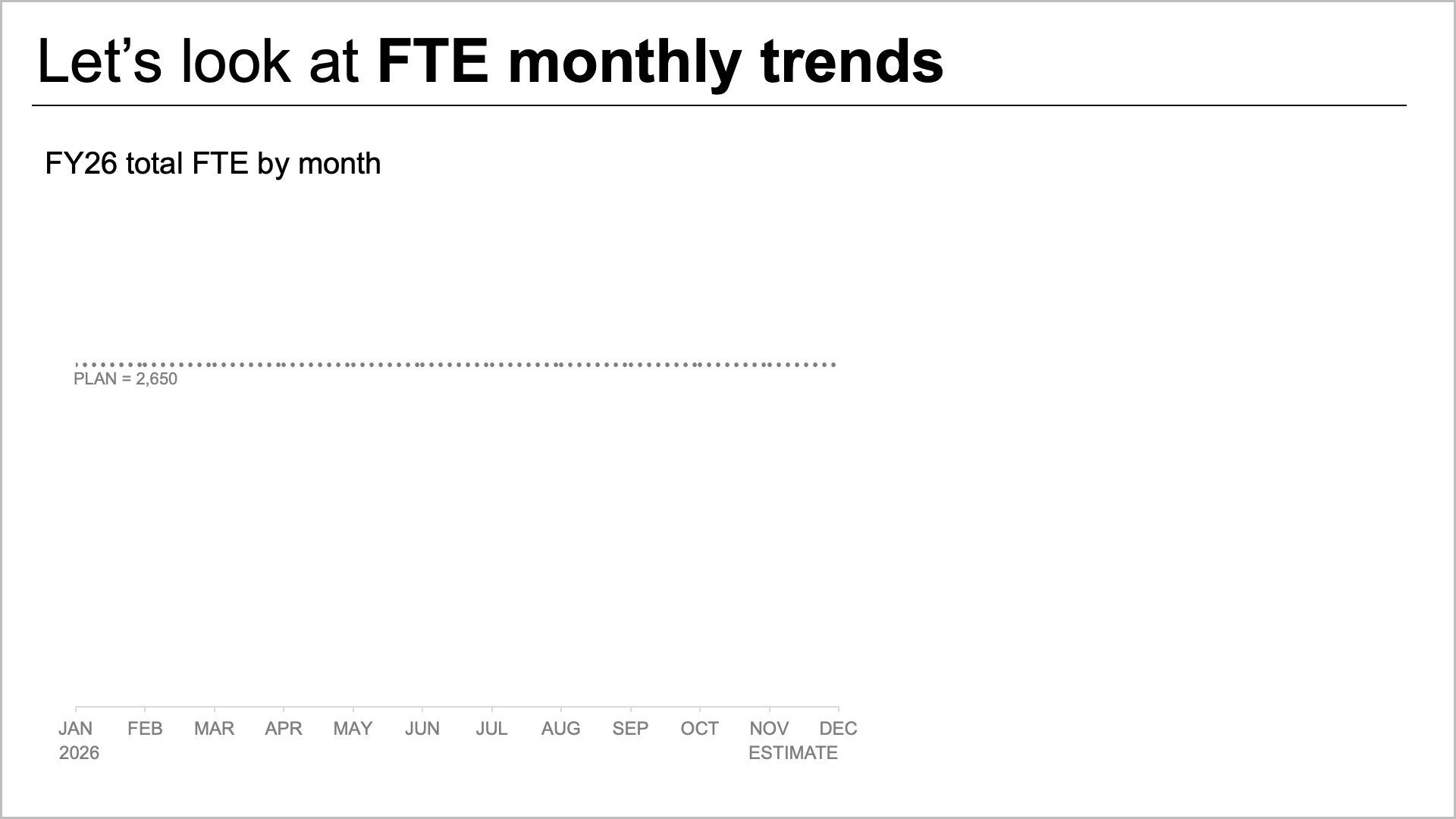
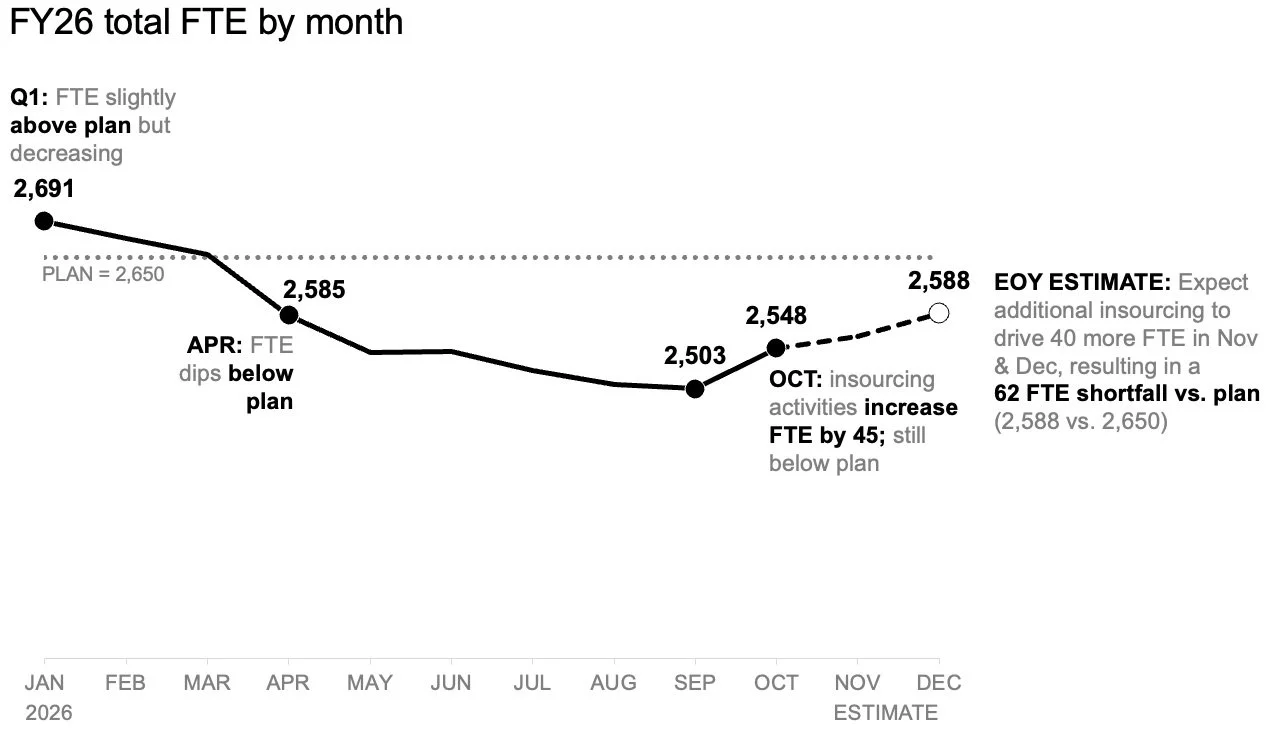
To tackle the anticipated shortfall first, the team introduced a standalone line chart. This focused view made it significantly easier to observe how staffing had tracked against the original plan established at the start of the year, alongside how future forecasts compared with those initial targets.
This streamlined view also opened up valuable space to incorporate targeted annotations at critical junctures. As a result, readers could focus entirely on the expected gap to plan without first having to decode a complex role mix or scan through a dense supplementary data table.
Introducing a Second View for Role-Level Breakdowns
Once the overall view established the expected variance from the annual target, the next logical step was to examine role-level changes within the actual data to help illuminate where the largest shifts had taken place.
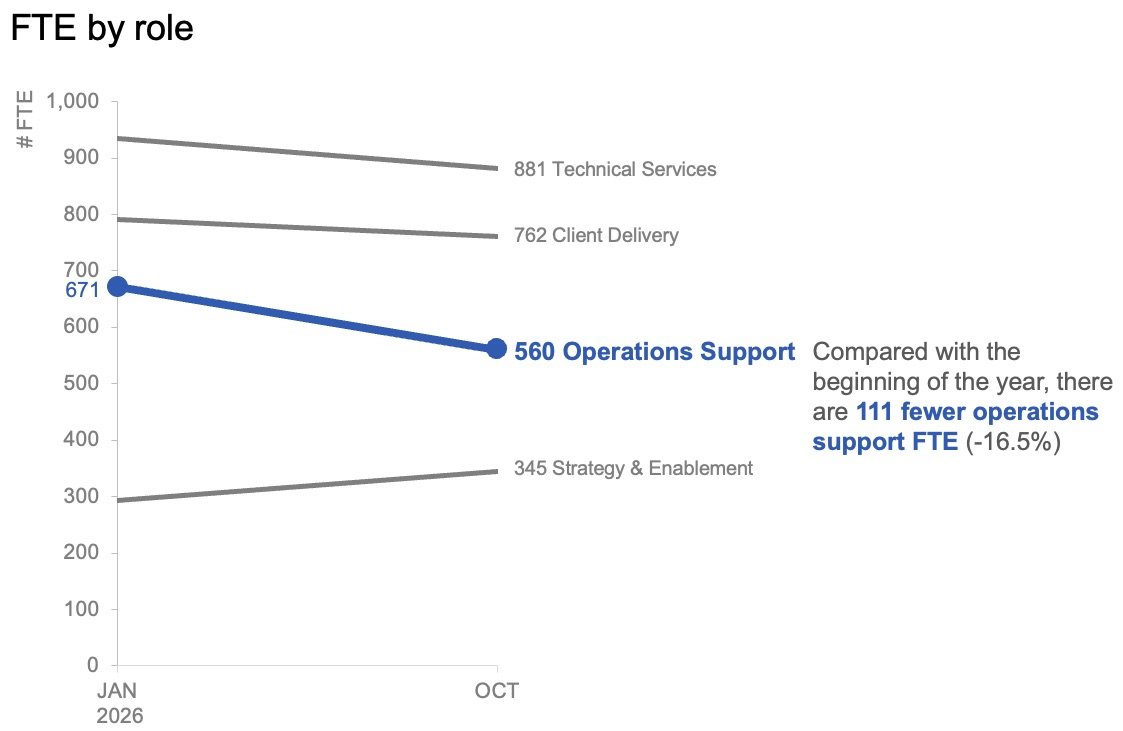
In this context, granular month-to-month variations mattered less than the overarching trajectory. Plotting only the figures from the start of the year and the latest actual month using a slopegraph provided an immediate sense of which specific roles had shifted the most. By applying color and contextual text sparingly, the visualization drew instant attention to the steep decline in operations support roles, helping the audience quickly identify the primary driver of the variance.
Together, the two visuals operated as a cohesive pair. The line chart successfully answered the overarching question of what was happening overall, while the slopegraph clarified which specific roles had experienced the most dramatic changes to date.
Planning for Different Communication Channels
The method of delivery heavily influences how data stories are consumed. For a summary report that might be read asynchronously or forwarded across departments without a live presenter, placing both views together on a single page offers a comprehensive overview. A clear, takeaway-driven slide title can state the expected shortfall, while supporting text highlights the decline in operations support roles and signals the urgent need for leadership to discuss next steps. The accompanying charts supply the necessary evidence without competing for visual space.
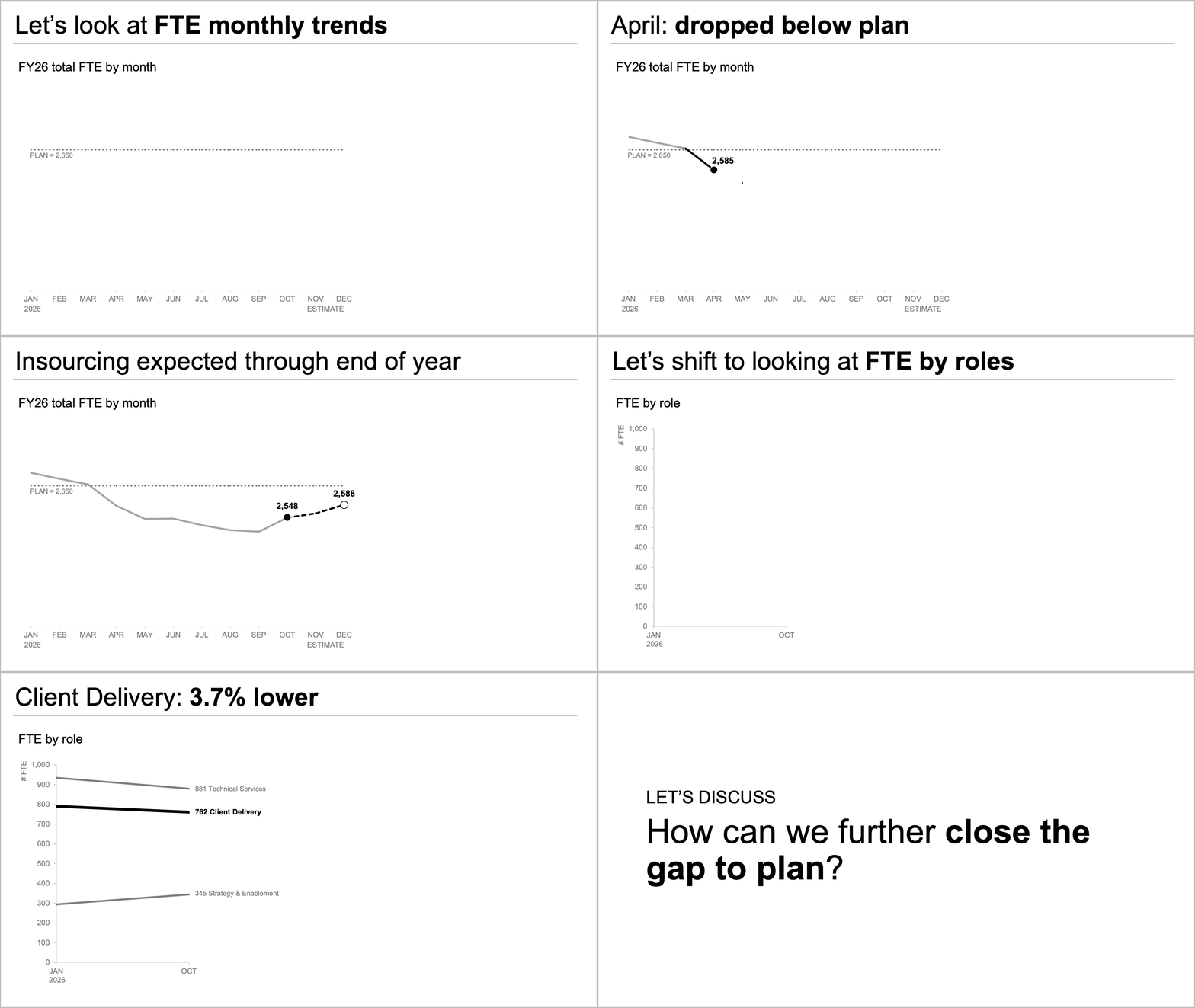
For a live presentation, however, the exact same data can be utilized in a completely different sequence. Instead of asking an audience to absorb an entire summary all at once while a speaker talks over the slide, presenters can walk through the overall forecast first, gradually reveal the actual role-level changes piece by piece, and finally pivot the conversation toward actionable solutions. This deliberate pacing allows the audience to digest one crucial insight before moving on to the next.
While the underlying data and core message remain identical, the real transformation lies in managing the volume of information the audience is expected to process at any given moment.
Giving Each Question Its Own View
When a comprehensive picture requires deep detail, the impulse to consolidate everything into a single view can feel like the most efficient choice. Yet, more information does not automatically generate deeper understanding.
By separating the macro-level FTE trend from the micro-level role shifts, both critical insights became instantly more accessible. Together, the paired charts delivered a clear, focused narrative that provided leadership with the actionable clarity needed to drive future decisions.