When an anticipated staffing shortfall looms on the horizon, it is an operational imperative that deserves immediate executive attention. Yet, for corporate analysts and reporting teams, recognizing a downward trend is only half the battle. A forecast alone does not immediately illuminate where a gap originates, nor does it map out a clear pathway toward a remedy. When communicators are tasked with explaining complex organizational shifts, they frequently fall victim to a common temptation: squeezing every available metric, data point, and historical trend into a single, overloaded chart.
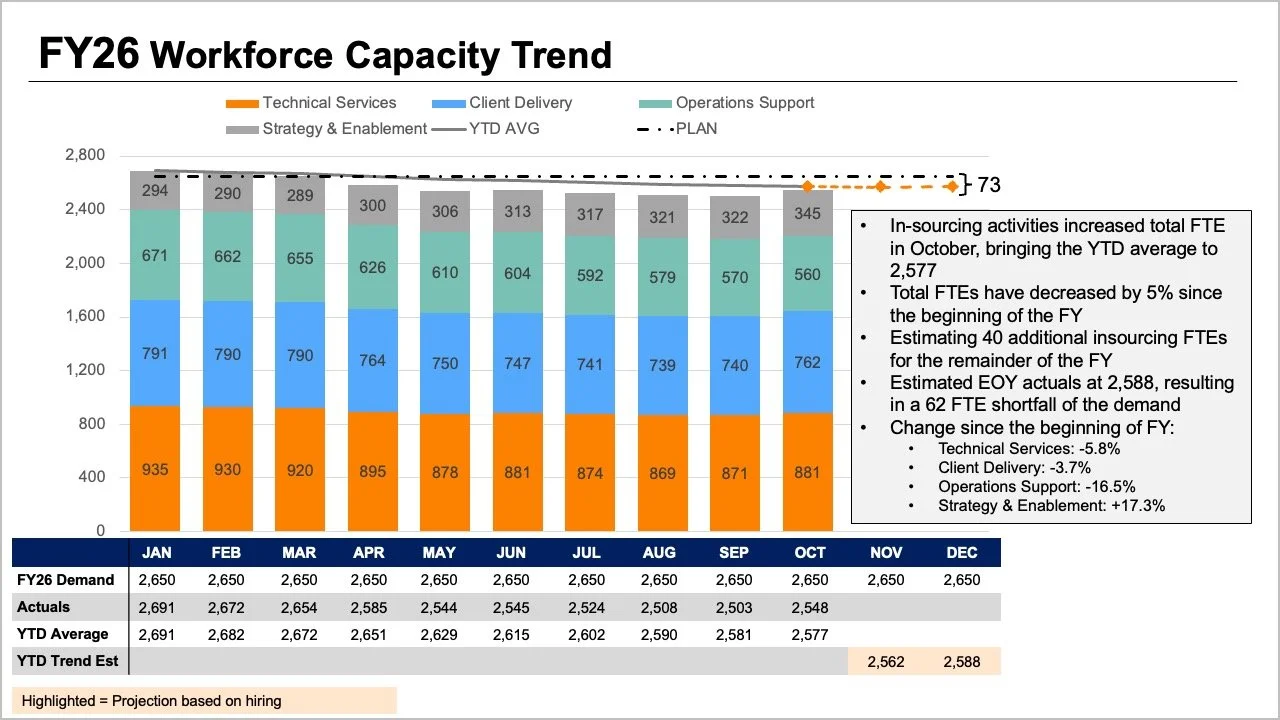
This exact communication hurdle took center stage during a recent custom client workshop hosted by Storytelling with Data. The participating team faced a multifaceted reporting challenge. They needed to convey several critical realities to their leadership group: that full-time equivalent (FTE) staffing levels were tracking below initial projections, that a noticeable decline in operations support roles was serving as a primary driver of this trend, and that executives needed to engage in an urgent, strategic dialogue to formulate a corrective path forward.
While all the essential information was technically present within their initial reporting materials, the core narrative was buried beneath layers of visual complexity. The original slide design demanded that readers process multiple visual streams simultaneously. The tops of stacked bar charts, overlapping trend lines, and dense data tables all attempted to communicate overall FTE counts through different visual mechanisms. Simultaneously, internal bar segments forced the audience to decode role-by-role breakdowns, while a mixture of baseline plans, actual performance figures, year-to-date averages, and future projections added yet another layer of cognitive friction.

Each individual element within the crowded graphic attempted to answer a reasonable business question. However, when crammed together into a singular frame, they undermined one another, making it remarkably difficult for decision-makers to extract clear answers. Recognizing this bottleneck requires stepping back to evaluate what leadership actually needs to navigate the upcoming discussion. In practice, executives typically search for answers to two fundamental questions: How severe is the expected shortfall, and what do the most recent staffing figures reveal about where structural shifts have occurred?
Rather than forcing every variable into one congested graph, the solution involves separating the narrative into distinct, digestible visuals, dedicating one clear chart to each core question.
Utilizing Line Charts to Clarify Overall Trends
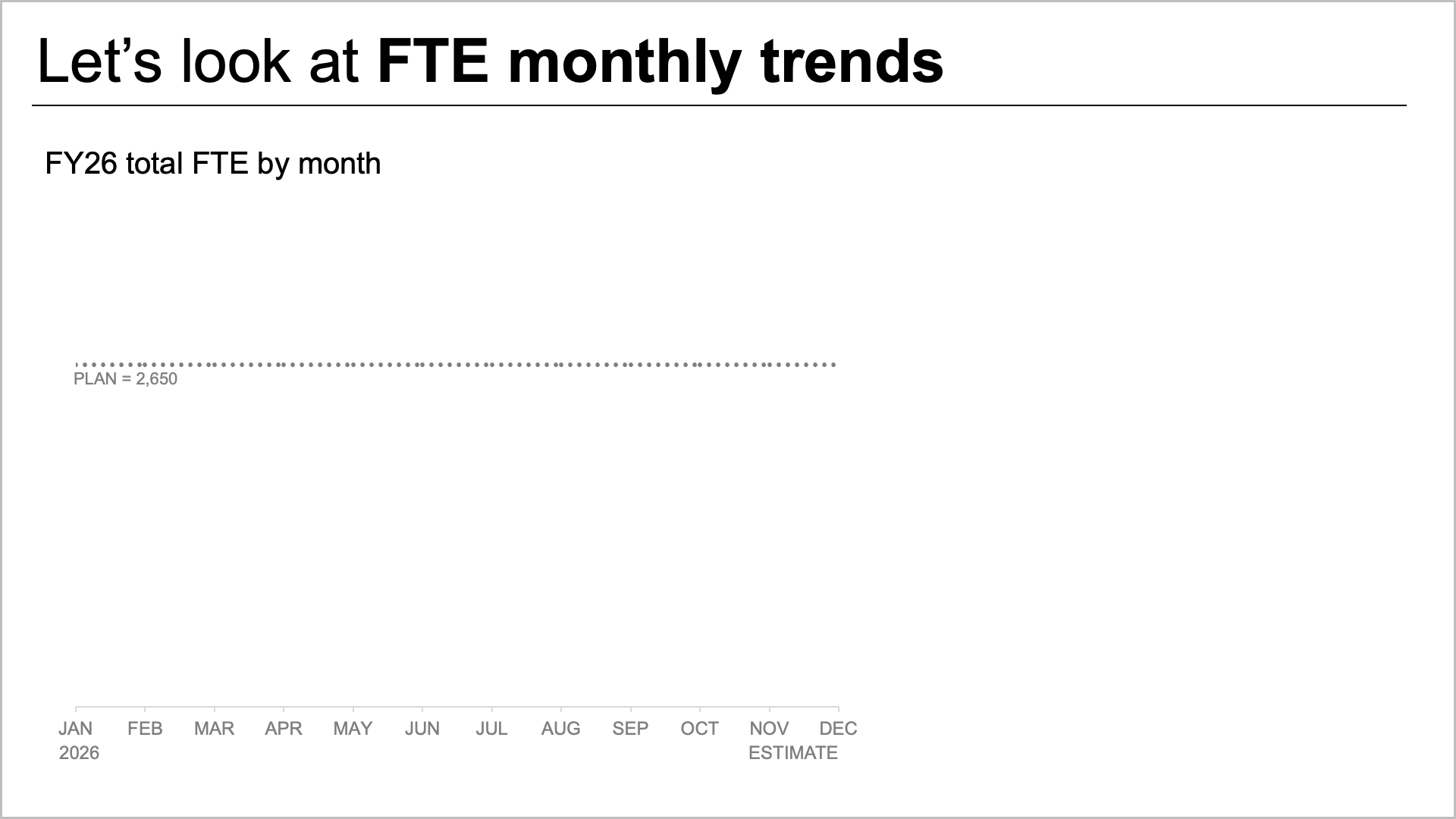
To address the anticipated shortfall effectively, analysts must first isolate the macro-level trajectory. A standalone line chart offers an uncluttered method for tracking how organizational staffing has measured up against the strategic plan established at the beginning of the fiscal year. Furthermore, it illustrates how forward-looking projections compare against those original targets.
This streamlined view creates valuable visual real estate, allowing teams to incorporate precise annotations at critical inflection points. Instead of struggling to decode complex role mixes or scanning exhaustive data tables, readers can immediately focus their attention on the expected gap between plan and reality. By stripping away extraneous noise, the line chart transforms a confusing projection into an unmistakable call to action.
Providing Role-Level Context Through Alternative Views
Once the macro-level trend establishes the expected variance from initial yearly targets, leadership naturally pivots to the underlying composition of the workforce. Understanding where the largest shifts have occurred requires looking closely at actual role-level changes.
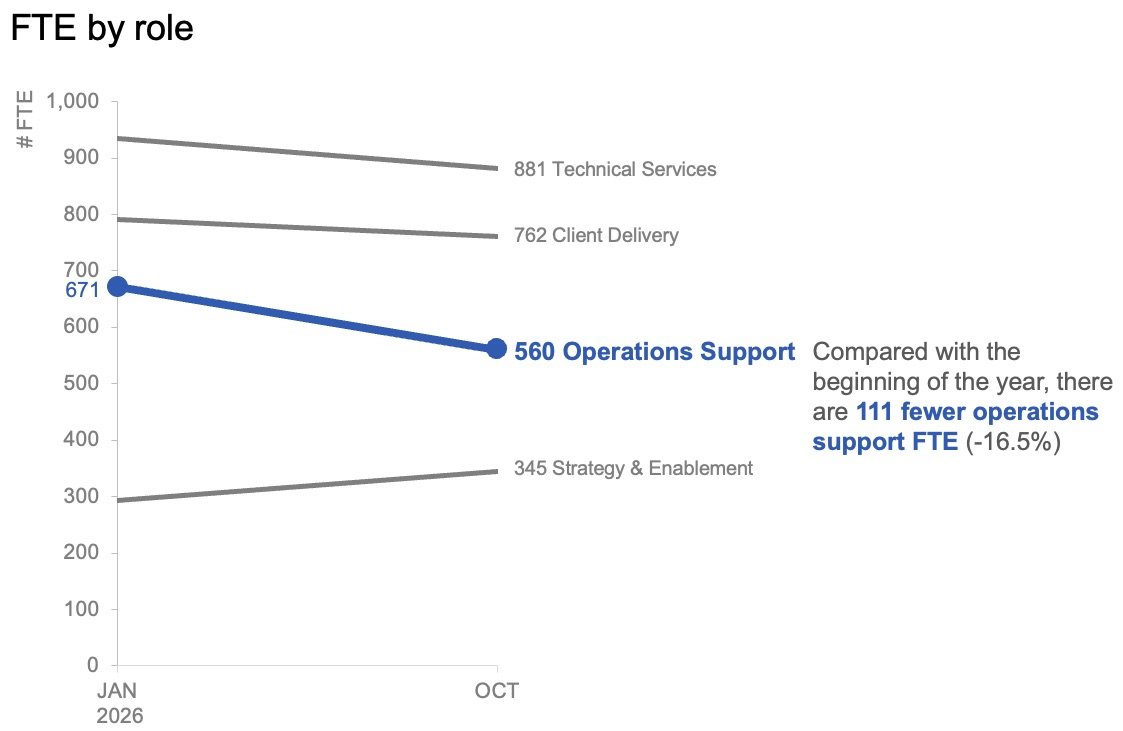
In this specific context of variance analysis, granular month-to-month fluctuations often matter less than the broader trajectory. Plotting data points exclusively from the start of the year alongside the latest actual month using a slopegraph provides an immediate, highly readable sense of which job categories experienced the most dramatic changes. By applying color and contextual text with great restraint, reporting teams can naturally draw the audience’s eye toward the prominent decline in operations support roles. This deliberate visual prioritization ensures that executives instantly recognize the primary driver behind the broader organizational gap.
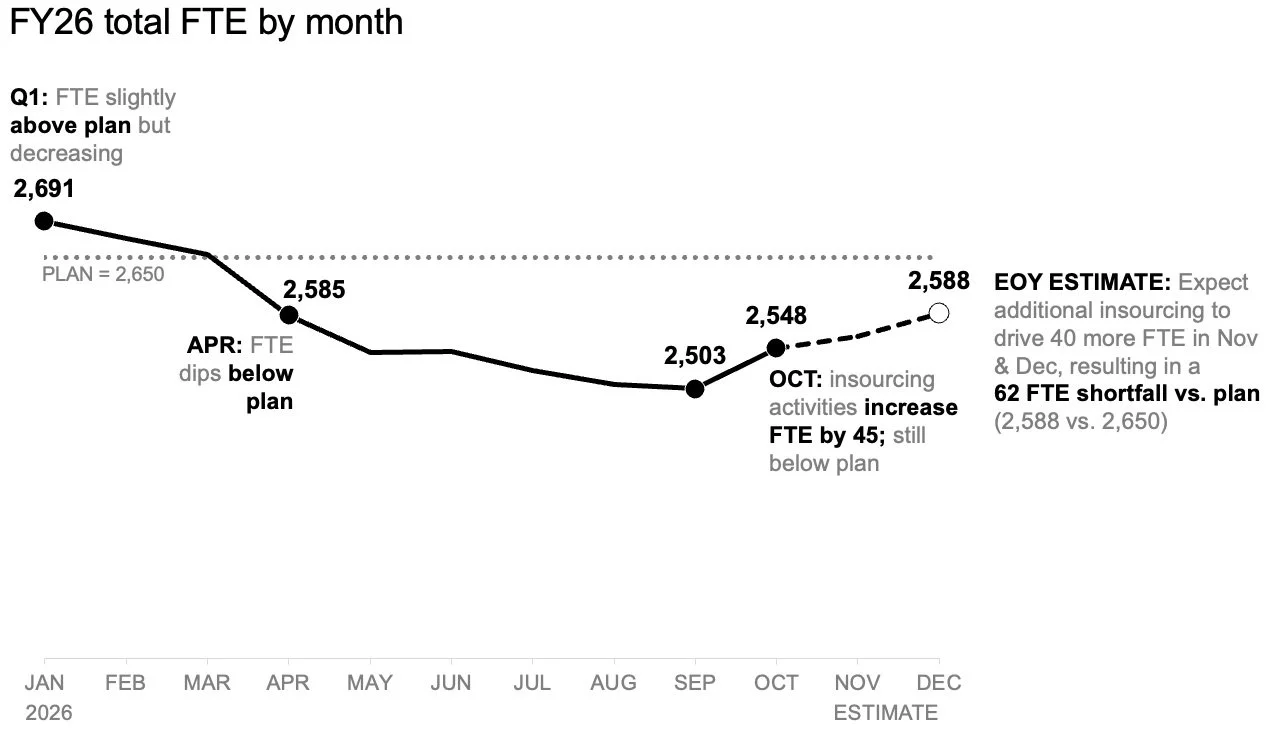
When deployed side by side, these two visual instruments function as a cohesive analytical pair. The line chart answers the overarching executive inquiry regarding overall organizational health, while the slopegraph responds directly to questions concerning functional shifts across specific departments and titles.
Structuring the Narrative for Different Audiences
Beyond the design of the charts themselves, data communicators must carefully plan how their insights will be shared across different mediums. When a report is prepared as a standalone summary document that might be reviewed or forwarded independently without a live presenter, combining multiple views onto a single page can be effective. In such formats, a strong, takeaway-driven slide title explicitly states the expected staffing shortfall. Supporting text can then direct attention toward the contraction in operations support roles, signaling the exact areas where leadership must deliberate over next steps. The underlying charts provide robust, uncompromised evidence without competing for visual prominence.
Conversely, live presentations require a fundamentally different pacing strategy. Rather than presenting the entire summary all at once while speaking over a dense slide, presenters can unroll the information progressively. Walking through the overall macroeconomic forecast first, subsequently revealing actual role-level changes in a step-by-step manner, and finally pivoting the conversation toward strategic next steps transforms the dynamic of the meeting. This measured sequence grants the audience adequate cognitive space to absorb one insight before transitioning to the next.
While the underlying data and the ultimate business message remain entirely unchanged between a static report and a live briefing, the primary variable is cognitive load—specifically, how much information the audience is expected to process simultaneously.
Giving Each Core Question Its Own Visual Space
When complex enterprise environments demand high levels of detail, the impulse to consolidate everything into a single view can feel like an exercise in efficiency. Yet, in professional data visualization, more information does not automatically translate into deeper understanding.
By separating the macro-level FTE trend from micro-level role shifts, organizations can remove ambiguity from executive boardrooms. Through targeted visual redesigns, complex operational challenges transform into clear, focused narratives that empower leadership to make informed, decisive interventions.