To address this friction, analytics platforms like Julius have introduced specialized AI presentation generators designed to bridge the gap between raw data and editable slide decks. Industry analysts note, however, that treating artificial intelligence as a magic wand for complex, data-heavy reporting can introduce errors or superficial summaries. Rather than asking an automated tool to generate a finished deck instantaneously, best practices dictate a deliberate, multi-step workflow. By carefully auditing source data, establishing clear analytical parameters, and providing the AI with a structured briefing, professionals can harness automation while maintaining strict control over the narrative and accuracy of their reports.
To illustrate this methodology, analytics experts frequently point to a standard quarterly marketing review. Imagine preparing a performance assessment for a corporate leadership team eager to understand how revenue evolved over the previous quarter while gathering critical insights to inform the upcoming budget cycle. Framing the objective around specific business questions—such as evaluating overall top-line changes, identifying the specific marketing channels driving those shifts, and interrogating proposed budget increases—provides a far more effective foundation than simply instructing an AI tool to "make a presentation about marketing performance."
In a typical scenario, a multi-sheet workbook might contain a dedicated revenue tab tracking attributed revenue by channel across consecutive quarters, alongside a separate paid search spend tab detailing corresponding advertising expenditures. Best practices emphasize the importance of isolating reference data, such as pre-calculated checking tabs, to prevent accidental duplication or skewed calculations. Before generating any visual slides, data professionals advise uploading the workbook to the AI platform and issuing explicit commands to inspect the sheets, confirm reporting periods and units, flag missing or duplicate values, and strictly avoid making modifications or drafting slides prematurely.
This preliminary audit is also the ideal moment to clarify foundational definitions. In corporate finance and marketing analytics, metrics such as booked revenue, cash collected, and pipeline forecasts are rarely interchangeable. If a dataset relies on attributed revenue—which indicates how revenue was assigned within a specific report rather than proving causality—analysts must recognize those boundaries before allowing automated systems to draw broader conclusions.
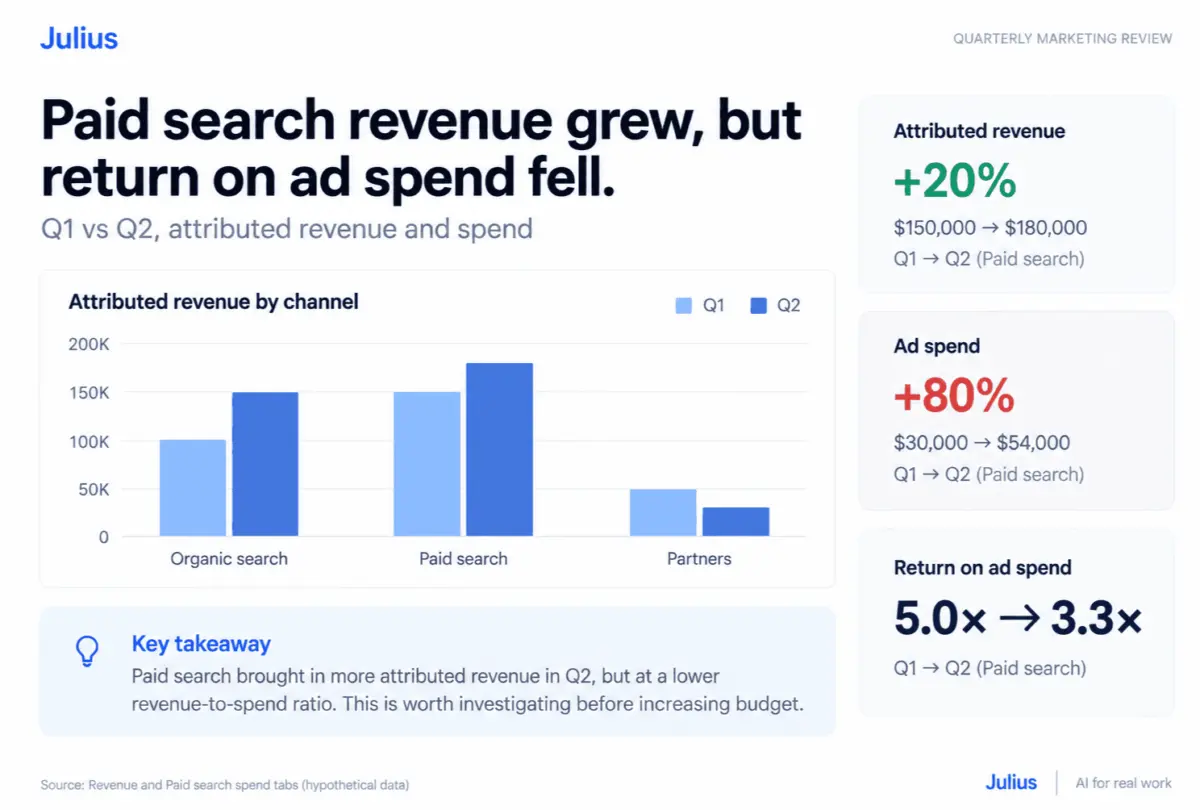
Once the foundational inputs are verified, the next phase involves executing the core calculations. Analysts can prompt the AI to compute total attributed revenue across periods, calculate percentage changes, determine each channel’s exact monetary contribution to overall growth, and evaluate return on ad spend by dividing attributed revenue by media expenditures. In a standard quarterly review using hypothetical data, organic search revenue might climb significantly while paid search experiences moderate growth and partner channels decline. When summed together, these channel movements paint a clear picture of overall business expansion.
However, a superficial reading of the data can easily misinform leadership. For instance, if paid search advertising costs experience a sharp upward trajectory while attributed revenue grows at a much slower pace, the channel’s return on ad spend will inevitably drop. A slide that merely highlights positive revenue growth without contextualizing the rising acquisition costs would omit a vital operational insight. While such metrics do not automatically justify cutting a budget, they highlight critical anomalies that leadership must investigate before committing additional capital. Independent verification of these calculations remains essential, ensuring that human oversight catches any potential blind spots before recommendations reach decision-makers.
With the quantitative analysis verified, the process moves into shaping the presentation brief. Modern AI tools are capable of producing customized charts, such as grouped bar charts comparing channel performance alongside companion tables detailing advertising expenditures and efficiency ratios. When briefing an automated presentation generator, professionals should outline specific parameters, including the target audience, meeting length, verified findings, and inherent data limitations.
Effective presentation briefs emphasize concise, takeaway-driven slide titles that communicate the core message directly to the audience, sparing them from having to decipher complex charts on the fly. Furthermore, professionals must explicitly mandate design standards, requesting specific brand color palettes, readable axis labels, consistent layouts, and clear sourcing notes beneath every visual asset. Because platforms like Julius support iterative revisions, users can thoroughly inspect the initial draft and issue follow-up commands to refine visuals, adjust narrative structures, or update corporate branding elements.
The final stage of the workflow involves exporting the presentation format directly into Microsoft PowerPoint for a rigorous pre-flight review. Relying solely on a web-based preview can obscure formatting glitches, misaligned text boxes, or awkward chart scaling. Analysts must independently verify that financial totals remain consistent, chart labels are legible, and slide titles accurately reflect the underlying data. If structural edits or narrative tweaks are required, targeted follow-up prompts can quickly rebalance the slides—such as ensuring that both revenue growth and expenditure increases are clearly visible on paid search slides without introducing unsupported claims regarding profitability.
By treating AI-generated decks as sophisticated first drafts rather than infallible final products, data-driven organizations can streamline their reporting workflows without sacrificing professional rigor. Whether working with a sample workbook or tackling an active corporate report, this structured approach enables professionals to leverage automation while keeping human expertise firmly at the helm.