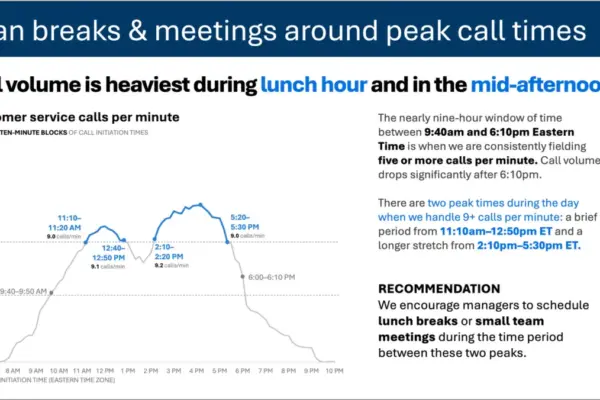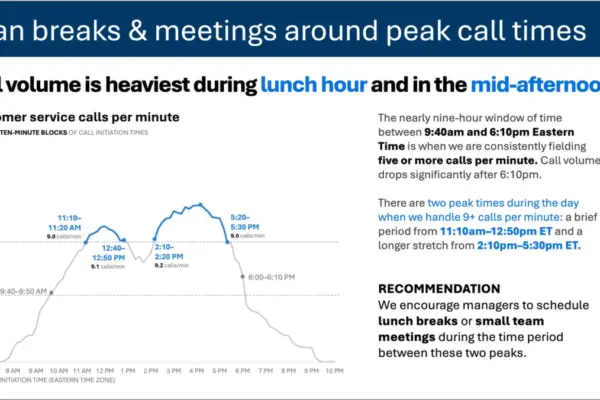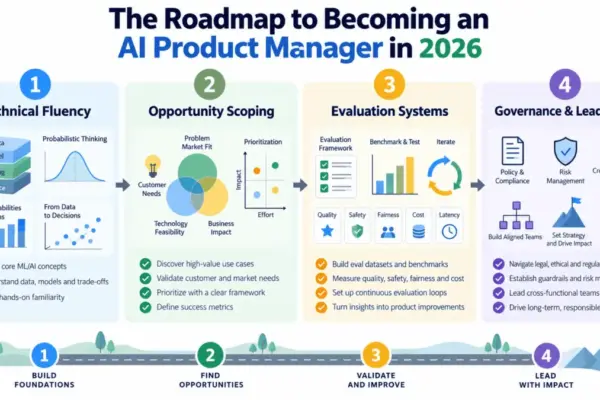
As artificial intelligence continues to reshape professional workflows, data practitioners are finding new ways to bridge the gap between raw data and compelling communication. The latest installment in the ongoing "SWD + AI" series focuses on a critical phase of data storytelling: the actual design of visuals and slides. While choosing the right visual is a vital early step, the process of bringing those elements to life on a slide often consumes the bulk of a presenter’s time.
Industry experts note that the difference between a "good enough" presentation and a genuinely effective one usually lies in how the final visual is refined. Whether generated through traditional charting software or modern AI tools, an initial graph is rarely ready for an audience. It generally requires significant work to remove clutter, establish clear visual focus, and incorporate meaningful language that guides the viewer. Without a takeaway title or a clean layout, audiences are left to interpret complex data on their own, diluting the impact of the message.
However, professionals working in data visualization are increasingly turning to AI as a collaborative partner to streamline this heavy lifting. By providing appropriate context and direction, users can bypass the blank-slide phase. Instead of building each element from scratch, analysts can describe their needs, share their underlying data, and prompt AI tools to produce a strong initial version. While this first iteration rarely stands on its own, it provides a functional starting point that accelerates the design timeline from hours to minutes.
Recent developments in this space emphasize using AI capabilities integrated directly into presentation software, such as Microsoft PowerPoint, rather than relying on standalone chat interfaces. This technical distinction changes the nature of the workflow. Instead of generating static images that must be manually recreated, integrated tools produce fully editable native slides. This allows practitioners to build and refine real presentations in place, leveraging AI to execute targeted adjustments without leaving their editing environment.
Core Principles of Effective Graph and Slide Design
Effective visual communication rests on a foundation of established design principles that minimize cognitive load—the mental effort required for an audience to process visual information. When extraneous elements are removed, the essential message becomes much more prominent. In practice, this requires eliminating unnecessary chart borders, gridlines, tick marks, and default formatting additions that software often includes automatically. By stripping away visual noise, the remaining data points gain clarity.
Visual order is another critical component. When slide elements are misaligned—such as text boxes starting at irregular coordinates or graphs floating without consistent structure—the presentation can feel unintentional and disjointed. Consistent alignment creates a silent scaffolding that allows audiences to navigate the content effortlessly. When design is executed thoughtfully, it fades into the background, allowing the core message to take center stage.
Directing audience attention requires deliberate choices regarding color, size, and position. If every element on a slide utilizes a different color or a uniform hue, nothing stands out as important. Utilizing a neutral background with a single, strategic splash of color immediately draws the eye to the most critical data point. Similarly, manipulating visual weight and hierarchy ensures that the audience’s gaze lands precisely where the presenter intends, without requiring explicit verbal direction.
Language also plays a fundamental role in slide design. Every graph requires a descriptive title that clarifies the underlying data, while every slide benefits from a takeaway title that answers the audience’s unspoken questions about the broader implications of the findings. At the same time, maintaining editorial discipline is essential. Every label and annotation must earn its place by serving the viewer, while superfluous text that adds visual clutter should be eliminated.
Professional standards also emphasize the importance of organizational templates and brand guidelines. Incorporating approved corporate colors, fonts, and layouts ensures aesthetic consistency while reinforcing institutional credibility before any custom design principles are applied.
Working with AI to Refine Presentations
To achieve optimal results when collaborating with artificial intelligence, data professionals are encouraged to provide comprehensive foundational materials before starting a project. Rather than offering brief, ad-hoc prompts, users can share specialized resources, such as the SWD + AI primer, with their AI tools. This foundational document grounds the model in established data storytelling principles, resulting in significantly higher-quality outputs for graph and slide design.
The workflow typically begins with a draft slide or a detailed description of the desired visual, accompanied by the underlying dataset, audience descriptions, and a clear statement of the core takeaway. By specifying how the slide will be utilized—whether as part of a live presentation or as a standalone report graphic—users help the AI tailor its output to the specific communication medium.
Through this collaborative process, AI tools can frequently handle the initial ninety percent of the design work, producing clean, structured layouts that align with the user’s objectives. The remaining ten percent relies on human judgment, involving final tweaks to color emphasis, wording, and alignment to elevate the slide from standard to exceptional.
This integrated approach is currently being tested across various sectors, including people analytics. Professionals managing internal workplace initiatives—such as recommending modifications to hybrid work policies—are utilizing AI-driven presentation assistants to translate complex human resources data into structured, professional slide decks. By combining rigorous design principles with advanced digital tools, data communicators can spend less time wrestling with formatting and more time ensuring their core message moves their audience to action.