As professionals spend countless hours bridging the gap between "good enough" presentations and genuinely effective communication, a new shift is emerging in how data storytellers use artificial intelligence. The latest installment in the ongoing "SWD + AI" series explores practical guidance for utilizing AI as a thoughtful design partner, transforming raw data into clear, compelling, and editable presentation slides.
This stage of the data storytelling process comes immediately after choosing appropriate visuals. It involves the meticulous work of designing graphs to communicate clearly, directing the audience’s attention to what matters most, and holding multiple slides together as part of a cohesive presentation. For many professionals, this represents the most time-consuming phase of the workflow.
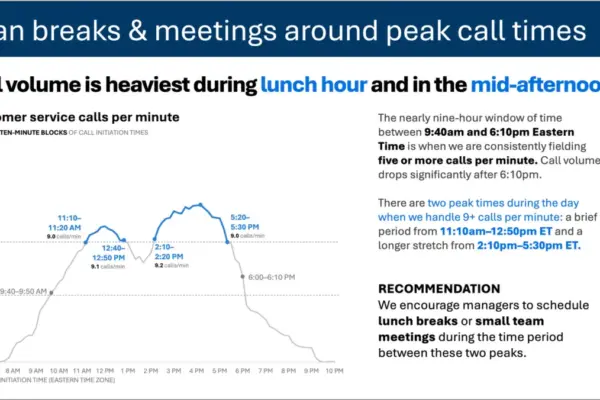
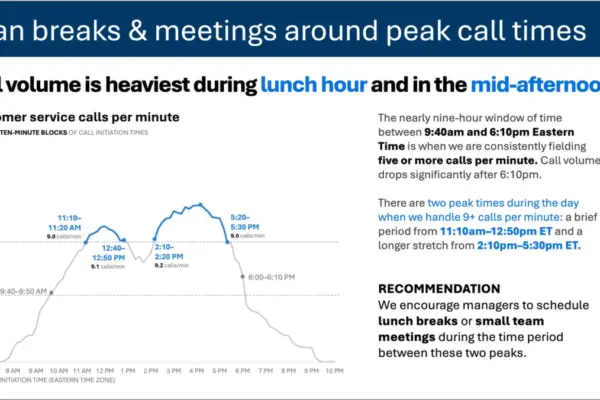
Whether generated by standard charting tools or advanced artificial intelligence models, the initial version of a graph or slide is rarely ready for a live audience. Initial drafts typically require significant decluttering, focused attention, and the addition of meaningful language. A graph lacking a clear takeaway title forces an audience to guess at the core message, while a slide overcrowded with data makes viewers work far too hard to understand the underlying insights. Getting this step right ultimately separates presentations that merely inform from those that successfully move people to action.
Working with AI: Designing Effective Graphs and Slides
Rather than building every slide completely from scratch, professionals can now describe what they need, share their raw data, and instruct AI to produce a polished first version to react to. While the initial output will rarely be flawless, it serves as an immediate starting point. Reaching that baseline in a matter of minutes rather than hours fundamentally changes what is possible in a corporate workflow.
This approach relies on AI integrated directly into PowerPoint, ensuring that the final output consists of fully editable native slides rather than static images. This distinction is critical for creators who are no longer just evaluating prototypes, but actively building the real thing with AI assisting in-place refinement.
To achieve optimal results, experts recommend sharing a specialized foundational document—such as the SWD + AI primer—with the AI tool before beginning design work. Providing this free PDF resource grounds the AI in established data visualization principles, yielding noticeably better outcomes than prompting without prior context.
Core Principles of Visual Design
Effective graph and slide design ultimately comes down to four essential principles: removing what does not belong, creating visual order through strict alignment, directing attention to critical data points, and using precise words to make the underlying message unmistakable.
Every element added to a graph or slide inevitably contributes to cognitive load, which is the mental effort an audience must expend to process what they see. Anything failing to add informative value constitutes clutter, making visuals feel far more complicated than they actually are. The goal is not minimalism for its own sake, but rather the reduction of extraneous details so that essential insights can stand out. In practice, this often means removing unnecessary chart borders, default gridlines, redundant labels, and distracting tick marks that charting tools add automatically.
Consistent alignment is equally vital for establishing an invisible visual structure. When elements are misaligned—such as text starting at irregular points or graphs floating at inconsistent positions—a slide feels inherently disjointed, even if viewers cannot immediately articulate why. Thoughtful design fades gracefully into the background, whereas poor alignment places an unnecessary burden on the audience.
Even a clean and well-aligned visual still leaves viewers to decide for themselves what matters most. Creators must actively guide audience attention through the strategic, sparing use of color, size, position, and contrast. When everything on a page features a different color or tone, nothing stands out; however, highlighting a single element against a neutral field immediately draws the eye.
Finally, even the finest graph requires careful use of text to contextualize its points. Every graph needs a descriptive title outlining what is being shown, while every slide requires a takeaway sentence that answers the "so what?" question before the audience has to ask it.
Practical Implementation and Organizational Standards
Before applying these design principles, professionals must ensure they are working within their organization’s established visual identity, including standard templates, corporate fonts, and brand colors. These guidelines are not merely aesthetic choices; they signal credibility and consistency to stakeholders.
The modern workflow encourages professionals to bring a draft slide to their AI tool, outline the target audience, state the primary takeaway in a single sentence, and specify how the material will be used. By combining clear human intent with AI-assisted drafting, creators can quickly generate clean, structured, and on-message presentations, leaving final human judgment to handle the nuanced adjustments of color, emphasis, and wording that turn a good slide into a great one.