When a company faces an expected staffing shortfall, bringing the metric to leadership’s attention is a critical first step in organizational planning. However, a high-level forecast alone rarely tells executive leaders where the gap originates or how the deficit has evolved across different sectors of the workforce. When analysts and communication teams are tasked with explaining these complex operational dynamics, they frequently encounter a powerful temptation: the urge to squeeze every available detail, trend line, and granular breakdown into a single, comprehensive chart.
This exact challenge recently surfaced during a custom client workshop hosted by Storytelling with Data, where an organizational team struggled to communicate a multifaceted workforce challenge. The team needed to convey three distinct pieces of critical information simultaneously: that full-time equivalent (FTE) staffing levels were expected to fall significantly below the established plan, that a noticeable decline in operations support roles was driving a major portion of the deficit, and that corporate leadership needed to initiate an immediate discussion to determine an effective strategy for closing the gap.
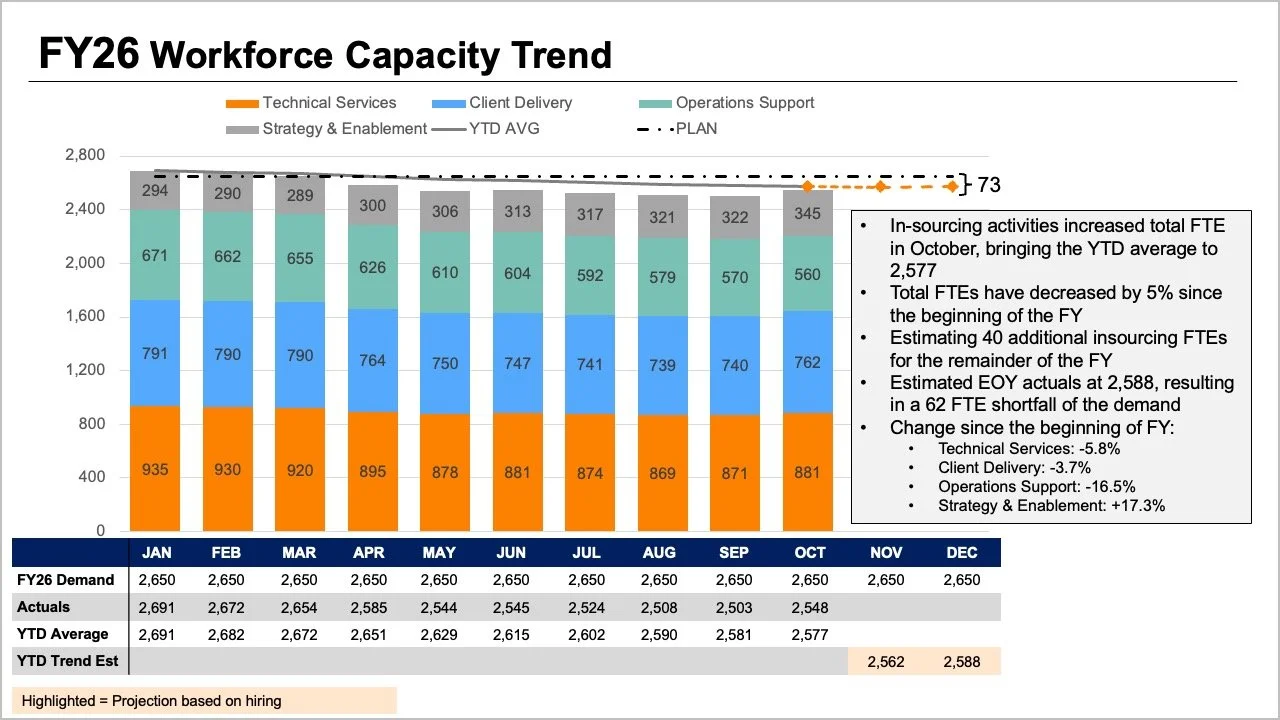
While all the necessary data points were present in their initial reporting materials, the core narrative was effectively buried beneath layers of visual complexity. The original slide asked readers to process a multitude of competing elements at the very same time. The tops of stacked bars, overlapping trend lines, and an accompanying data table all attempted to display overall FTE figures in different formats, while internal bar segments revealed role-level breakdowns. Furthermore, layers of information comparing the official plan, actual performance figures, year-to-date averages, and forward-looking projections created an overwhelming cognitive load for anyone trying to interpret the slide.

Untangling the Visual Clutter for Executive Leadership
Each individual element included in the original presentation answered a reasonable analytical question, but when crammed together into a single graphic, they made it exceptionally difficult for stakeholders to answer any single question well. Recognizing this common pitfall requires taking a step back to evaluate what executive leadership genuinely requires for the strategic conversations ahead. Corporate decision-makers generally need answers to two fundamental questions: How large of a staffing shortfall should the organization anticipate, and what do the most recent workforce data reveal about where these changes have actually occurred?
Rather than continuing to pack every available metric into one overburdened graph, data communication specialists recommend splitting the information into two distinct views, dedicating one targeted visual to each core question.
Utilizing a Line Chart for the Overall Trend
Addressing the anticipated shortfall first requires a clean, uncluttered visual. A standalone line chart makes it considerably easier for leadership to observe how overall staffing has tracked against the strategic plan established at the beginning of the fiscal year, as well as how current projections compare to that trajectory moving forward.
This simplified view also provides ample physical space on the slide to incorporate targeted annotations at critical inflection points. Instead of spending cognitive energy decoding complex role mixes or scanning dense data tables, readers can immediately focus their attention on the expected gap between the actual forecast and the original plan.
Introducing a Second View for Role-Level Breakdowns
Once the overall macroeconomic trend establishes the expected variance from the annual target, analysts can turn their attention to role-level changes within the actual data to help illuminate where the largest shifts have taken place.
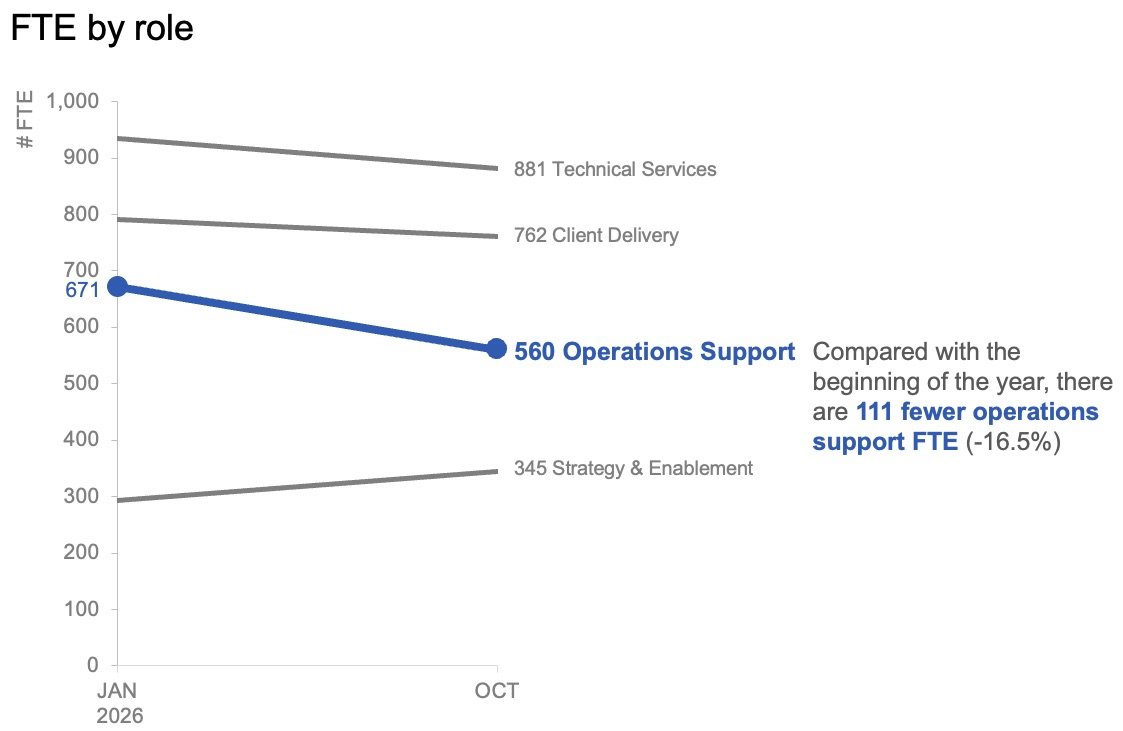
In this phase of the analysis, granular month-to-month variations matter significantly less than the overarching direction of specific departments. By plotting only the figures from the start of the year alongside the latest actual month using a slopegraph, presenters can provide their audience with an immediate sense of which job roles have experienced the most substantial changes. Applying color and explanatory text with restraint helps naturally draw the audience’s eye toward the prominent decline in operations support roles, ensuring decision-makers quickly spot the most significant operational variance.
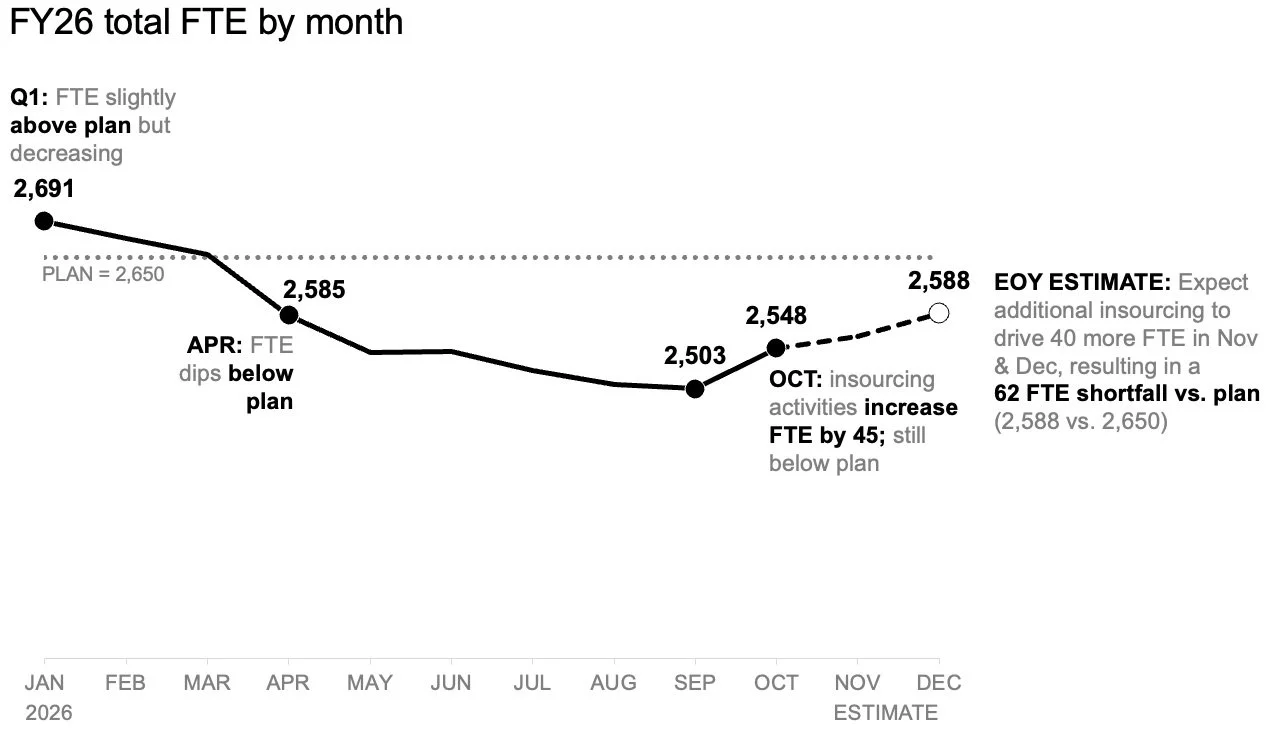
Together, these two visuals function seamlessly as a cohesive pair. The initial line chart effectively answers the macro-level question of what is happening overall, while the subsequent slopegraph addresses the micro-level inquiry regarding which specific roles have shifted most dramatically up to that point in the fiscal year.
Planning the Delivery and Narrative Flow
When preparing a report that might be read asynchronously or forwarded to stakeholders without a live presenter present, both analytical views can be placed together within a single unified layout. A clear, takeaway-driven slide title can state the magnitude of the expected shortfall directly, while concise supporting text points directly to the decline in operations support roles and signals the urgent need for leadership to discuss remediation strategies. In this format, the charts provide robust, undeniable evidence without competing against one another for visual space.
For live presentations, however, the exact same underlying data can be leveraged in a completely different sequence. Rather than demanding that an audience absorb an entire analytical summary all at once while a speaker talks over the slide, presenters can walk through the overall macro forecast first. They can then reveal the actual role-level changes piecewise, and finally steer the collaborative discussion toward necessary next steps. This paced sequence allows the audience to fully absorb one critical insight before transitioning smoothly to the next.
The underlying data and the core message remain entirely identical in both scenarios; the only variable that shifts is the pacing and the volume of information the audience is asked to process at any given moment.
Giving Each Analytical Question Its Own Visual Space
When complex organizational situations demand high levels of detail, professionals routinely fall into the trap of consolidating everything into a single, monolithic view. While this approach can superficially feel efficient, empirical communication principles demonstrate that simply adding more information to a single graphic does not automatically generate greater understanding.
By separating the overarching FTE trend from the granular, role-level changes in this specific corporate makeover, both distinct insights become instantly clear and actionable. Working in tandem, these two streamlined charts forge a focused, compelling narrative that empowers leadership to make informed, strategic decisions.