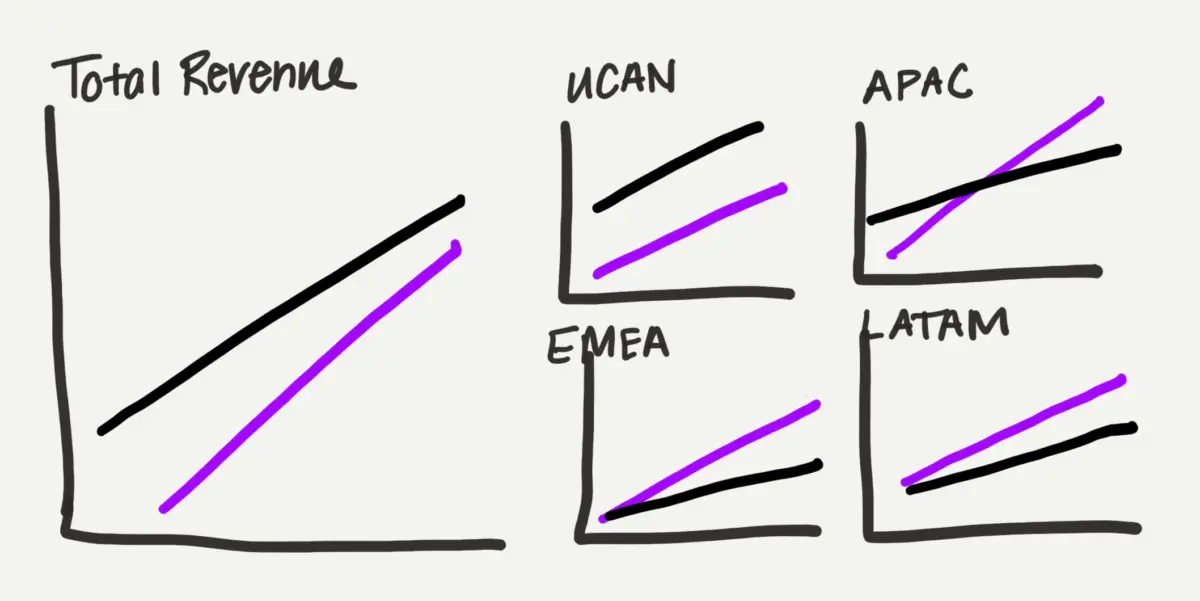
As professionals across industries continue to navigate the real-world experiment of artificial intelligence in the workplace, many are finding themselves daily evaluating where these emerging tools genuinely help and where they simply get in the way. For data storytellers and presentation designers, a central question continually surfaces: when is it actually desirable to hand tasks over to an algorithm, and when must the human stay firmly in the driver’s seat?
The data storytelling process involves numerous micro-tasks, some of which practitioners genuinely enjoy. Tinkering with alignment, adjusting color palettes, and sketching rough layout ideas before committing to a final format can feel like creative play. While these steps might occasionally seem like unnecessary friction, they almost always trigger new insights and lead to a more refined final output. By contrast, building complex charts from scratch or manipulating spreadsheet software to force a non-standard visual layout rarely improves analytical thinking. This mechanical execution is precisely the part many professionals would gladly delegate, provided they maintain ultimate control over the final design. Every minute saved from manually plotting chart elements represents another minute that can be dedicated to analyzing the underlying narrative and structural design.
Rather than looking for artificial intelligence to completely redesign a complex slide autonomously, many practitioners are open to using it to produce a solid starting point that can subsequently be refined and polished. A recent test of this collaborative approach using modern AI additions to standard presentation software has begun to shift how everyday data design workflows operate, highlighting a balanced partnership between human judgment and automated execution.

One Chart That Is Trying to Do Too Much
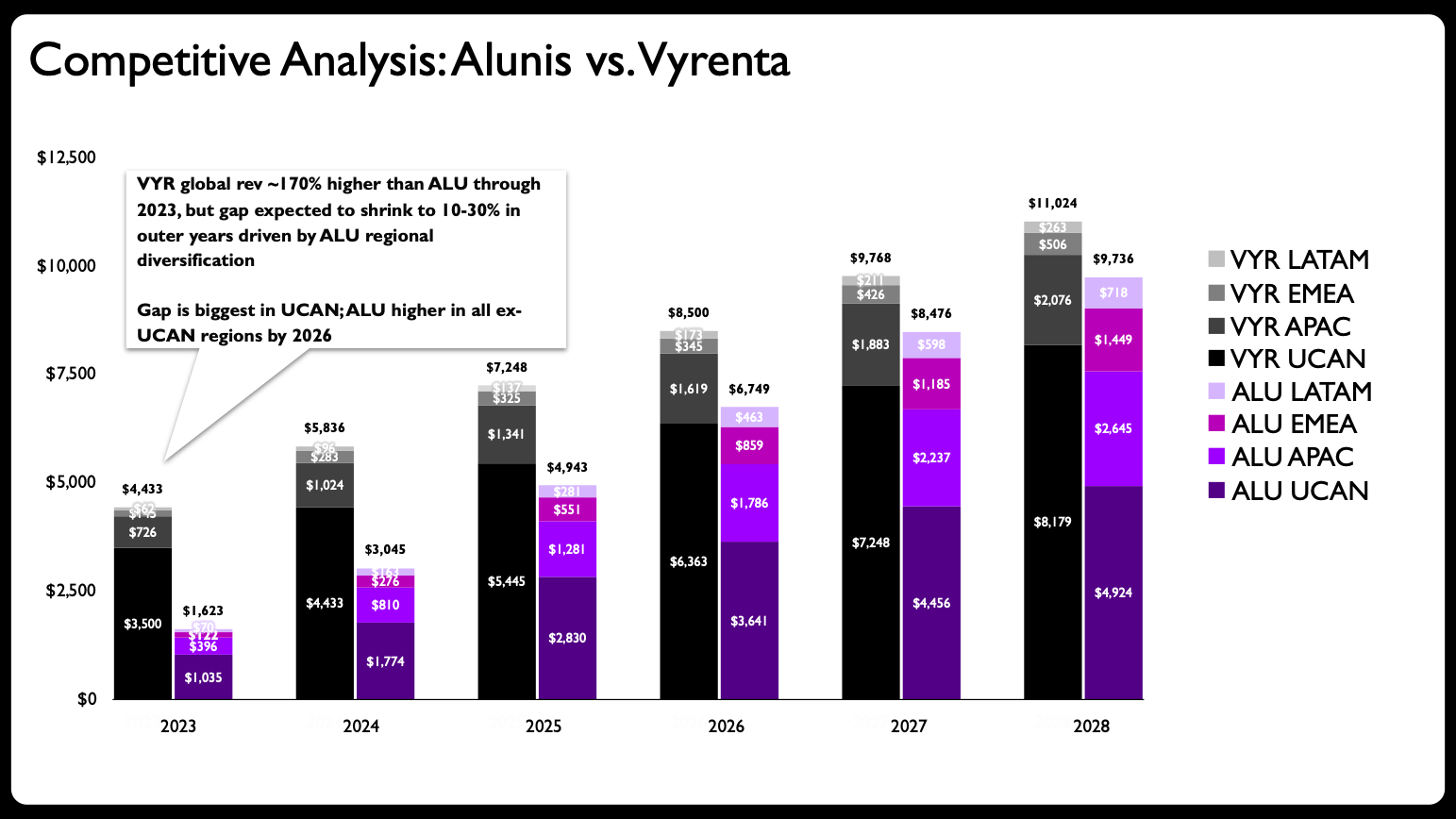
A recent client project provided the ideal testing ground for evaluating this dynamic. The initial scenario focused on a corporate case study examining how a growing company, Alunis, planned to close a significant revenue gap with its top competitor, Vyrenta, by strategically focusing on regional expansion over time.
The original slide featured a stacked bar chart mapping out these financial projections. However, a preliminary assessment of the graphic revealed a classic design flaw: the chart was simply trying to do too much at once. The visual was tasked with communicating change over time, comparing the total trajectories of two distinct companies, and simultaneously breaking down each company’s regional composition. That represents an immense amount of heavy lifting for a single visual element.
This scenario echoes a widely recognized pitfall in data visualization: adding too much information to a single graph. The standard prescription to avoid this mistake is to break a complex, overloaded graph down into multiple, digestible charts. In this case, the first step of the makeover required dividing the data into a more manageable structure, paving the way for an interesting experiment in human-AI collaboration.
Partnering with Claude
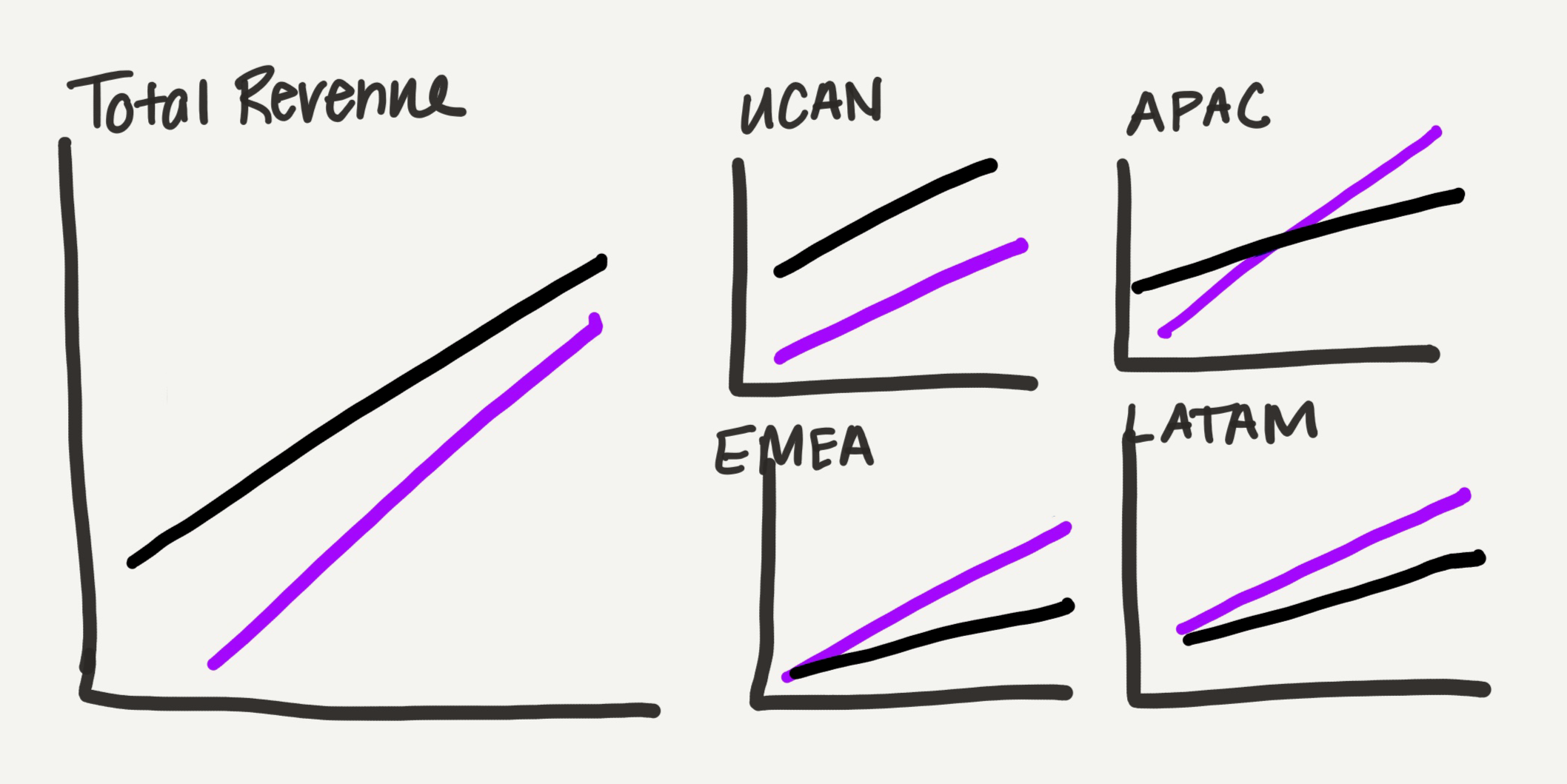
Because many designers prefer to sketch to iterate on their visual concepts, the process began with a hand-drawn draft outlining how a multi-chart layout could look.
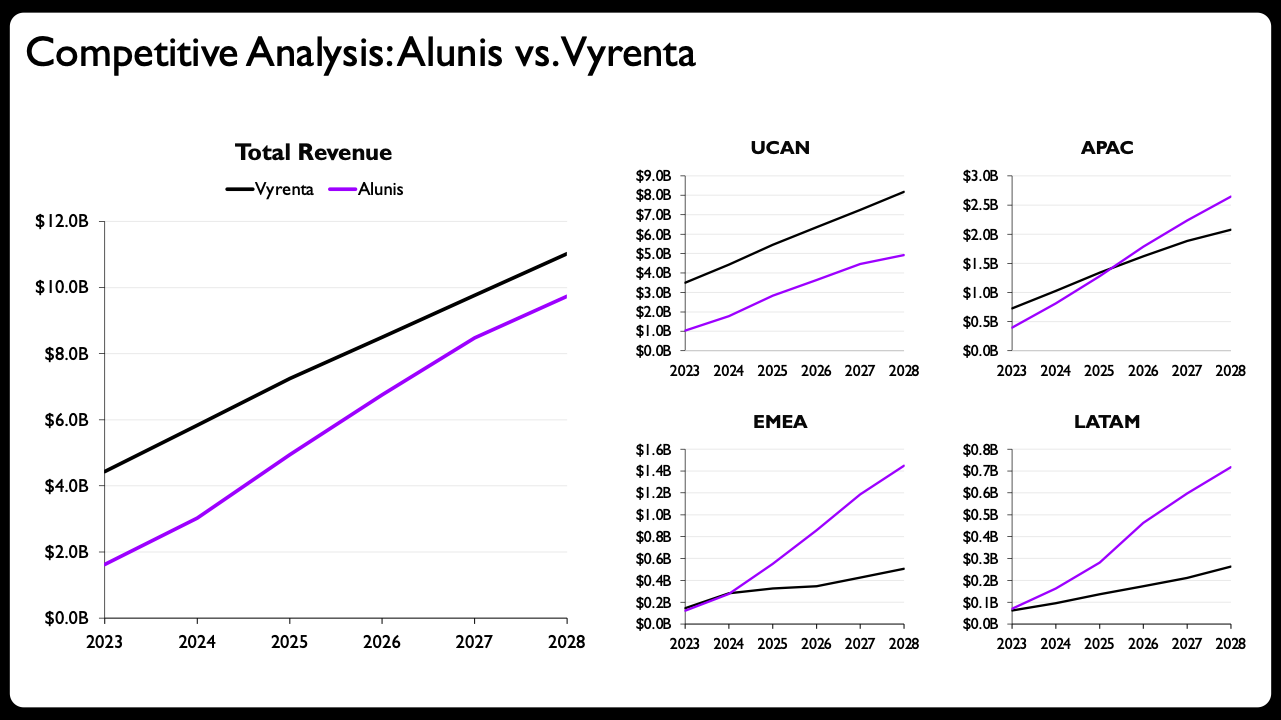
The strategy shifted away from traditional bar charts toward line charts, which possess a much lighter visual footprint—a vital advantage for a presentation slide burdened with substantial data. The graphs were systematically divided by location, allocating one prominent view for total revenue and separate views for each geographic region. Rather than sizing every chart uniformly, the total view was rendered larger, while the four regional charts were arranged into a compact grid occupying roughly the same total footprint as the primary chart. This deliberate arrangement serves as a subtle, intuitive way to visualize the part-to-whole nature of the underlying financial data.
In a traditional workflow prior to the advent of advanced generative tools, creating each of these individual graphs manually within presentation software like Microsoft PowerPoint would demand a considerable investment of time, patience, and mental energy.
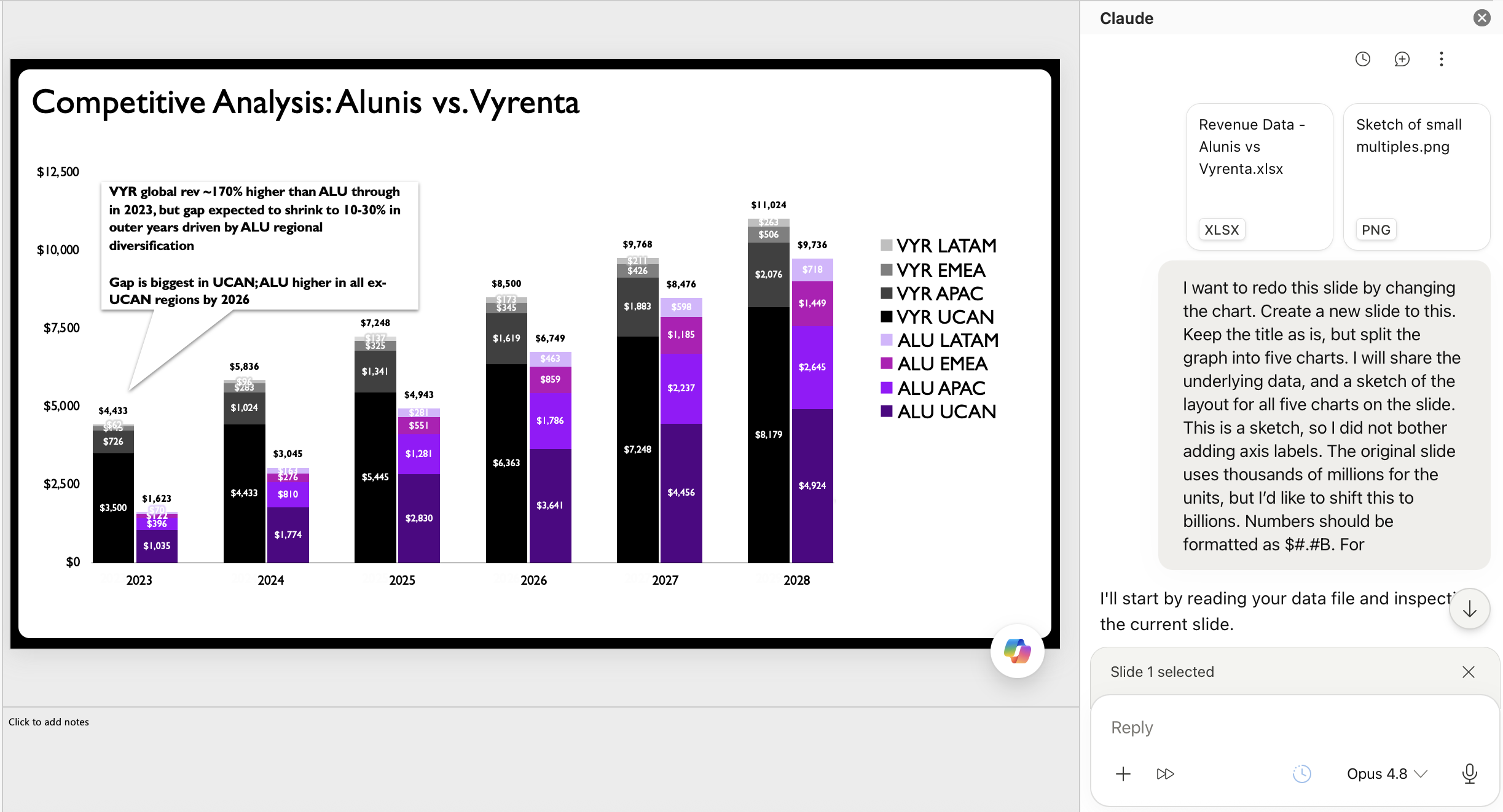
For this project, the designer instead shared the hand-drawn sketch and raw data directly with Claude, utilizing a specialized PowerPoint add-in. While various artificial intelligence assistants exist across the software landscape, add-ins that generate editable charts natively within presentation software offer a distinct workflow advantage. The ability to directly manipulate the underlying chart elements is what makes a true collaborative experiment possible, avoiding the limitations of static image outputs that cannot be easily tweaked.
The initial prompt provided the assistant with the raw figures and the visual layout sketch. The resulting output proved to be a marked improvement over the original stacked bar layout, translating the conceptual sketch into a structured multi-panel format with real axes, labels, and properly plotted trends.
While generating a clean multi-chart layout using an AI assistant is often considered sufficient by many general business users, experienced data designers understand that a few targeted refinements can elevate a slide from adequate to exceptional.
The Value That Humans Bring
A thorough review of the AI-generated draft highlights several crucial interventions that demonstrate the irreplaceable value of human oversight in data visualization.
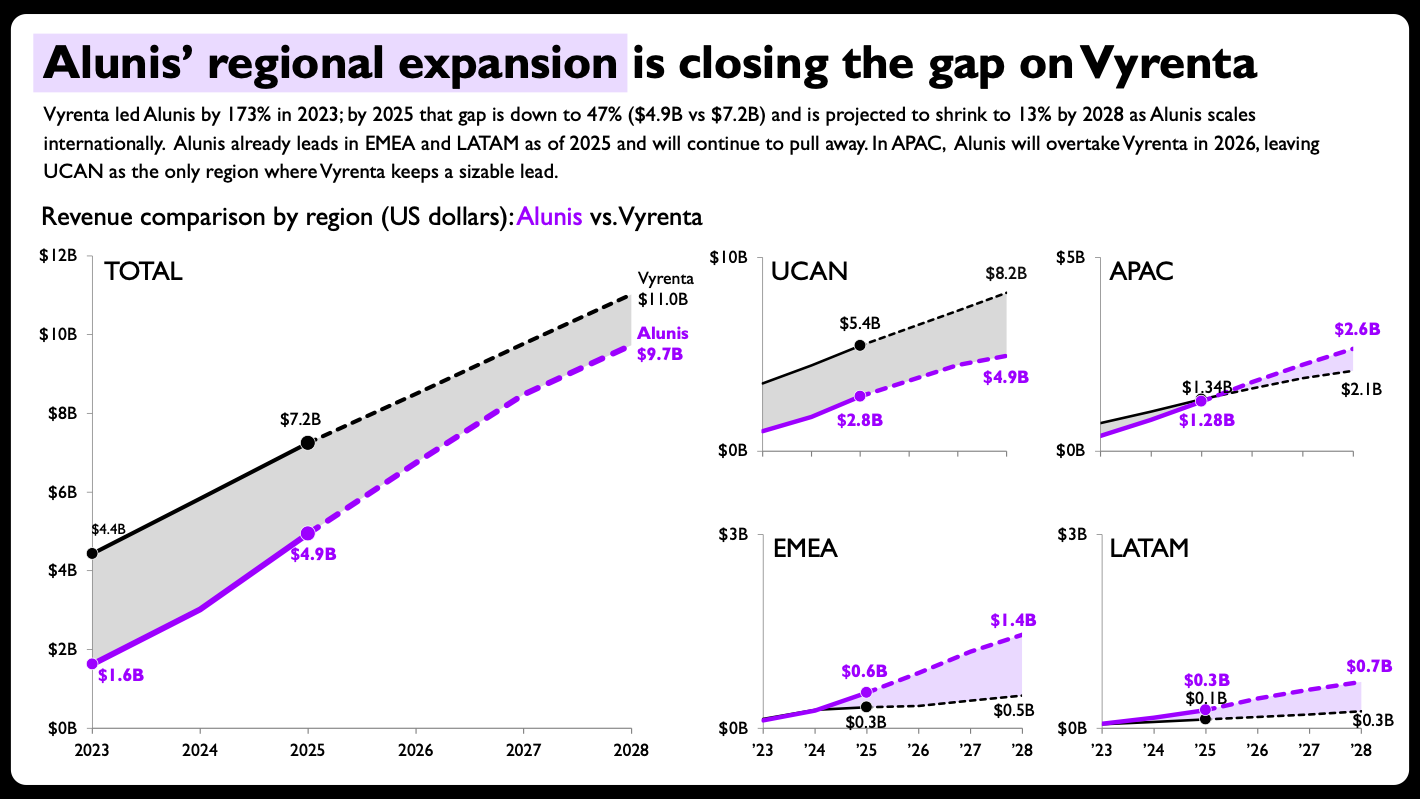
First, the design was enhanced by incorporating subtle shaded areas between competing lines to emphasize the revenue gap and its trajectory over time. Second, direct end-of-line labels with exact values were added to eliminate the need for eye-tracking across a traditional legend, improving immediate readability. Third, the per-panel axis ranges were carefully scaled to suit each individual region rather than enforcing a rigid, uniform scale that might obscure local nuances. Fourth, solid versus dashed lines were implemented to clearly separate historical actuals from future financial projections. Finally, compact year formatting was applied to the smaller regional panels to reduce visual clutter.
These adjustments resulted in a final design that not only clearly communicates the business narrative but also preserves analytical integrity. The success of this redesign underscores a broader takeaway regarding the evolving relationship between human practitioners and artificial intelligence.
Historically, a major hurdle for data practitioners attempting to use automated tools was that AI-generated charts were typically output as static images. Inaccuracies in image processing often made those outputs unusable without complete manual recreation, diminishing their practical value. Now that modern AI tools are capable of generating solid, editable charts directly inside standard workplace software, they have finally matured into genuinely useful additions to the data storytelling workflow.
The implications of this shift extend well beyond experienced presentation designers. For individuals who are new to data storytelling or who feel uncertain about how to construct a specific type of chart, AI tools can significantly lower the initial learning curve, helping them bridge the gap between concept and execution.
However, automation does not eliminate the necessity of understanding the foundational principles that govern effective data communication. Throughout this AI-assisted makeover, the human designer still had to recognize that a stacked bar chart was fundamentally ill-suited for the dataset and understand why. The designer still had to determine the optimal layout for multiple charts on a single slide and decide whether breaking conventional rules—such as maintaining consistent axis scales across panels—served a legitimate analytical purpose. The human remained firmly in control of the strategic and aesthetic direction.
Ultimately, this dynamic highlights the division of labor shaping modern professional workflows. Human practitioners provide critical judgment, contextual understanding, and narrative direction, while artificial intelligence accelerates the mechanical execution of building the baseline assets. For many professionals navigating the modern data landscape, combining human insight with rapid AI execution offers a practical path forward for effective workplace communication.