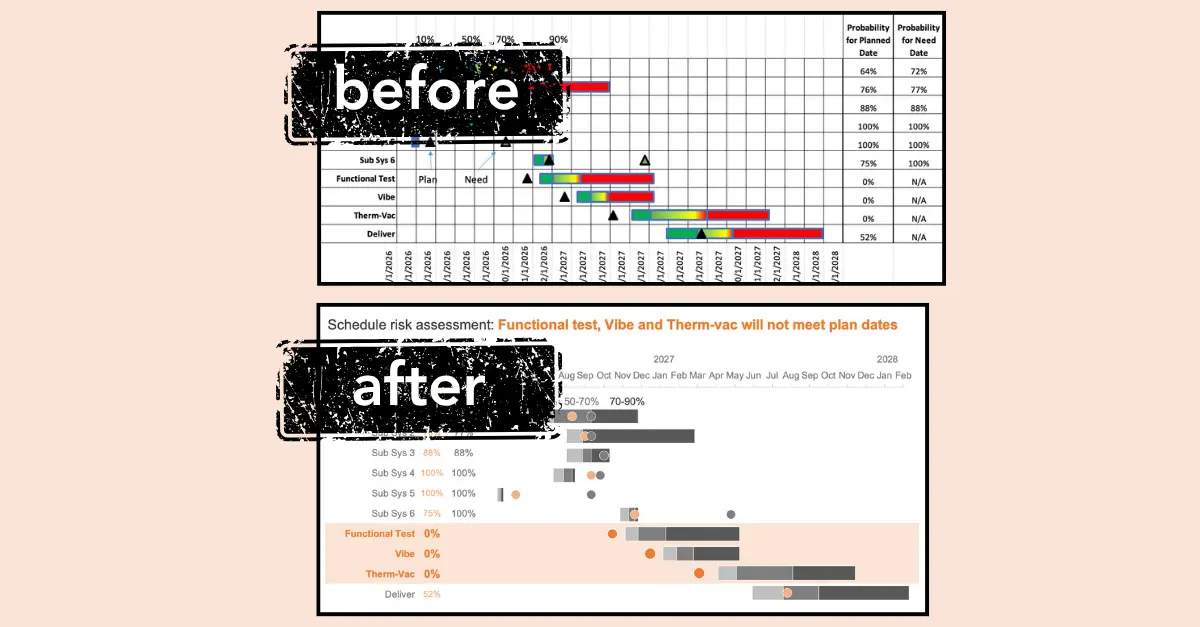
Gantt charts have long remained a staple of project management, serving as the go-to visual tool for illustrating the start times, durations, and overlapping dependencies of various events within a complex workflow. Yet, while these timelines are indispensable for mapping out a project’s lifecycle, they notoriously suffer from a critical design flaw: they can quickly become overwhelmingly busy, dense, and difficult to interpret when applied to intricate operational schedules.
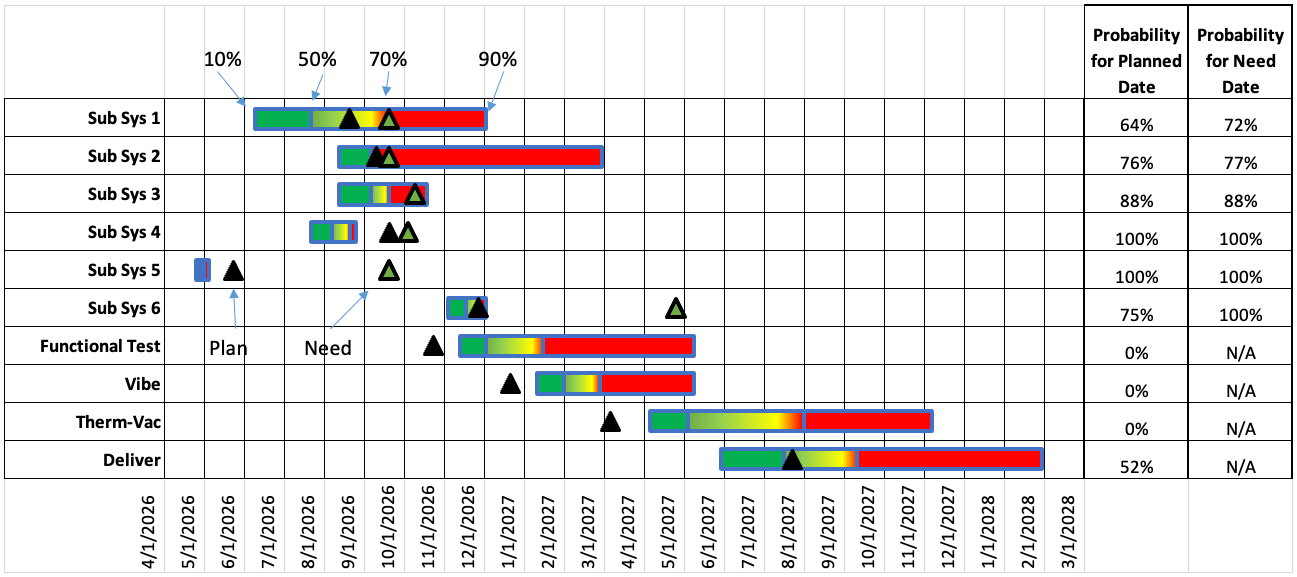
To understand the magnitude of this common visualization hurdle, it is helpful to examine a concrete example. Consider a standard project schedule integrated with risk assessments, which maps out probability distributions for each individual activity of interest. In these legacy charts, the colors assigned to horizontal bars typically represent the statistical likelihood of completion. For instance, segments shaded in green toward the left side of the chart denote optimistic timing, usually representing a 10 to 50 percent probability of finishing early. Conversely, portions shaded in red indicate later, more statistically likely completion dates, often hovering in the 70 to 90 percent range.

Adding to the complexity, these charts often feature supplementary markers. Black triangles frequently represent the planned date—the scheduled target for each activity listed along the left-hand axis—while green triangles designate the need date, which is the absolute deadline required to maintain on-time delivery. Furthermore, a companion data table is often appended to the right side of the visualization, listing the precise mathematical probability of meeting each milestone. While this approach packs a wealth of information into a single screen, it simultaneously introduces an immense amount of visual noise.
When viewers are confronted with such dense informational displays, a significant portion of their cognitive effort is squandered simply decoding the chart’s structure rather than engaging with the actual insights it is meant to convey. This friction becomes especially problematic when a project team needs to rapidly identify focal points to ensure a delivery target is met. For example, if a schedule reveals that specific workstreams—such as Functional Test, Vibe, and Therm-Vac—possess zero chance of achieving on-time completion under current conditions, stakeholders must recognize this instantly to deploy corrective actions. Achieving this level of clarity requires intentional, thoughtful design changes that strip away extraneous noise and elevate the core message.
Reduce clutter
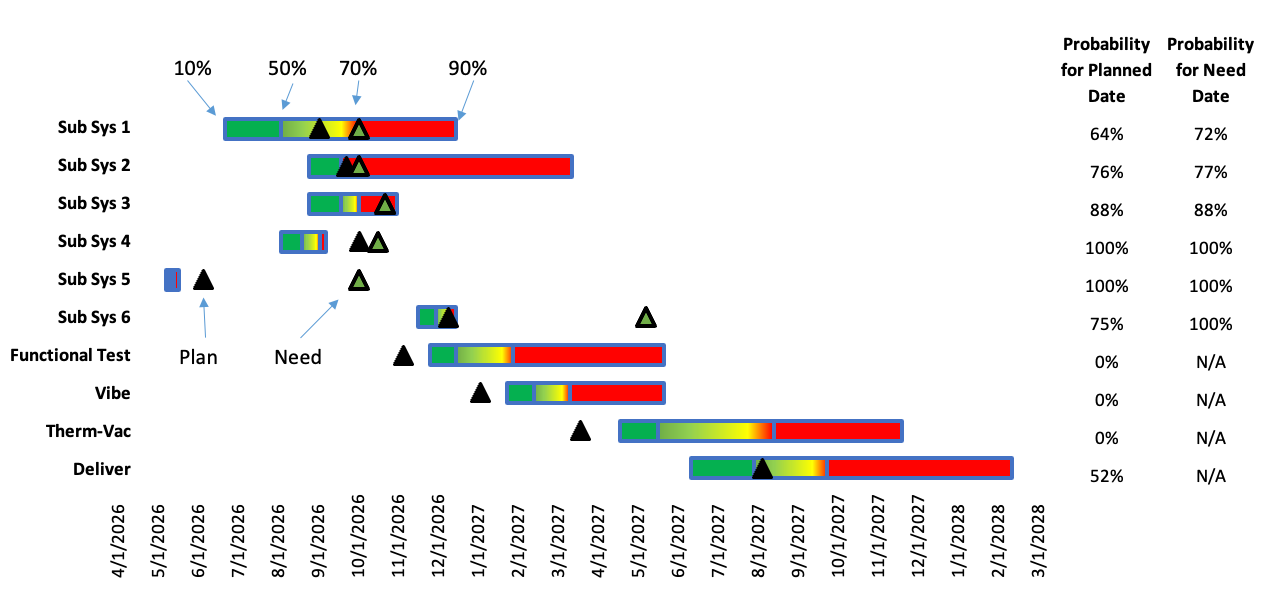
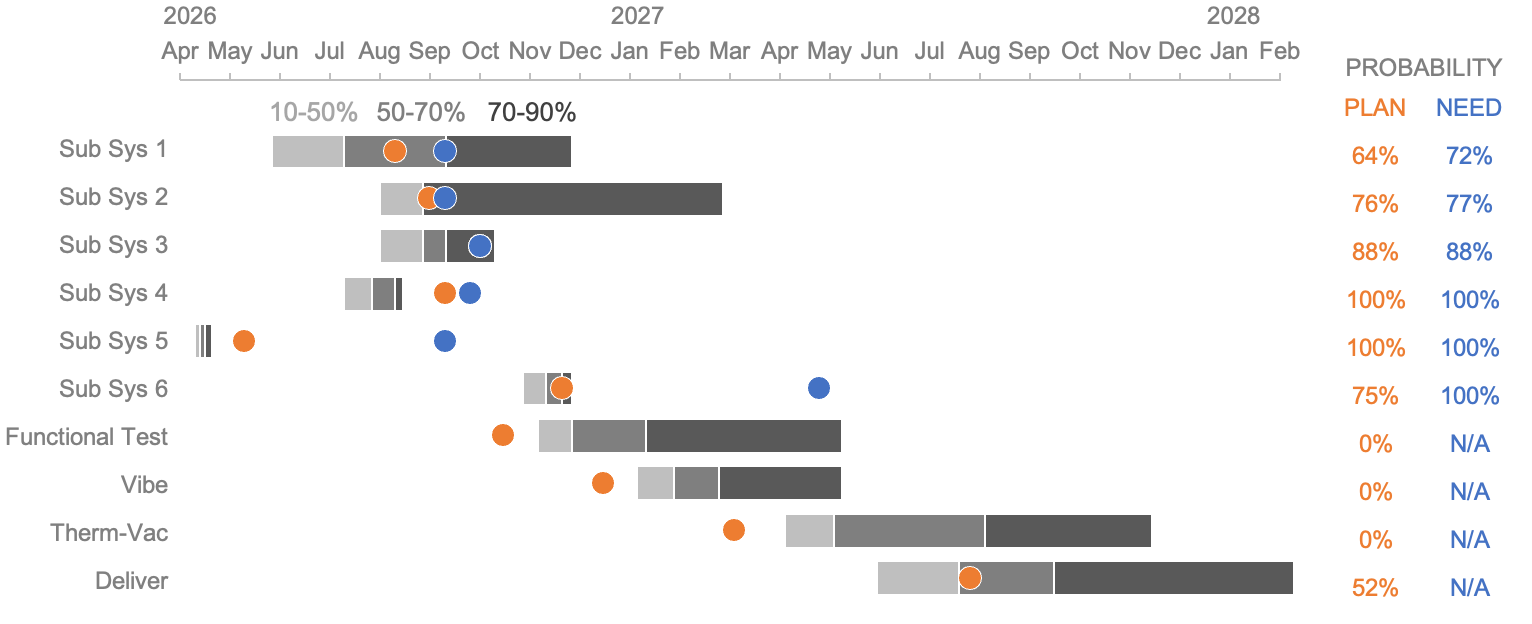
The baseline design of a typical project schedule often suffers from structural overload, featuring numerous gridlines that contribute heavily to a cluttered aesthetic. Removing these persistent background lines is frequently the quickest and most effective way to begin bringing pertinent information to the foreground.
When borders and gridlines are minimized, a natural contrast emerges between the background canvas and the underlying data. This subtle shift allows the horizontal duration bars and milestone dates to stand out more clearly, easing the visual burden on the viewer.
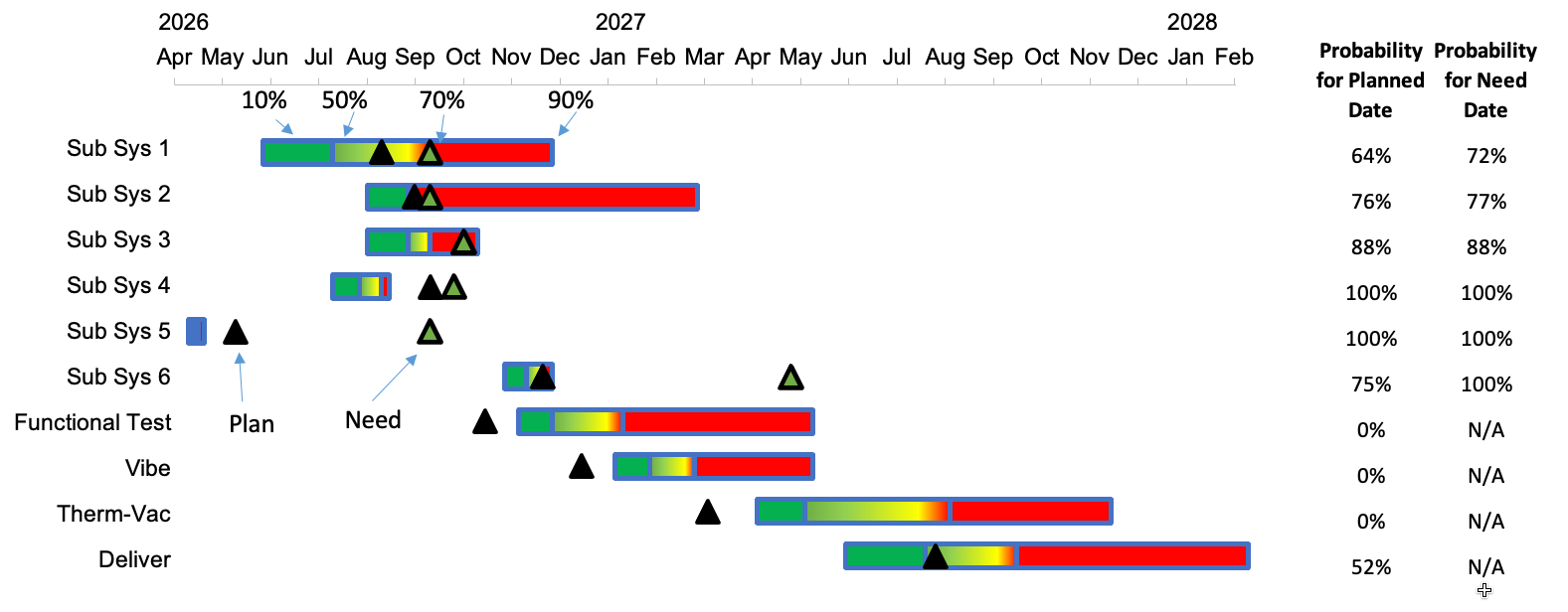
Beyond structural gridlines, another crucial element in enhancing information consumption is the deliberate reevaluation of data ordering and spatial alignment. In many traditional layouts, date axes are positioned awkwardly at the bottom of the visualization. Because of standard reading patterns, this means timeframes are frequently the last piece of information processed by the audience. Given that chronological progression is the very backbone of any project timeline, dates deserve a far more prominent position at the top of the chart where they can be observed immediately.
Relocating the dates to the upper section of the visualization ensures they are encountered first during visual scanning. Furthermore, simplifying date formats along this axis unlocks additional design improvements, such as rotating text horizontally. This simple adjustment makes timestamps significantly quicker and easier to read at a glance.
Once structural clutter is addressed, attention must shift to the color palette employed within the chart. Traditional visualizations frequently rely on a standard green, yellow, and red gradient to communicate status. However, this particular combination can create severe readability hurdles for individuals with color vision deficiencies, effectively obscuring critical intelligence from key team members.
Transitioning to a color palette that utilizes neutral shades of gray for standard activity bars effectively eliminates the visual noise generated by multiple competing bright colors. This restraint allows the viewer to focus entirely on the core timeline and task durations without distraction. For milestones, substituting the traditional scheme with more accessible hues—such as blue and orange—ensures they distinctively command attention. Additionally, opting for smooth circle markers instead of sharp, pointy triangles creates a visually softer interface that feels less alarming while maintaining clear demarcation. Harmonizing the design by applying the exact color used for the circular milestone icons to the corresponding probabilities listed in the data table helps to visually bind related pieces of information together.
Focus attention
With the overall chart successfully decluttered and optimized for accessibility, the next objective is to actively guide viewers toward the insights that matter most. Effective data visualization relies on intentional focus techniques to ensure critical takeaways are instantly recognizable rather than buried in the details.
In the case of the troubled project schedule, the most urgent revelation is that the Functional Test, Vibe, and Therm-Vac workstreams currently exhibit a zero percent probability of being completed on time. A straightforward and highly effective method for communicating this immediately is the integration of a clear, descriptive takeaway title placed directly at the top of the chart. Instead of forcing the audience to deduce the problem from raw data, this headline explicitly states the primary message the presenter intends to convey.
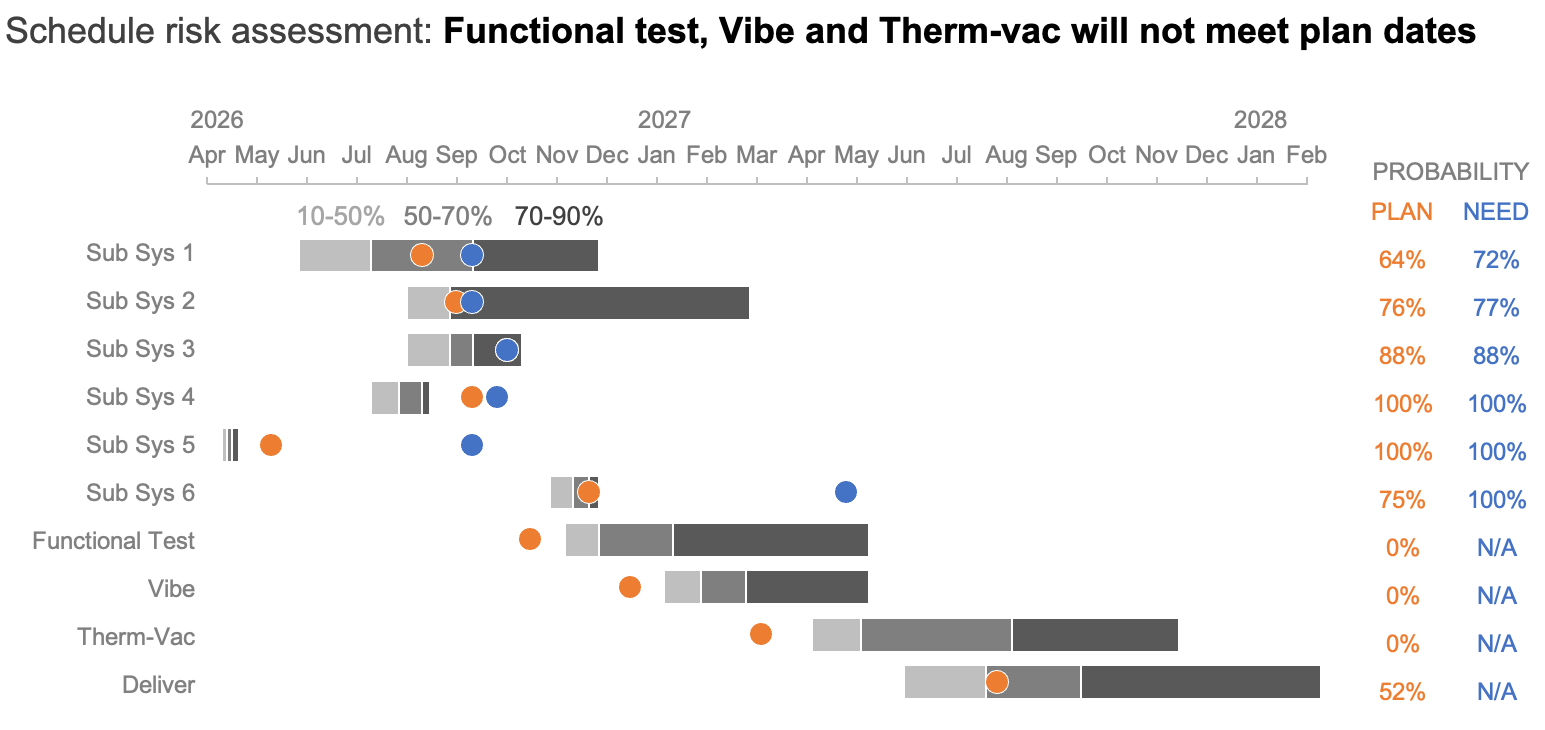
The addition of this contextual text establishes a direct narrative anchor for the viewer. However, to maximize its impact, corresponding adjustments must be made within the graphical body of the chart itself, ensuring that visual elements directly reinforce the written message.
Achieving this synergy involves introducing targeted visual cues. For example, applying a soft, light orange band that spans horizontally across the specific tasks named in the headline instantly draws the eye directly to the vulnerable workstreams. Sparing use of color can be employed to highlight plan dates—especially where need dates are absent—while a deeper intensity of color can be reserved to spotlight projections set to miss their scheduled targets.
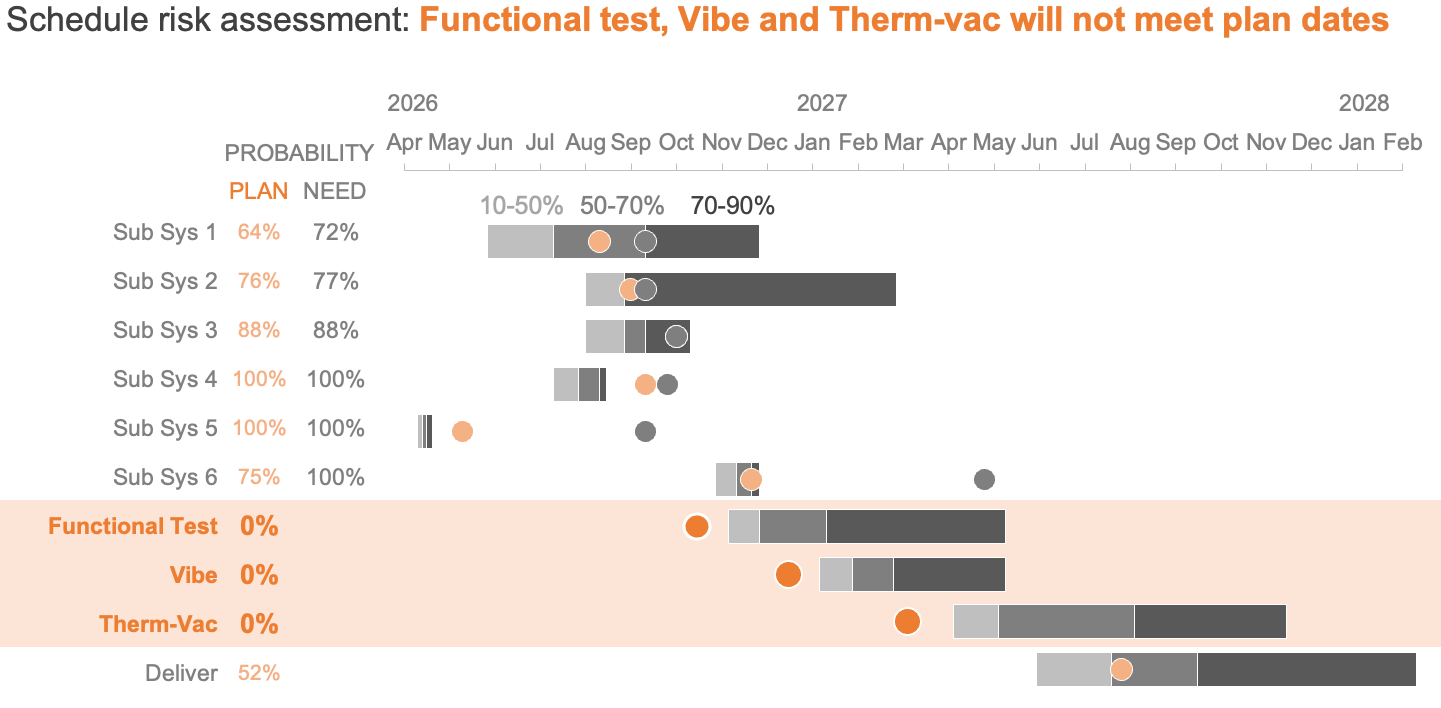
Further structural refinements can significantly accelerate comprehension. Moving the probability columns for plan and need dates to the left side of the data arrangement places them in the natural line of sight, making them much quicker to locate. Finally, applying bold formatting to critical task names and zero-percent probability values elevates their prominence, ensuring that catastrophic schedule risks cannot be overlooked.
Through a disciplined application of decluttering strategies, thoughtful color theory, and intentional focal techniques, even the most complex Gantt charts can be transformed into clear, actionable narratives. By removing visual friction and directing audience attention precisely where it is needed, project managers can foster faster decision-making and secure a far deeper, unhindered understanding of schedule risks across the entire team.