"I don’t have a design eye."
Kaitlin utters this phrase with a casual, matter-of-fact certainty, as if referring to an immutable physical trait like her height or the city where she grew up. As an education and outreach specialist at storytelling with data, Kaitlin is known across her team for being fiercely passionate, highly creative, and deeply dedicated to her daily responsibilities. Her primary focus at the moment centers on raising public awareness for the organization’s children’s book, Daphne Draws Data. Yet, she readily boxes herself into a category where she feels entirely unequipped: she is, by her own admission, not a designer.
This self-assessment, common among professionals who work primarily with numbers, words, or administrative tasks rather than visual arts, has sparked a broader conversation within the organization. Working closely alongside her, colleagues have begun noticing steady, tangible progress. There is a more intentional selection of color choices appearing in her projects, cleaner font selections taking the place of generic standbys, and a rapidly developing awareness of how her creative outputs will actually be received and utilized in the real world.
This observation naturally prompts a compelling and widely debated question: Can design actually be taught to those who feel they possess no innate talent for it?
The prevailing perspective from seasoned visual communicators is an unequivocal yes, though it comes with a vital caveat. Individuals approach the realm of design with vastly different starting points. Some naturally possess an acute, innate sensitivity to visual harmony—an instinctive ability to recognize when an element looks out of alignment or aesthetically unsettled long before they can articulate the technical reason why. Others must exert considerably more effort to cultivate that same visual instinct from scratch.

Yet, extensive professional experience demonstrates a consistent truth: everyone has the capacity to improve. The functional gap separating a beginner’s starting point from a high level of competency is rarely a matter of genetic predisposition. Instead, it functions primarily as a direct result of focused attention, deliberate practice, and learning precisely what visual cues to look for.
This dynamic closely mirrors long-held philosophies regarding the creation of effective graphs and visual data displays. Crafting clear, impactful visual communication is not some magical talent that people either possess at birth or entirely lack. It is a practical, learnable skill. Much like any other professional capability, it can be systematically cultivated through conscious application and repetition.
For professionals like Kaitlin—and for anyone else who has ever muttered the phrase, "I’m just not a design person"—overcoming this mental barrier begins with understanding foundational principles rather than relying on raw artistic inspiration. When breaking down how individuals can bridge the gap from hesitant beginner to intentional communicator, several core principles emerge as essential areas of study.
Start with Your Audience, Not Your Content
The foundational rule of effective visual work requires answering a critical question before opening any software program, touching a layout, or drafting an outline: Who will actually see this, and what do they genuinely need from it?
While this concept sounds deceptively obvious, creators routinely skip this initial phase. Instead, professionals frequently begin with what is immediately available to them—the raw content, an existing presentation template, or a layout recycled from a previous project—and simply work forward from there. The inevitable result is a design that serves the convenience of the creator rather than the actual needs of the audience.
Resist the Default Settings
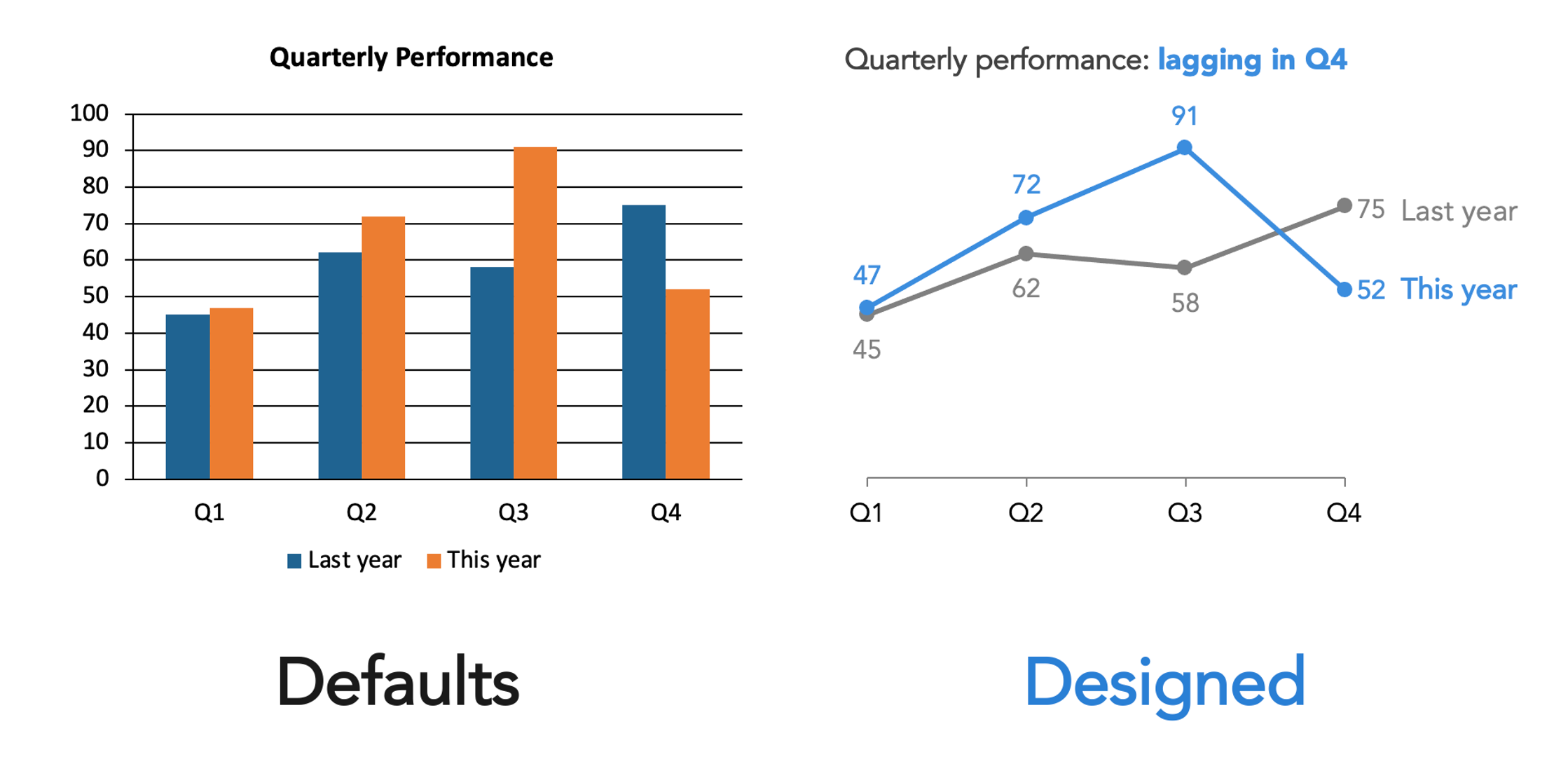
Every modern software tool used in professional environments—whether PowerPoint, Canva, Google Slides, or a digital website platform—actively makes design choices on behalf of the user. These platforms supply default fonts, predetermined color palettes, and standard layouts.
Crucially, these defaults are never truly neutral. They represent deliberate decisions made by software developers to accommodate a generic use case that almost certainly fails to align with the specific goals of an individual project. Accepting these system defaults uncritically is functionally equivalent to making an unconsidered design choice. The vital first step toward improving visual output is simply recognizing that these predetermined choices exist and actively questioning whether they truly serve the communication objective.
Constrain Your Choices
A common misconception in visual communication is that having access to more options equates to greater creative freedom. In practical application, an excess of choices typically generates unnecessary visual noise. When every font, color variation, and layout structure remains available, the final product frequently devolves into a visual cacophony where competing elements battle for attention and nothing stands out.
Implementing strict constraints provides a reliable solution. Relying on a limited color palette, committing to a single readable typeface, or sticking to a structured layout helps streamline the process. Organizations that maintain established brand guidelines or standardized templates offer a distinct advantage here, having already resolved many of these foundational decisions to ensure consistency and build audience trust. The ultimate objective is not creative restriction, but rather visual coherence. Within clear boundaries, genuine design decisions become significantly easier to execute.
Create Clear Visual Hierarchy
Every piece of visual communication forces the viewer’s eye to move across the page or screen, regardless of whether the creator intended a specific path. The central challenge lies in directing that movement with deliberate purpose rather than leaving it to chance.
Establishing a clear visual hierarchy requires answering basic structural questions: What should the viewer notice first? What represents the most critical piece of information? Making that primary element the most visually prominent establishes the initial anchor. Determining what follows in second and third place allows the creator to choreograph a clear sequence. Achieving this does not require elaborate technical wizardry; fundamental adjustments in size, visual weight, spatial position, and margins can establish hierarchy simply and effectively. Success depends on mapping out this hierarchy before placing elements onto the canvas, rather than trying to fix the flow after the fact.
Understand How Differences Signal Meaning
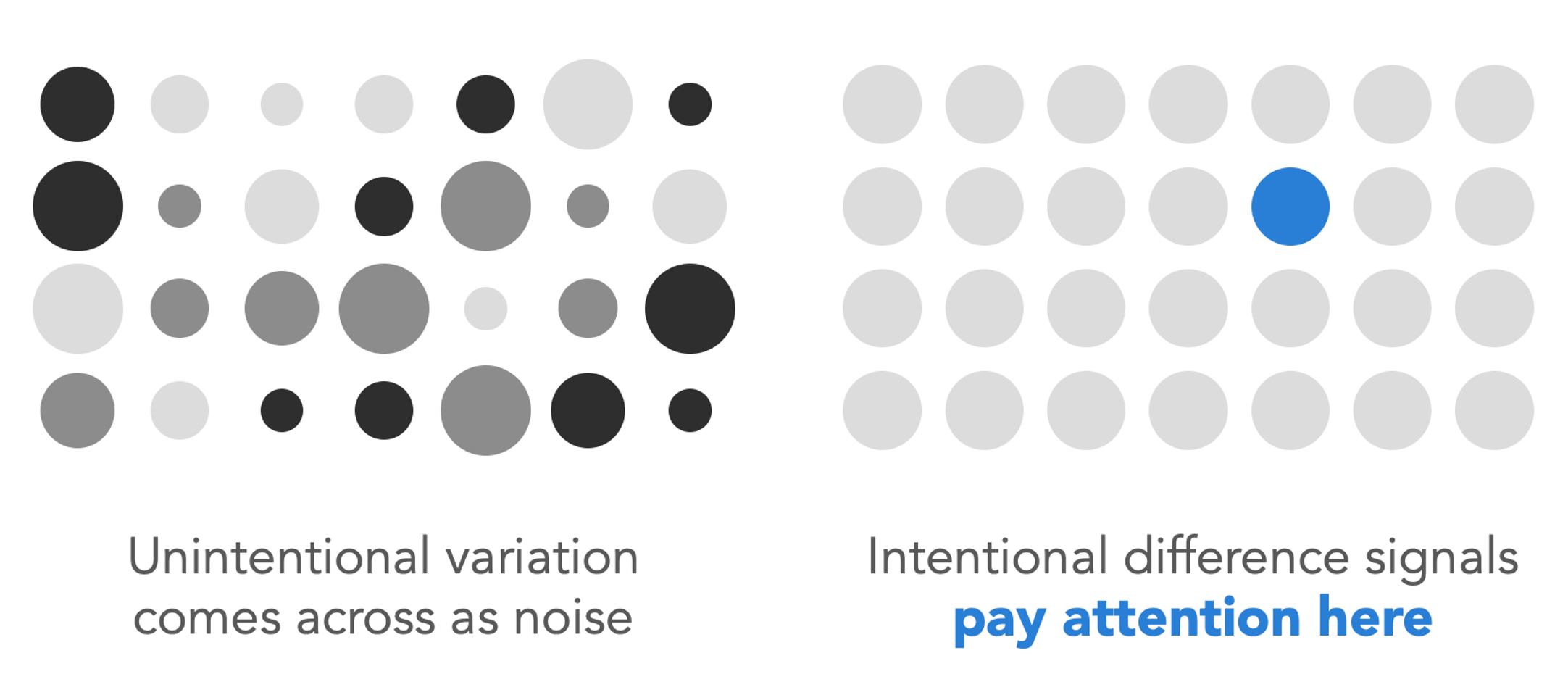
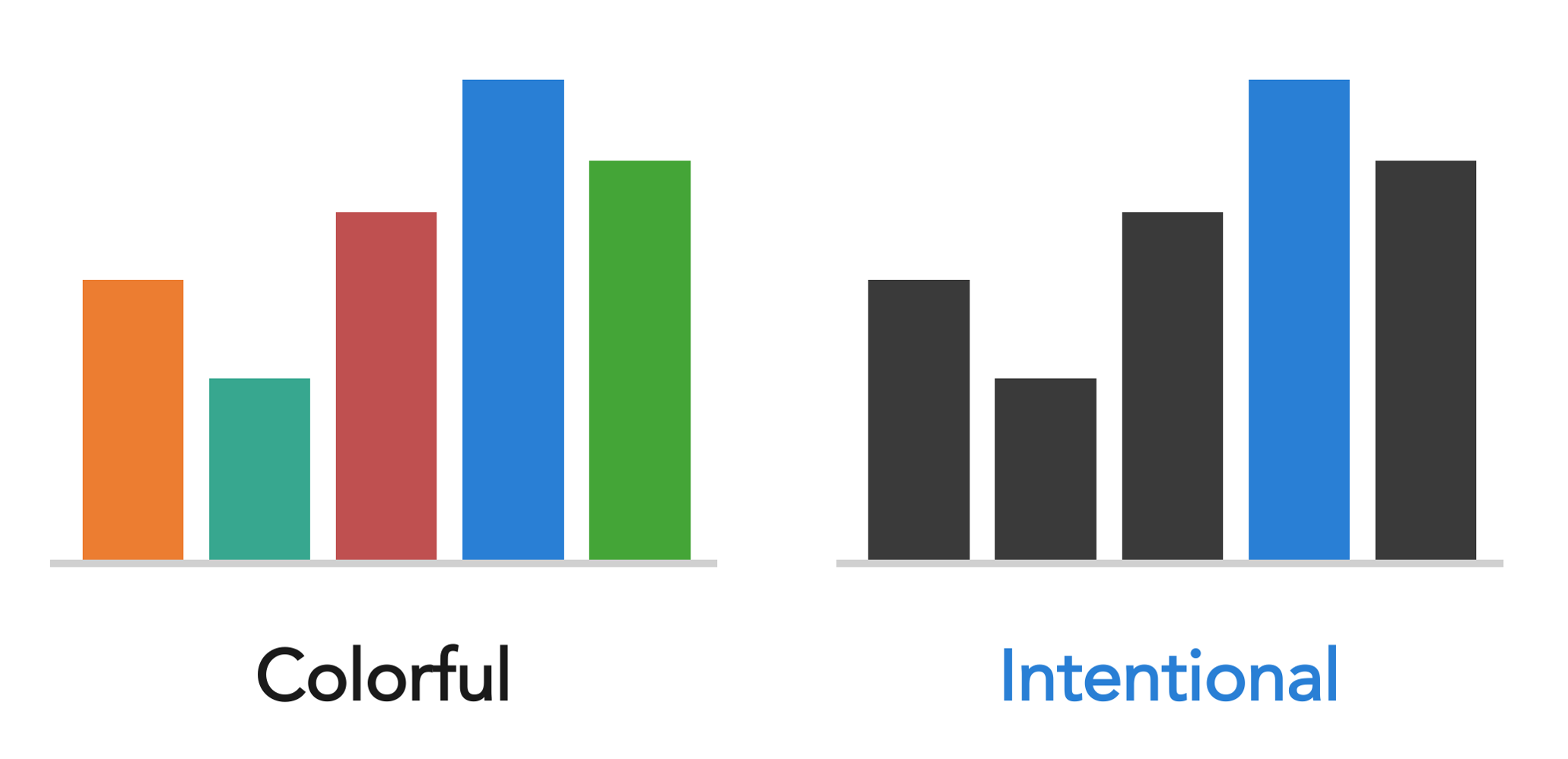
One of the most vital principles in visual design—and frequently one of the most widely violated—involves the psychological impact of variation. When a specific element within a design breaks the established pattern by appearing larger, bolder, rendered in a different color, or set in a distinct font, human viewers automatically interpret that difference as meaningful. It acts as an immediate signal telling the brain to pay close attention because something important is happening.
The direct corollary to this principle is that unintentional variation inevitably creates confusion. If three separate text blocks or data markers feature slightly different sizes or formatting styles without any underlying strategic purpose, the viewer will still attempt to decode the reason behind the discrepancy. They will naturally suspect they are missing a crucial detail. Inconsistency reads as distracting visual noise, whereas intentional variation reads as a clear, purposeful signal. Before finalizing any project, creators must verify whether every visual difference carries a distinct meaning, and whether elements that share the same level of importance actually look identical.
Use Color with Purpose
Color remains one of the most potent tools available to communicators, yet it is frequently misused. The appropriate application of color depends entirely on the specific communication goal.
When producing expressive work—such as illustrations, promotional posters, or book covers—color can be applied richly, playfully, and in abundance. In projects like the children’s book Daphne Draws Data, color is utilized exuberantly to match the playful spirit of the narrative and engage young readers effectively.

Conversely, when the objective is to direct analytical attention within a data graph or a corporate presentation slide, a completely different logical framework applies. Utilizing a largely restrained, neutral palette complemented by a single, intentional accent color deployed sparingly proves vastly more effective than throwing multiple competing hues at the audience. The guiding question should never revolve around personal color preferences, but rather an evaluation of what role color plays within the design and whether it executes that function successfully.
Align Everything Thoughtfully
Among the numerous subtle factors that separate a polished, professional project from an amateurish draft, precise alignment stands out as exceptionally telling. Misaligned elements—such as text boxes that fail to line up correctly or graphical objects placed near an imaginary grid rather than anchored directly to it—generate a subtle yet persistent sense of visual unease. Viewers may lack the technical vocabulary to name the exact flaw, but they instinctively feel that something is wrong.
A frequent offender in professional presentations is center-aligned text. Floating unmoored in the center of the page without a solid visual anchor, multi-line center-aligned text produces two jagged, uneven edges on both the left and right sides, generating unnecessary visual tension instead of resolving it. Left-aligning text anchors the content firmly against a predictable margin.
The remedy is straightforward: utilizing software alignment functions, enabling gridlines, and making deliberate placement choices. Every element should anchor securely to an established boundary, a margin, or a grid line. Vague approximations have no place in professional layout work. Once an individual trains their eye to recognize proper alignment, the flaw becomes impossible to ignore, making it much easier to correct in future iterations.
Give Things Room to Breathe
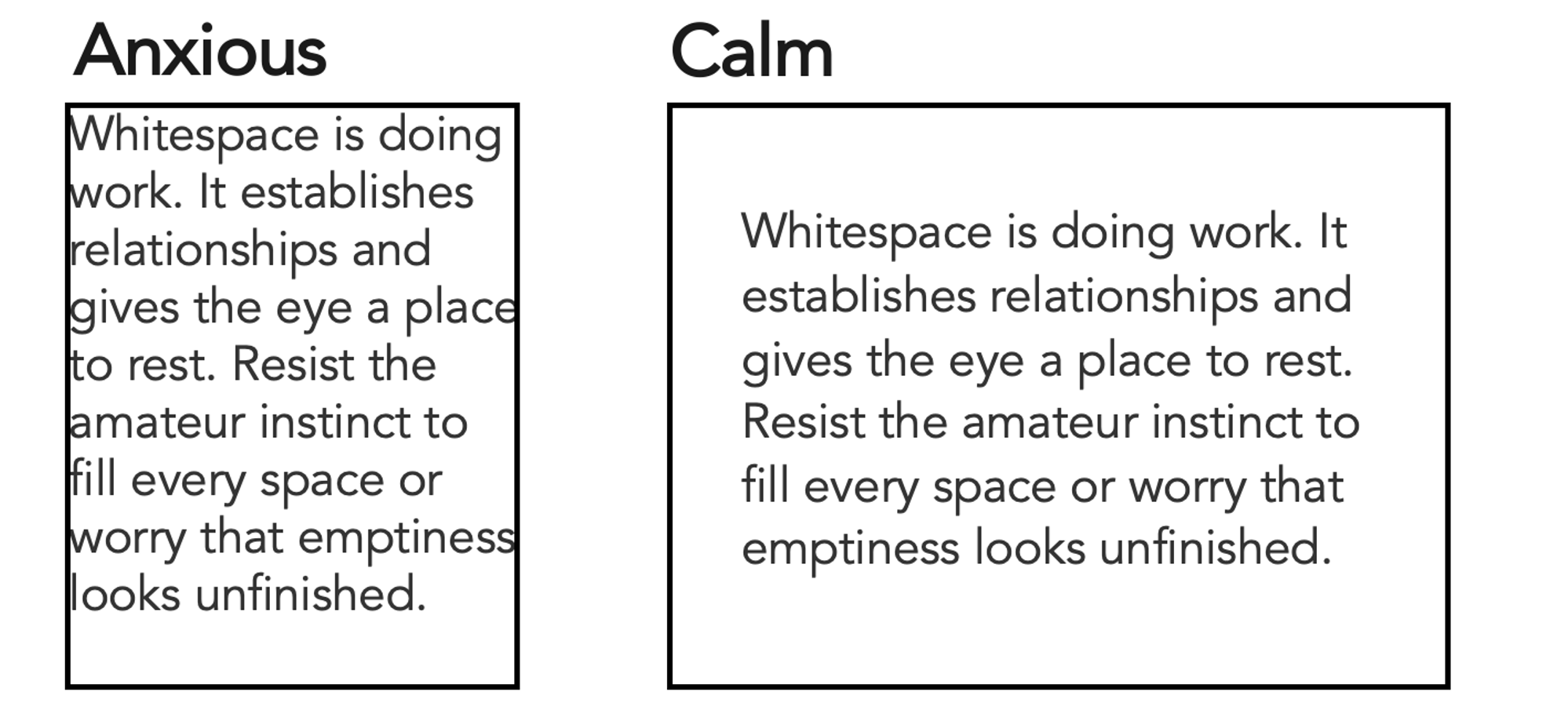
Whitespace—the deliberate empty space incorporated into a layout—is never wasted area. It performs active, crucial labor within the design. Generous spacing separates distinct concepts, establishes clear relationships between elements, and provides the viewer’s eye with a necessary place to rest. Visuals that crowd too many elements together inevitably feel anxious, cluttered, and difficult to parse, while layouts featuring balanced spacing feel calm, clear, and thoroughly considered.
Beginners frequently fall into the trap of trying to fill every available inch of whitespace, often driven by an underlying anxiety that empty areas look unfinished. Resisting this urge is essential. Some of the most effective visual communications derive their clarity as much from the strategic absence of elements as from the content explicitly included.
Seek Inspiration Actively
Developing visual literacy requires cultivating the habit of active observation. When a specific visual catches the eye—whether it is a striking book cover, a cleanly formatted restaurant menu, a sophisticated color combination, or a data graph that suddenly makes complex numbers instantly comprehensible—pausing to analyze the mechanics behind the success is crucial. Determining what specific techniques made the piece work provides valuable lessons that can be adapted for future projects.
Applying the same analytical eye to ineffective design yields equal value. Examining why a poorly executed visual fails and brainstorming alternative solutions builds an analytical habit that compounds over time. The more frequently a professional engages in this deliberate observation, the faster their visual perception sharpens. Inspiration surrounds everyday environments; noticing it simply requires making the conscious decision to look.
For those seeking to practice this analytical approach specifically within the realm of data visualization, resources like community discovery galleries offer extensive repositories of examples created by practitioners around the world, providing a vast library of visuals to explore and evaluate.
Trust Your Eyes, Then Train Them
Ultimately, human visual instinct is far more developed than most people realize. When something feels visually disjointed or difficult to understand, that internal reaction is a form of data in its own right. Trusting that initial instinct provides a solid foundation.
While natural instinct serves as an effective starting point, it should never be treated as a permanent ceiling. Visual intuition can be systematically expanded. The functional difference between an individual who describes themselves as lacking a design background and someone who navigates visual tasks with confidence rarely stems from innate genetic talent. Instead, it is the direct product of accumulated practice, heightened awareness, and a willingness to iterate based on feedback. Training the eye operates much like developing any other professional competency: through consistent use, paying close attention to visual details, and refining the work over time. Mastery does not require a formal background in graphic design; it simply requires the commitment to start looking critically at the world.