Gantt charts have long served as a staple in the toolkit of project managers everywhere, valued for their ability to map out the start and duration of events across a project lifecycle. Yet, despite their widespread popularity in illustrating timelines, these standard charts possess a notorious drawback: they can rapidly become visually overwhelming, cluttered, and profoundly difficult to interpret, particularly when applied to complex workflows involving multiple moving parts and overlapping milestones.
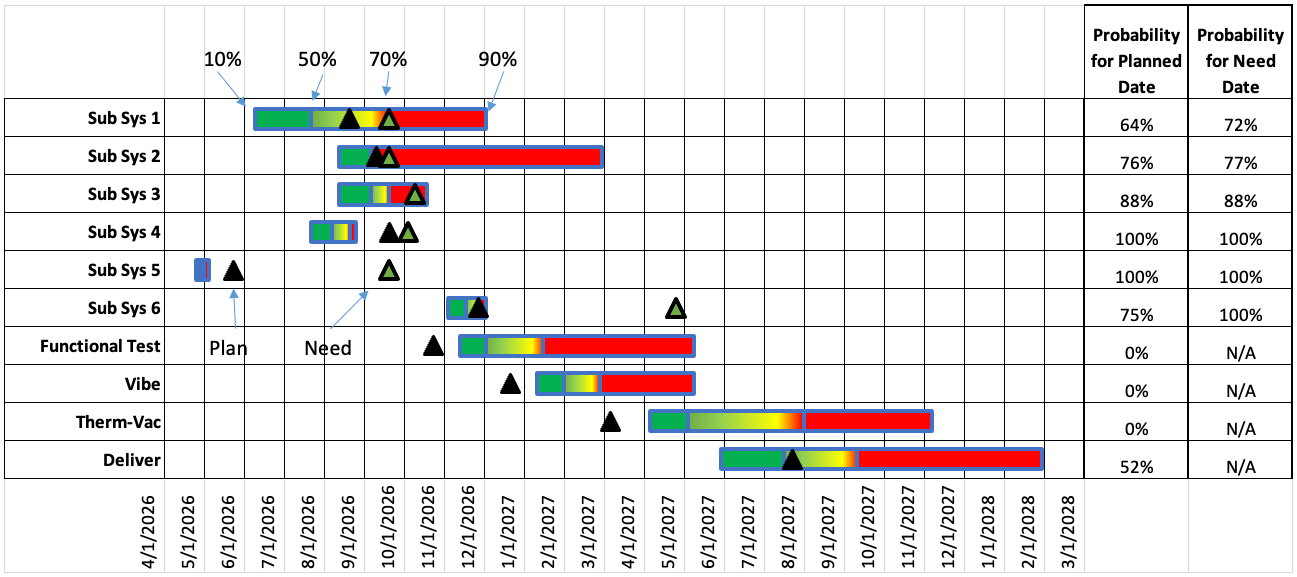
To understand the depth of this challenge, it is helpful to examine a real-world example of a project schedule incorporating risk assessments. In such a complex view, the visualization often attempts to pack an immense amount of data into a single frame, including probability distributions for individual activities of interest. Within these traditional charts, the colors assigned to the horizontal bars frequently represent the statistical likelihood of completion. For instance, portions shaded in green toward the left side of a bar typically denote optimistic timing, often registering a 10 to 50 percent likelihood, while red portions indicate later, far more probable completion dates stretching into the 70 to 90 percent probability range.

Complicating matters further, these diagrams often incorporate additional symbolic markers. Black triangles are traditionally used to represent the planned date—the official scheduled target for each activity listed along the left-hand axis—while green triangles highlight the need date, designating the absolute latest required date to ensure on-time delivery. To top it off, a comprehensive data table is frequently appended to the right side of the visualization, listing out the precise mathematical probability of meeting each designated deadline. While this method successfully packs an exhaustive amount of information into a single screen, it simultaneously introduces severe visual complexity that can paralyze decision-making.
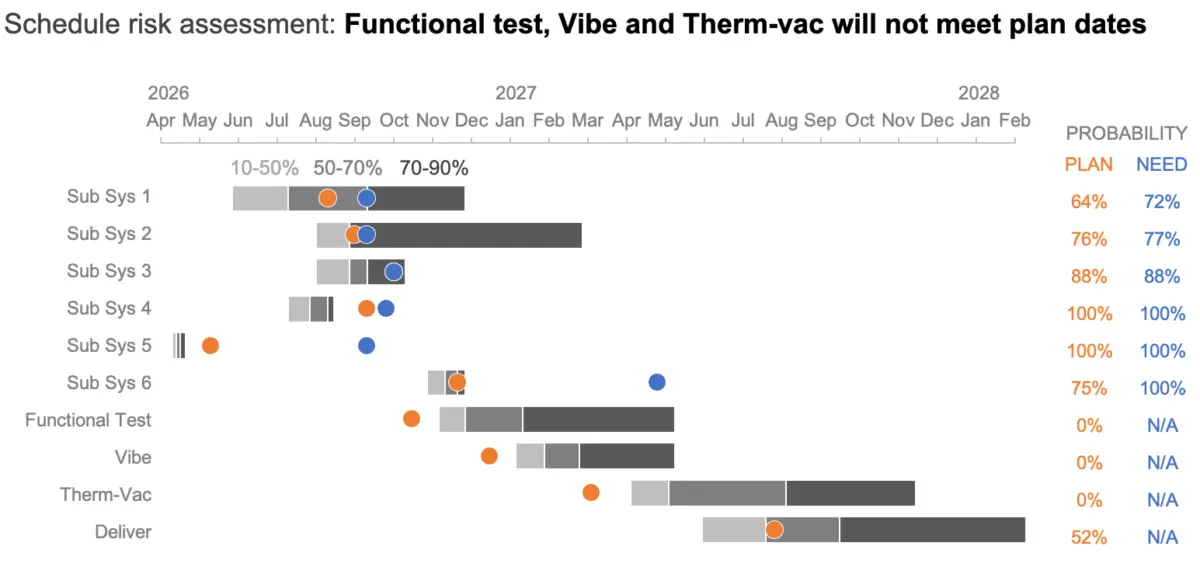
Simplifying such data-dense visual environments is critical. When a project schedule is cluttered, an audience spends an excessive amount of cognitive effort simply decoding the structural layout of the chart rather than engaging with the actual insights and risks the data conveys. Consider a scenario where project leadership intends to use this exact chart to direct team efforts precisely where they are needed most to secure a desired delivery date. In the case under review, specific critical workstreams—namely the Functional Test, Vibe, and Therm-Vac activities—demonstrate a zero percent chance of on-time completion under current conditions, signaling an urgent need for corrective action to salvage deadlines. Achieving this realization quickly and clearly requires thoughtful design modifications that elevate the message above the visual noise.
Reduce Clutter
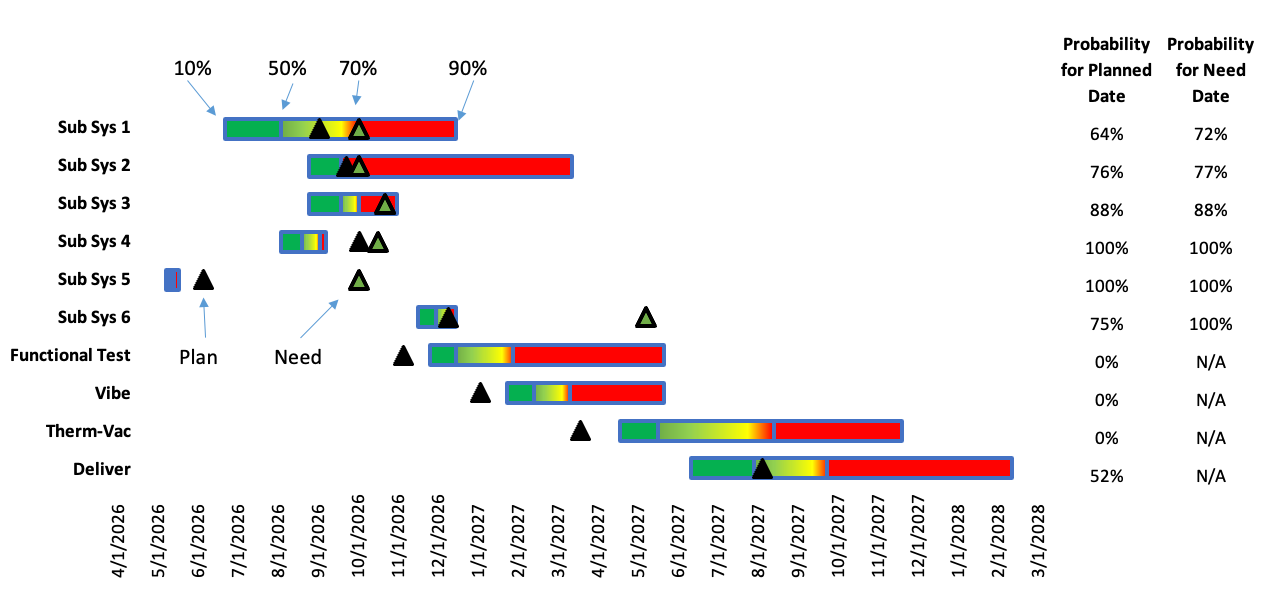
The primary hurdle in interpreting traditional project schedules lies in the sheer volume of competing visual elements. The original view frequently relies on a dense web of background lines that contribute significantly to a chaotic, cluttered appearance. Eliminating these unnecessary gridlines represents a quick, highly effective preliminary step toward bringing the most pertinent project information out of the background and directly into the foreground.
Stripping away extraneous borders achieves an immediate functional benefit: it establishes a much sharper visual contrast between the blank background canvas and the underlying data points. This deliberate subtraction allows horizontal progress bars and critical milestone dates to stand out with striking clarity, instantly reducing the cognitive load placed on the viewer.
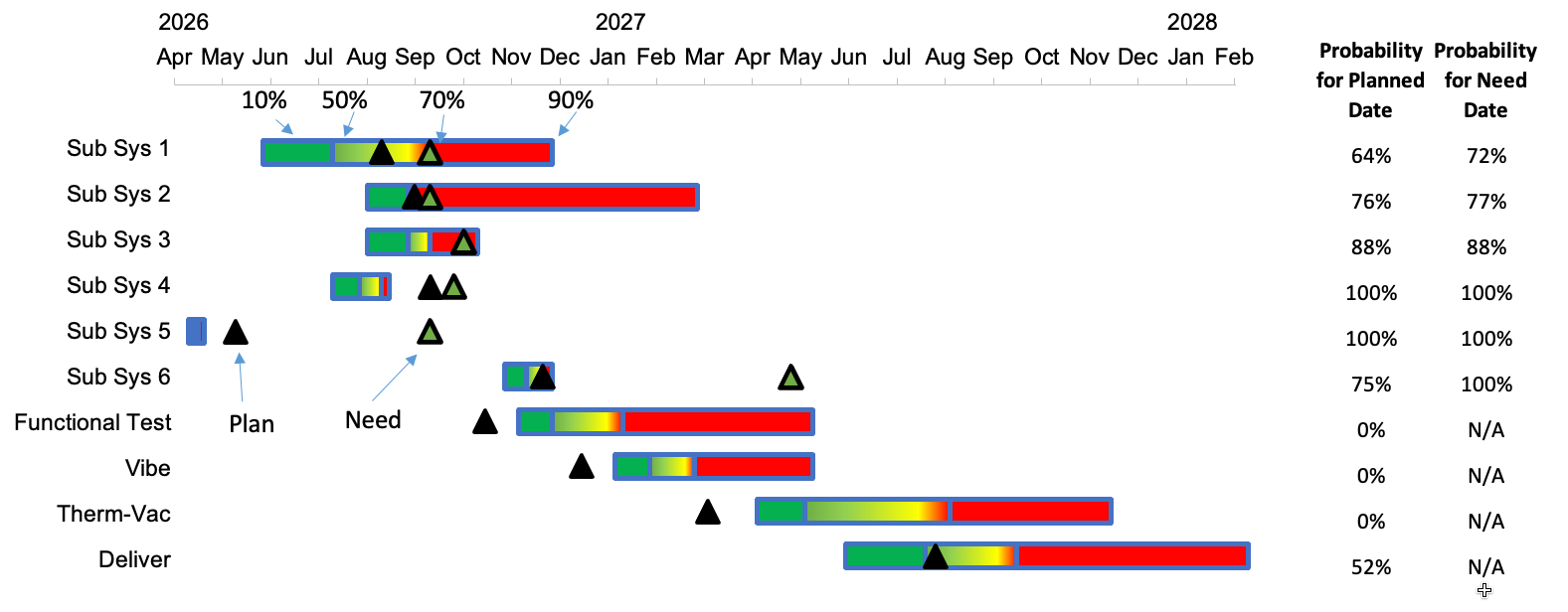
However, decluttering alone is not enough to optimize comprehension; project leaders must also exercise intentional care regarding the order, hierarchy, and spatial alignment of data and labels. In many legacy chart designs, crucial date axes are relegated to the bottom of the graphic. Because of natural scanning habits, this placement means dates are frequently the very last piece of information processed by the audience. Given that chronological deadlines form the foundational backbone of any project timeline, moving these dates to a much more prominent position at the top of the chart fundamentally improves information architecture.
Relocating the dates higher up guarantees they will be encountered first by viewers scanning the display. Furthermore, streamlining the date formats displayed along the axis opens up the practical possibility of rotating text horizontally. This minor formatting adjustment drastically increases readability, allowing stakeholders to parse timeline markers quickly and accurately without tilting their heads or struggling with vertical text orientation.
Another critical frontier in optimizing project schedule visualizations involves a careful reassessment of color theory. Traditional visual designs heavily rely on a green-yellow-red gradient to denote status or risk levels. Unfortunately, this standard color combination presents a formidable barrier for individuals living with color vision deficiency, rendering large portions of the chart completely uninterpretable to key team members.
Transitioning to a more accessible palette—such as utilizing neutral shades of gray for the horizontal task duration bars—effectively eliminates the visual noise created by multiple competing bright colors. This restraint allows the viewer’s eye to focus cleanly on the underlying timeline and the true duration of tasks. For critical milestones, designers can substitute colorblind-friendly hues like blue and orange, which stand out sharply against a neutral background. Moreover, replacing sharp, pointy triangles with smooth circle markers creates a visually softer aesthetic that feels distinctly less alarming while remaining entirely distinct. Applying the exact same hue used for the circular milestone icons to the corresponding probabilities listed in the auxiliary table on the right further reinforces the connection, visually tying related data points together.
Focus Attention
Once a chart has been successfully decluttered and optimized for accessibility, attention must pivot toward guiding the audience directly toward the insights that matter most. Effective data visualization does not merely present facts; it actively directs the viewer’s gaze to key takeaways and emerging risks within the graph. Implementing intentional focus techniques ensures that critical warnings are communicated instantly rather than buried in the details.
In the project schedule under review, the Functional Test, Vibe, and Therm-Vac tasks stand out for a critical reason: they possess a zero percent probability of being completed on time. A remarkably direct and efficient way to communicate this alarming reality is to incorporate a clear, concise takeaway message directly into the title or header area at the top of the chart. Instead of forcing viewers to hunt for anomalies, this headline-style addition explicitly tells the audience precisely what they need to know before they even begin analyzing the visual data.
The inclusion of upfront summary text establishes a powerful interpretive framework, actively priming the audience for what the chart intends to demonstrate. To maximize the impact of this messaging, designers can apply targeted visual enhancements to the chart itself, ensuring that the written takeaways are powerfully reinforced by graphical cues.
A sophisticated way to achieve this is by introducing a subtle, light orange horizontal band spanning the specific workstreams identified as being at risk in the title. This localized highlighting draws immediate, unavoidable attention to the exact areas requiring management intervention. Sparing use of color can also be deployed to highlight plan dates—especially in regions lacking corresponding need dates—while applying a deeper color intensity specifically to those projections guaranteed to miss their scheduled targets.
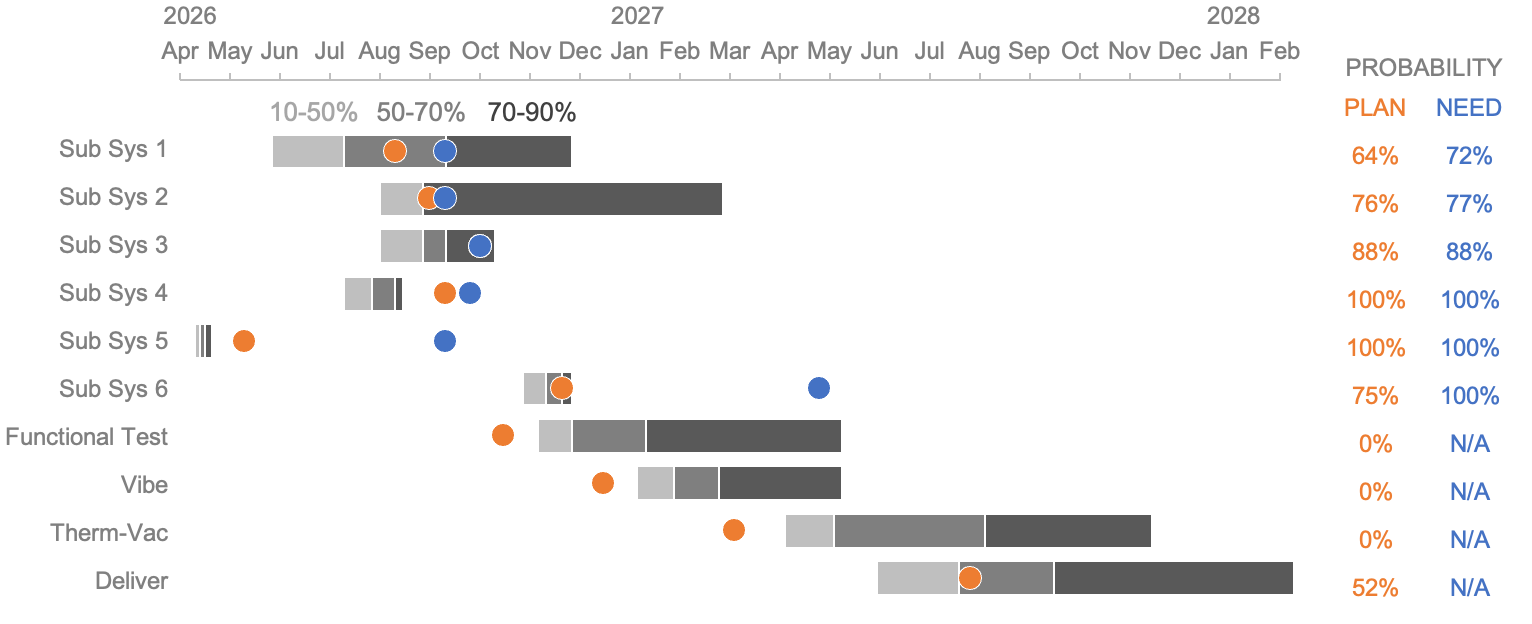
Arranging the layout with strategic positioning also yields substantial dividends. Placing the probability columns for plan and need dates on the left-hand side of the display drastically reduces search time, making key metrics faster to locate. Bolding the names of high-risk tasks alongside their zero-percent probability values adds an extra layer of prominence, ensuring that critical failures cannot be overlooked during high-stakes reviews.
Ultimately, by systematically applying rigorous decluttering strategies, improving color accessibility, and intentionally focusing audience attention where it is most desperately needed, organizations can bring profound clarity to even the most complex Gantt charts. Transforming these dense administrative artifacts into clean, transparent visual narratives empowers project teams to make faster, more informed decisions, drastically improving risk awareness and keeping vital workflows on track.