A data science notebook dies the exact moment the command to restart the kernel and run all cells stops working properly. Most of the time, nobody notices for days or even weeks. The analysis is finished, the final visualization has been embedded into a presentation deck, and the raw file has been safely pushed to a remote repository. Then, a colleague asks a seemingly simple question about where a specific numerical figure originated. You open the notebook, execute the code sequentially from the top, and suddenly an intermediate cell throws a key error because of a data column that was renamed halfway through the document and later deleted entirely. Because the output cells still display the old numbers from the previous session, the document appears completely fine at a glance while remaining entirely unrunnable underneath.
The underlying coding habits required to prevent this silent deterioration are remarkably inexpensive in terms of time and effort. By applying these disciplined practices to a real-world dataset, data professionals can maintain robust, reproducible workflows using standard data manipulation libraries like Pandas while keeping their scripts clean and maintainable.
The Data
To illustrate how these structural failures happen and how to prevent them, consider a standardized dataset drawn from real analytics scenarios: a table containing historical Olympic athlete events. This particular extract, frequently utilized in professional technical interviews, captures detailed records of athletic participation across decades of global competition.

The dataset contains hundreds of rows, with each entry representing an individual athlete competing in a specific event. This granularity is crucial for understanding downstream aggregations. The records cover a wide span of modern games and individual events, with multiple athletes appearing across multiple competitions and events. A significant portion of the rows contains explicit medal information, while blank entries simply indicate that an athlete competed in that particular event but did not secure a podium finish.
Without careful inspection, datasets of this nature often harbor subtle data quality issues that evade standard top-line summaries. Exploring the fundamental habits designed to safeguard exploratory environments helps maintain long-term analytical integrity.
Adding Configurations to the First Cell
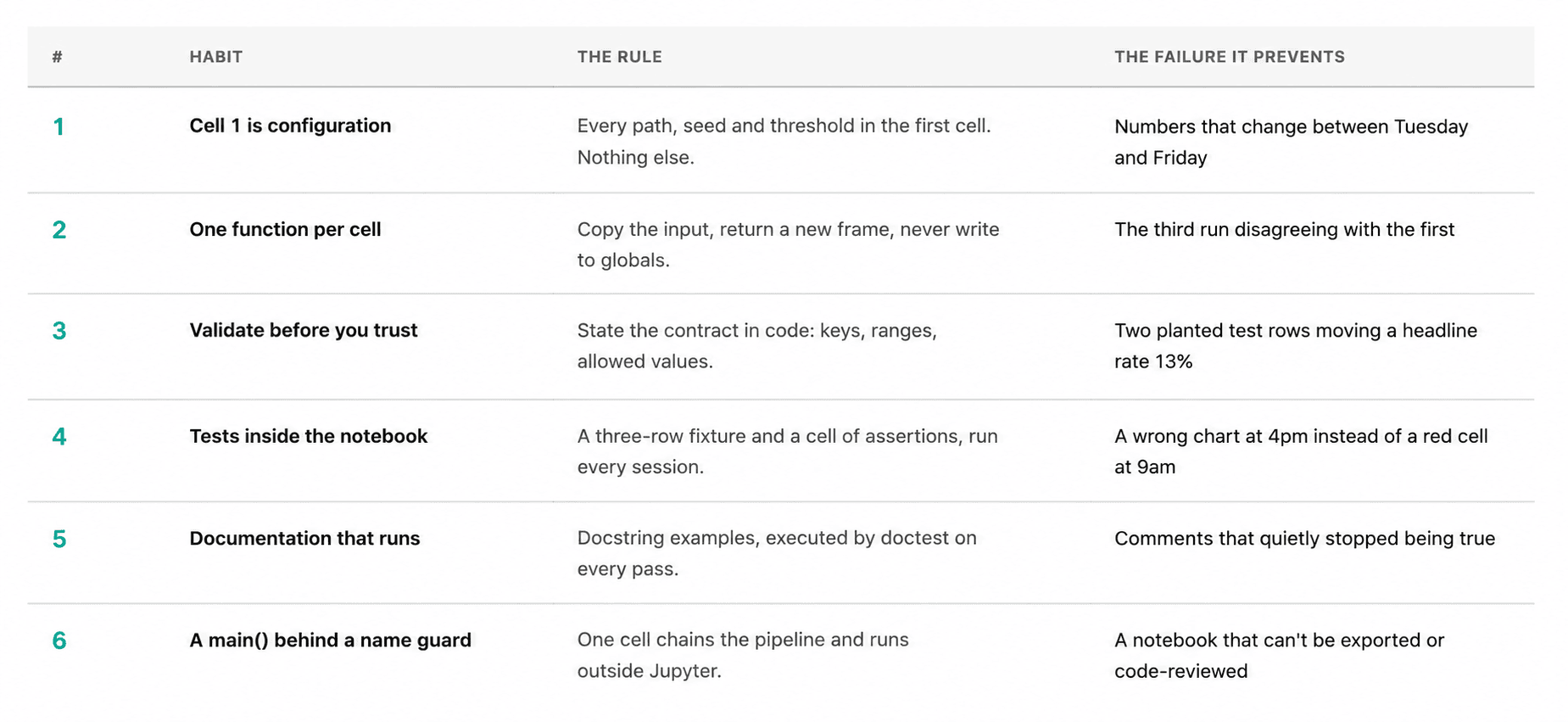
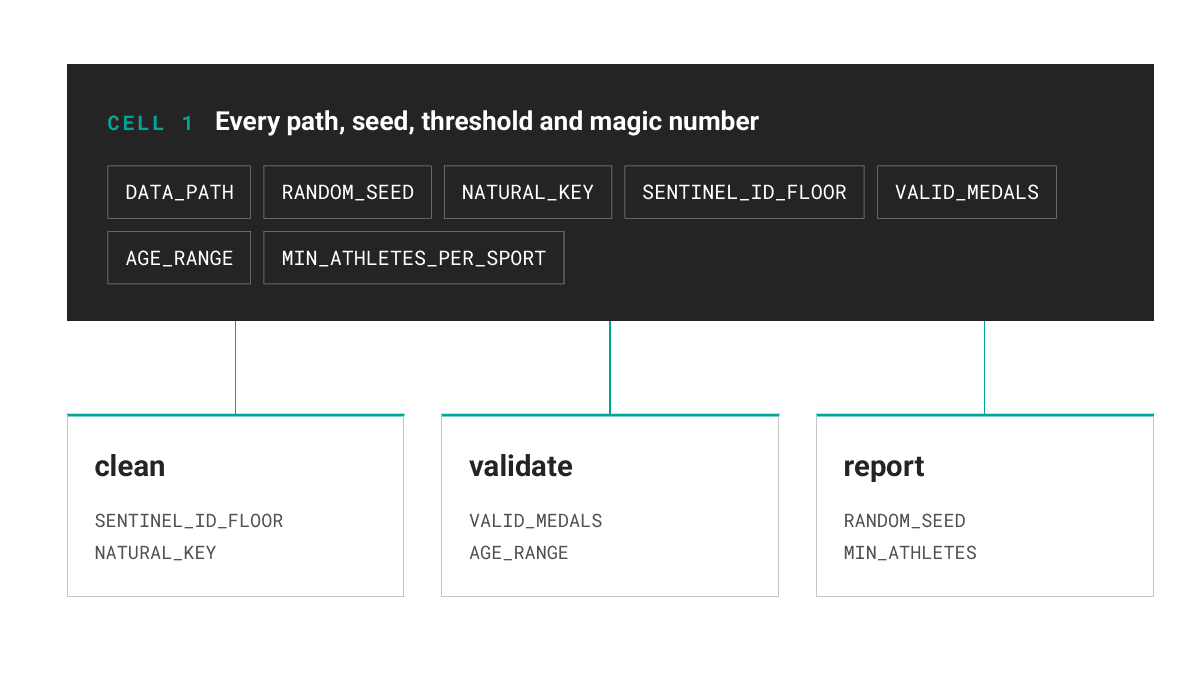
Every file path, random seed, validation threshold, and static configuration parameter belongs in the absolute first cell of a project notebook, and nothing else should be placed there. When this convention is followed strictly, anyone reading the analysis months later can review every core assumption within a few lines without needing to scroll endlessly through the code. Furthermore, when underlying files are relocated or evaluation thresholds shift, developers only need to update a single, centralized location.

The random seed is particularly critical, even in workflows where direct sampling is not immediately apparent. Standard sampling methods, dataset partitioning routines, and clustering algorithms all draw from the global random state during execution. A computational document that yields shifting numerical outputs on different days of the week quickly erodes organizational trust.
Writing One Function per Cell
Another foundational rule for maintaining sustainable analytical workflows dictates that an individual execution cell should either define a function or call one, but never perform both operations simultaneously. Crucially, a cell must never modify a variable that another preceding cell has already created and stored in memory.
Utilizing defensive copying at the very beginning of custom functions forms the core of this approach. Once individual functions stop writing directly to their input arguments, the execution order of the notebook cells ceases to matter. Re-executing a feature-engineering function multiple times yields identical data frames every single time, thereby eliminating the classic notebook failure mode where repeated executions produce conflicting results.
Properly handling missing values is another vital aspect of this stage. Standard data analysis libraries often interpret blank data fields as null values, but in specific contexts like sports competitions, a blank record simply means the participant did not place. Treating these as explicit categories rather than missing data prevents downstream distortion.
Validating the Data Before You Trust It
Before performing any deep aggregations or predictive modeling, analysts must explicitly articulate their baseline assumptions regarding the input data and allow the notebook itself to automatically verify them. Establishing a comprehensive validation function that returns a list of contract violations ensures that any structural anomalies are caught immediately upon loading.
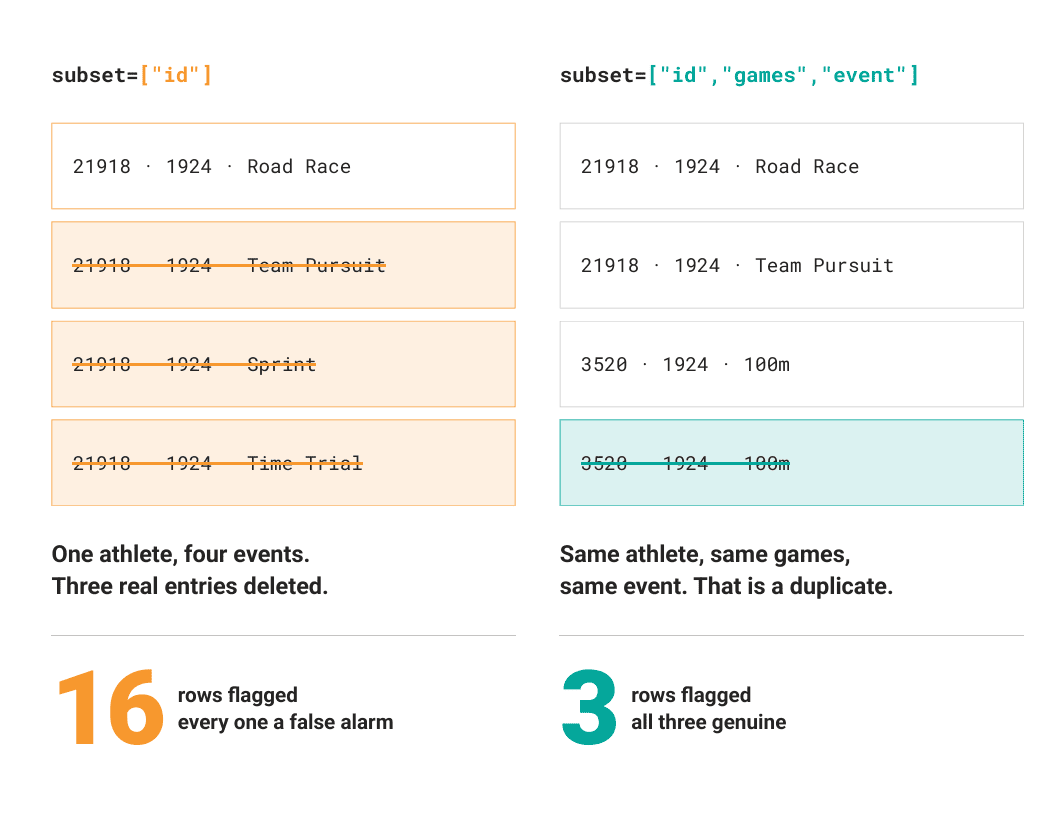
When applied to historical extracts, rigorous automated checks frequently reveal unexpected discrepancies. For instance, validating uniqueness constraints must rely on the true natural key of the dataset rather than a simplistic identifier. Checking a unique identifier column in isolation often triggers false alarms because individual competitors frequently enter multiple events within the same overarching competition. Choosing the wrong primary key can inadvertently lead to the deletion of legitimate entries.
Automated validation routines are equally essential for detecting planted test fixtures or synthetic anomalies that occasionally slip into production data extracts. These anomalies often represent a tiny fraction of the total file size and remain completely invisible when inspecting standard descriptive summaries or null counts. However, they can silently skew vital statistical metrics and headline indicators. Automated checks that take only a few lines of code can easily prevent significant distortions in final reports.
Writing Tests That Live in the Notebook
Ensuring software reliability within an exploratory environment does not require heavy external testing frameworks. Instead, analysts can utilize lightweight fixtures paired with dedicated validation cells containing explicit assertions.
Constructing small, representative mock data frames alongside assertion logic allows developers to verify core data cleaning and feature engineering transformations instantaneously. Automated checks that verify immutability—ensuring that transformation functions return new data frames rather than mutating inputs in place—prevent subtle bugs from creeping into production codebases. Running these verification cells at the beginning of every analytical session ensures that potential errors are caught early, long before final reports are generated.
Writing Documentation That Runs
Traditional comments and static documentation tend to degrade over time because no automated system actively verifies their accuracy. In contrast, executable documentation embedded directly within function docstrings remains perpetually accurate because specialized standard libraries can execute and validate code examples automatically.
By incorporating standard testing snippets inside function documentation, developers bridge the gap between theoretical descriptions and actual implementation behavior. Within an interactive environment, executing these embedded routines ensures that documentation and actual functional behavior can never silently diverge. If a developer modifies an underlying mathematical formula without updating the corresponding documentation examples, the validation routine flags the discrepancy immediately.
Making the Notebook Run as a Script
The final component of a resilient analytical workflow is a terminal execution block that chains all preceding functions together. This concluding section serves as the ultimate proof that the notebook remains fully functional from end to end.
Integrating a standard conditional execution block at the bottom of the document allows the entire notebook to be converted into a standard executable script via command-line utilities. This transformation enables the code to be imported cleanly and reviewed through normal peer-review pull requests. Without this structural boundary, top-level statements would execute immediately upon import, disrupting automated pipelines and external scripts.
Conducting randomized spot checks alongside aggregate metrics provides essential visibility into real-world data distributions. Printing seeded sample rows side-by-side with high-level summaries allows analysts to spot missing fields, structural shifts, or sparse demographic attributes that might otherwise remain obscured beneath aggregate statistics.
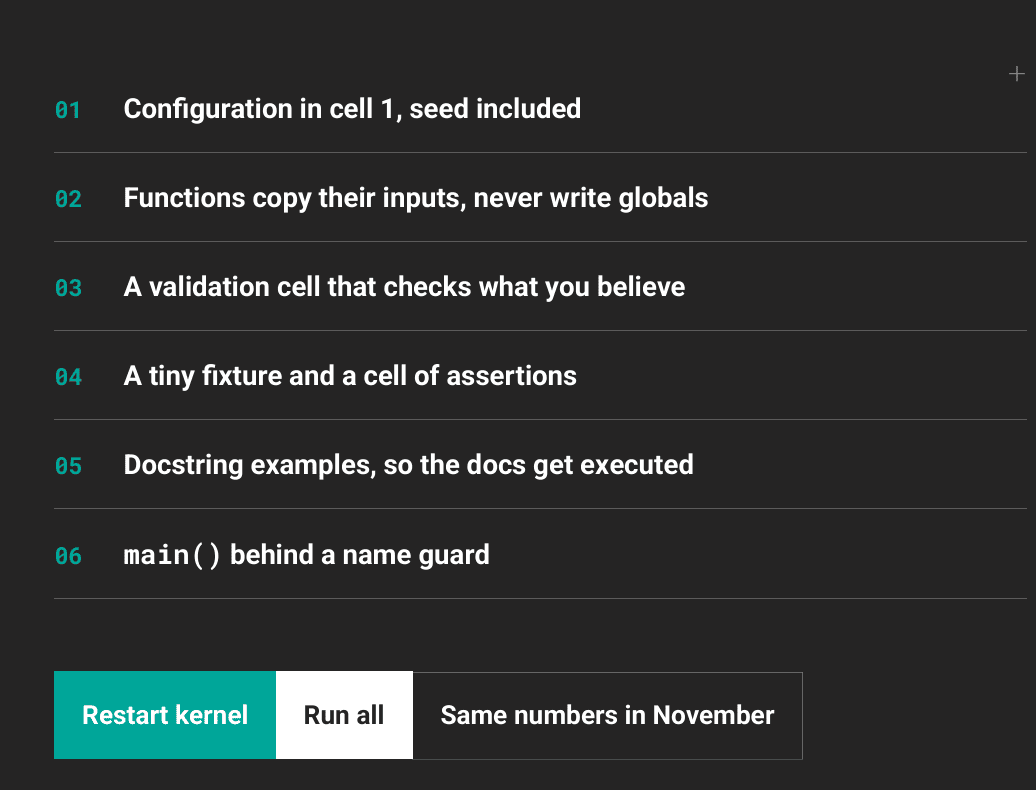
Ultimately, adopting these disciplined habits requires a modest investment of time during initial project setup, but it pays substantial dividends across every subsequent analysis. The primary objective behind these practices is simple: ensuring that when a colleague or stakeholder opens the project months down the line, the computational document executes seamlessly and produces identical, trustworthy numbers every single time.