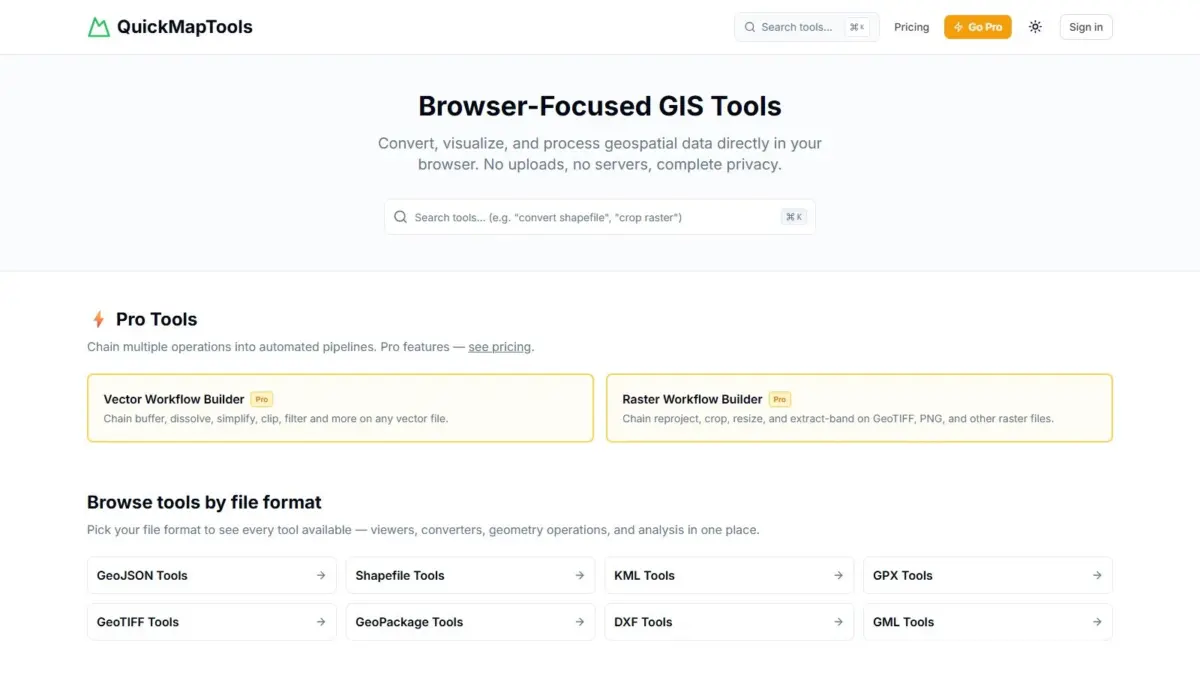
Geospatial specialist Daniel O’Donohue, creator and host of The MapScaping Podcast, has announced the launch of QuickMapTools, a browser-focused platform designed to perform complex geographic information system tasks directly within a web browser. The application enables users to convert vector files, clip raster datasets, generate buffer zones around spatial features, and execute coordinate transformations without requiring desktop software installations or transferring data to external web servers.
By using WebAssembly, QuickMapTools runs spatial processing engines natively within the user’s web browser memory. This approach eliminates the traditional requirement of uploading files to cloud services or relying on heavy desktop applications such as QGIS or ArcGIS for routine data manipulations. The platform operates on a zero-upload model, ensuring that user datasets remain stored on the local device throughout the processing lifecycle.
The emergence of browser-native processing marks a shift in how spatial operations are executed. Historically, performing operations such as file conversion, geometry buffering, or coordinate reprojecting required either dedicated desktop GIS software capable of running local binary executables or backend cloud processing services. Cloud-based conversion tools often present security and privacy challenges because they require users to transmit potentially sensitive geographic files across network endpoints to third-party servers.
QuickMapTools addresses these privacy and operational constraints by leveraging WebAssembly, an open binary instruction format that allows code written in languages like C, C++, or Rust to execute inside modern web browsers at near-native speed. By compiling high-performance spatial libraries directly into WebAssembly modules, the platform delivers client-side processing capabilities. As a result, geospatial files are ingested, calculated, transformed, and exported entirely within the client machine’s memory, ensuring that no proprietary or confidential geographic data leaves the local device environment.
The platform provides comprehensive coverage across major geospatial data standards, catering to vector, raster, and computer-aided design file types. Supported formats include GeoJSON, ESRI Shapefile, Keyhole Markup Language, GPS Exchange Format, GeoTIFF, GeoPackage, Drawing Exchange Format, and Geography Markup Language, among others.
Handling file format diversity remains one of the most persistent operational hurdles in spatial data management. Field data collectors frequently generate GPX tracks from mobile handhelds or KML files from consumer mapping tools, while enterprise infrastructure teams maintain legacy ESRI Shapefile datasets or GeoPackages. Similarly, engineering and planning workflows often depend on DXF files generated by CAD systems, whereas web mapping applications rely primarily on lightweight GeoJSON. By supporting cross-format conversions and spatial operations across these standard formats inside a single browser interface, QuickMapTools streamlines daily file management for professionals who routinely bridge CAD, web mapping, and traditional desktop environments.
In addition to basic format conversion, the suite includes viewers, coordinate transformations, and geometry operations. Users can perform spatial operations such as creating buffer zones around point, line, or polygon features, as well as raster processing tasks like clipping GeoTIFF images to specific bounding areas or vector boundaries. These operations are executed through an interface organized around specific file formats, simplifying navigation for users looking to perform targeted spatial tasks quickly.
The availability of local coordinate transformation tools addresses another recurring workflow bottleneck in geographic analysis. Spatial datasets are frequently captured in varying coordinate reference systems, ranging from global geographic coordinates like WGS 84 to local projected coordinate systems tailored for high-accuracy regional mapping. Reprojecting spatial files to ensure alignment usually requires opening desktop software or writing specialized command-line scripts. Running these transformations client-side allows users to reproject spatial data quickly before rendering or integrating it into secondary projects.
Data governance and privacy considerations are central to the platform’s architectural design. Across industries including urban planning, environmental consulting, civil engineering, and utility management, geographic datasets frequently contain sensitive location data. Proprietary infrastructure surveys, endangered species habitats, real estate transaction boundaries, and confidential field operations are subject to strict non-disclosure agreements, enterprise data policies, and regulatory compliance frameworks like GDPR. Uploading such datasets to conventional online file converters exposes organizations to data leak risks and regulatory non-compliance. By executing all calculations locally within the browser context, QuickMapTools allows teams to process protected geographic data while maintaining compliance with privacy standards.
QuickMapTools adopts a freemium service structure. The core tools, including standard format converters, viewers, coordinate transformation utilities, and individual geometry operations, are available free of charge. For users requiring advanced workflow management, the platform offers a Pro subscription tier. The Pro version introduces customizable, chained vector and raster workflow pipelines designed for repeatable processing tasks.
These workflow pipelines allow users to sequence multiple spatial tasks into a single, automated processing chain. Rather than manually carrying out individual steps—such as converting a Shapefile to GeoJSON, reprojecting its coordinate system, buffering its geometries, and clipping an underlying GeoTIFF raster—the Pro tier enables users to construct unified processing pipelines. These automated pipelines process data sequentially in browser memory, reducing manual intervention for routine data preparation jobs and operational mapping tasks.
The creation of QuickMapTools stems directly from Daniel O’Donohue’s experience within the geospatial industry. As an established geospatial specialist and host of The MapScaping Podcast, O’Donohue has spent years exploring advances in spatial technology, mapping tools, and location intelligence. Through his podcast and professional work, O’Donohue engages regularly with spatial data managers, cartographers, software developers, and remote sensing specialists, gaining insight into daily industry bottlenecks.
A recurring theme across the geospatial community is the friction associated with lightweight spatial tasks. Spatial professionals frequently express the need for fast tools to inspect, repair, convert, or transform datasets without waiting for heavy desktop applications to load or establishing custom python development environments. QuickMapTools was developed to address this operational gap, serving as an accessible utility that provides fast spatial operations without compromising data security or operational speed.
The development of client-side GIS utilities reflects broader industry shifts toward browser-based spatial computing. As web technologies evolve, web browsers have transformed from passive document viewers into execution environments capable of handling complex computational workloads. By moving spatial computation directly to the client browser, web-based tools are reducing reliance on dedicated hardware and client-server backend infrastructure.
This shift lowers barriers to entry for non-specialists who interact with geographic information. Professionals in adjacent fields—such as journalism, real estate development, logistics, and field research—frequently encounter spatial files but may lack formal training in desktop GIS software or access to specialized software licenses. Lightweight, secure browser utilities allow these domain experts to inspect and convert geographic data without training on specialized desktop software suites.
QuickMapTools provides a practical, secure alternative for managing daily GIS tasks. By combining support for major vector and raster formats with client-side WebAssembly execution, the platform provides a browser-based environment where geographic data can be transformed, converted, and processed locally, ensuring data remains secure on the user’s device.